10 Fab bbPress Plugins to Put Your Forums in Shape
bbPress is an extremely popular forum software created by the same people who make WordPress. It’s also similar to WP in that it often takes a number of plugins to get it working the way you’d like.
In this post, we’ve compiled a list of bbPress-oriented plugins that we find to be quite good. These plugins will allow you to extend bbPress’ features to get it running the way you want your forum to run.
- GD bbPress Tools
- GD bbPress Attachments
- bbPress Notify (No Spam)
- Rating-Widget: Star Review System
- myCRED
- ARMember
- Spam protection, AntiSpam, FireWall
- Content Aware Sidebars
- bbp topic count
- Private Groups
1. GD bbPress Tools

The GD bbPress Tools plugin is like a few different plugins rolled into one.
It lets you add signatures, and then it also lets you control what users can use them, as well as the length allowed. You can also decide whether to allow HTML or BBCodes in the signature.
Speaking of BBCodes, it allows you make standard BBCodes (things like [b] … text …[/b] for bold) apply to your forum. You can also control which level of user has access to these codes.
This plugin will also add quoting a reply or topic, topics search results, toolbar menu integration, and limiting bbPress’ admin side to certain user levels.
2. GD bbPress Attachments

The GD bbPress Attachments plugin lets you allow attachments to topics and replies.
The plugin comes with a number of controls, letting you control how large the files can be and also the number of files a user can attach per topic.
The plugin can embed attached files, and thumbnails can be generated.
3. bbPress Notify (No Spam)

bbPress Notify (No Spam) is a free plugin that lets you control who gets notifications of new Topics and Replies in your bbPress forum, and what they look like.
Some of the features included are:
- Send notifications in HTML, Plain text, or Multipart format, with full image support
- Override bbPress’ core subscription messages with personalized ones of your own
- Set Notification recipient roles for new topics and/or replies
- Send Background Notifications (to avoid delays in loading pages for large user databases)
There are a lot of premium add-ons available from the developer as well, which will extend functionality.
4. Rating-Widget: Star Review System

The Rating-Widget: Star Review System lets users giving star ratings for forum topics (as well as posts, pages, comments, and bbPress forums).
The plugin comes with a number of different styles for the ratings, and you can also customize them.
You also get a “Top Rated” widget you can use, and, it’s GDPR ready.
5. myCRED

The myCRED plugin gives your forum a points management system that lets you control how points are awarded, used, traded, managed, logged, and presented.
You can build brand loyalty by rewarding your customers through store reward systems, community leaderboards, and/or monetizing your website content.

FREE EBOOK
Your step-by-step roadmap to a profitable web dev business. From landing more clients to scaling like crazy.

FREE EBOOK
Plan, build, and launch your next WP site without a hitch. Our checklist makes the process easy and repeatable.
myCRED supports MarketPress, WooCommerce, and WP E-Commerce, and also offers premium addons through the author’s website.
6. ARMember

ARMember is a top rated plugin for WordPress, that will help you to build fully functional membership site with features like: a built-in Form builder to create material style and spam free forms for SignUp/Registration, Login, Edit Profile, Forgot Password, Change Password, etc.
This free lite version has a super easy interface from where you can restrict any content of your site with just one click. It also allows you to restrict partial content of any page/post by placing a single shortcode.
Self-touted as “very different and much better then even most popular membership plugins here”, the developer also offers a premium membership with additional features.
7. Spam protection, AntiSpam, FireWall
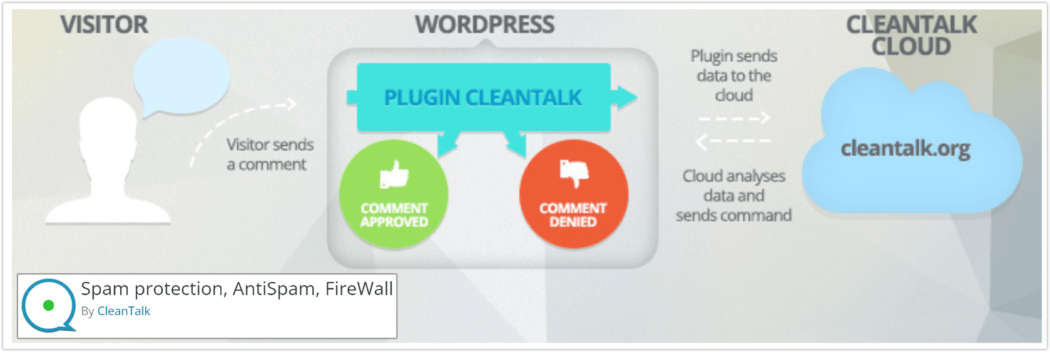
Spam protection, AntiSpam, FireWall is a universal AntiSpam plugin helps stop spam comment, spam registrations, and spam through email contact forms.
No CAPTCHA, no questions, no animal counting, no puzzles, no math and no spam bots. It also provides stats about spam caught.
The plugin moves spam comments to SPAM folder or you can set the option to ban spam comments silently. You can also enable the option in the plugin settings to auto-delete comments from SPAM folder.
8. Content Aware Sidebars

The Content Aware Sidebars (CAS) plugin allows you to display a different sidebar depending on which content is being viewed. While this plugin is useful for a traditional WordPress site, it also has a special function especially for bbPress, allowing the display conditions for Profiles, Forums, & Topics, out of the box.
You can set to display a specific sidebar for all user profiles, or you can even narrow that down to one individual user – showing Sidebar A to User X and Sidebar B to User Y.
Optimize conversion rates, boost on-site SEO, upsell products, and much more by displaying different widget areas on different conditions.
9. bbp topic count

The bbp topic count plugin lets you display counts for each user. You can show their total number of topics, their total number of replies, and then their total number of the two added together.
This type of info always gives a good clue about how committed people are to the forum, and it’s often a topic of discussion on forums that show these numbers. So it may be a smart thing to add.
10. Private Groups

The Private Groups plugin lets you assign users to groups, and then you can control access to different forums by giving permission to view a forum to only certain groups.
For example, you could assign User 1 and User 2 to Group A. And then you could assign User 3 to Group B.
From there, you could create different forums and give access to different groups. For example, Forum X could be accessible to Group A only (User 1 and 2), and Forum Y could be accessible to Group B only (User 3).
Make a Good Im(bbPress)ion
bbPress is a great tool to begin with. Add some carefully chosen plugins, and it can become even more useful.
Hopefully you’ll find several plugins from this list that zero in on your specific needs.
Editor’s Note: This post has been updated for accuracy and relevancy.
[Originally Published: June 2014 / Revised: March 2022]
Hassan Akhtar Hassan Akhtar is the lead dev for Smush and HummingBird. In his free time he enjoys writing about his development adventures at WPGurus.net.