6 Must-Have BuddyPress Plugins for Interactive Social Networking
BuddyPress is a great choice if you want to add social networking to your WordPress site, as it comes with essential features, such as user profiles, activity streams, and user groups. But if you want to create a more personalized experience for your users, you’ll need a few plugins to bolster the basic package.
In this post, I’ll take you through some great plugins for adding interactivity to your community, including live chat, membership, eCommerce, and social sharing.
Live Chat Options
With live chat, you can engage visitors in real-time, answer any of their questions, and provide more detailed explanations about various aspects of your website. Most importantly, you can “humanize” your business by being readily available to serve your site visitors.
Each interaction produces a transcript and you can use that data to further improve your services.
iFlyChat
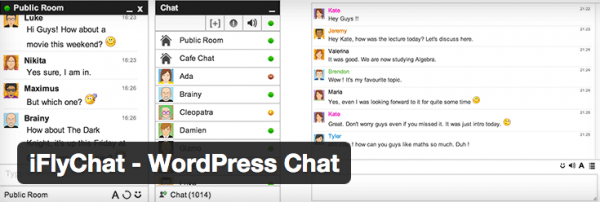
This cloud-based live chat plugin automatically integrates with BuddyPress, offering speedy chat loads and another layer of interaction to your website. Have users connect through group chat, create a chat room, or offer pop up chat for private or public interaction.
In addition to text and emoticons, community members can post videos, URLs, and images in the chat window.
You can install iFlyChat as you would any other plugin, but you’ll need to create an account and obtain an API key to activate this plugin on your website. Its free version is limited to ten simultaneous chats in one chat room; pricing for the remaining plans vary.
Through the Basic plan, you’d pay $17 per month for 60 simultaneous users in an unlimited number of chat rooms with the option to globally embed them.
For $44 per month, you can moderate 150 users in an unlimited number of chat rooms using the Professional plan. Monitor more than 300 simultaneous chats by enrolling in the monthly Business plan for $89. Both the Professional and Enterprise plans include global and private embeds plus group chat.
WP Live Chat Support
Unsure of where you’d like to host your live chat plugin? With WP Live Chat Support, you have the option to self-host or host your live chat on their servers for increased speed and security.
If you choose to self-host, though, it’s unlikely that your website would crash or your live chat stall. Through long polling, this plugin has been programmed to minimize its use of your server’s resources – shared or VPS.
Additional features:
- Program quick responses for common questions
- Assign an unlimited number of agents (Pro version)
- Compatible with all caching plugins
- Receive instant notification of an active chat
- Access to a log of missed chats
- Can be enabled for mobile devices and tablets
- Brand the chat window with your company logo (Pro version)
When you’re offline, the chat box becomes a message box in the pro version. And if you find you’re communicating with a menacing individual, there’s an option to block IP addresses from chat.

eCourse or Membership Options
If you’re thinking about adding e-courses or membership options to your community, here are a few plugins that can make design and execution a much more straightforward process.
BuddyPress for LearnDash
Connect a learning management system (LMS) to your BuddyPress group using the BuddyPress for LearnDash plugin.
LearnDash is a premium WordPress plugin with Basic ($159) and Plus ($189) package offerings for small businesses, organizations, larger corporations, or any group that wants to infuse a LMS into their BuddyPress network.
With BuddyPress, LearnDash, and BuddyPress for LearnDash combined, you can create a private group for your course participants. You can also monitor group interaction through an optional activity stream. The group administrator controls course inception and completion, grading, and comments moderation.
Here are some additional LearnDash features:
- Sell e-courses as a one-time or subscription payment
- Choose when to release course content to your students
- Time and/or restrict visibility of lessons
- Divide class participants into groups and assign a moderator
- Offer multimedia course content (audio, video, etc.)
- Award points and certifications to class participants
VideoWhisper Video Presentation
Although VideoWhisper requires a more complex hosting setup, it still integrates well with BuddyPress through a video presentation tab that enables users to enter a virtual group room to video chat and watch presentations.
This plugin is ideal for those creating real-time eLearning experiences in various formats:
- Webcam-supported online collaborations and coaching experiences
- Video consultations
- Live presentations
- Video training and webinars


eCommerce and Monetization Options
If you’re building a community with the aim of rallying people for a cause, or just want to create an online store for your users, here are some solid plugins to help you add eCommerce to your network.
Another WordPress Classifieds Plugin
If you’ve used BuddyPress to create a community forum, you have an existing niche community that might benefit from post advertisements. Niche-specific classified ads might complement your group goals as well as present a monetization option for your website. With the Another WordPress Classifieds platform, users can post paid or free advertisements (with or without images) on a secure system.
There’s a long list of features, including:
- Geographic, username, or keyword search
- Customizable form fields
- Social sharing
- Option to embed videos
- Blind email contact system
- Image customization options
The premium module links to BuddyPress. Some of its features include an activity stream, search by user, comments and ratings, ad management from BuddyPress profile, and group editing.
As an example, if real estate investment is your niche, community members can be given access to wholesale property listings available for purchase and/or rehab. Since such lists are solely shared amongst real estate brokers, lawyers, wholesalers and investors, this plugin would be fitting for a BuddyPress community surrounding this topic. Community members can be given exclusive access to listings made visible upon posting.

Social Sharing Options
Even if you have a strong private social network in your BuddyPress community, you may want to extend your social reach by offering your users new social sharing options.
Super Socializer
Using the Super Socializer plugin, you can fully integrate social media options into your online community, potentially enhancing the viral potential of your web content.
Group members not only have the option to log in with their offsite credentials, but they can easily share thoughts and snippets from your website a the wider audience connected to their social media accounts.
Here are some Super Socializer features:
- Floating icons (vertical or horizontal)
- Social logins (Facebook, Twitter, LinkedIn, Xing, Google, Vkontakte, and Instagram)
- Enable social likes and comments
- Icon customization
- Synchs social profile avatar
As you know, social sharing not only increases the number of visits to your website, it also communicates to website crawlers that your content is share-worthy.

As you can see, to help your BuddyPress site become even more amazing, the help with some useful plugins can help.
Tags:
Aileen Javier Aileen has over 10 years of experience in content writing and content marketing. She’s handled content teams, planned editorial calendars, and managed projects. She’s also written blogs, web copy, social media posts, and email newsletters for brands in different industries.