A Visual Guide To Setting Up WordPress for Business Sites
SimplyBusiness, a UK based company, has recently created an easy-to-read online flowchart for installing and maintaining a WordPress website for business purposes.

The WordPress installation flowchart follows a 24 step process where you answer simple yes/no questions regarding your installation and WordPress acumen, and get design specific tips from leading WordPress websites across the globe (including this one!).
For example, step 2 asks if you’ve chosen a domain name yet. If the answer is “yes”, you proceed to the next step. If the answer is “no” you are referred to an article that provides a few tips for choosing a great domain name for your business.
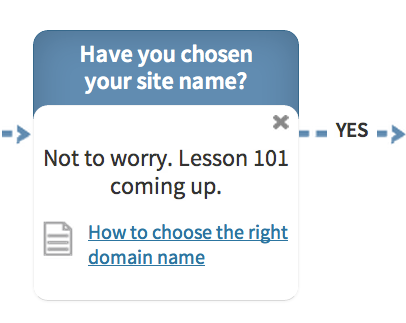
Flow Chart Lesson Formats
The site does a good job of integrating multimedia formats with lessons based in both text and video.

FREE EBOOK
Your step-by-step roadmap to a profitable web dev business. From landing more clients to scaling like crazy.

FREE EBOOK
Plan, build, and launch your next WP site without a hitch. Our checklist makes the process easy and repeatable.
Simple instructions, like which pages your business site must include are handled with text based tips; while more complex assignments are handled with video tutorials – like how to set up a Gravatar, or how to back up your website.

WPMU DEV Makes Your Business Website Better
After following the steps in the flow chart, you’ll have setup a standard WordPress installation and configured a few plugins and sharing options that help you tweak your site for business purposes.
But before you start doing business online you’ll probably want to add a few more business specific WordPress goodies, and for that you might read the following resources:
- Guide to Building a Small Business Site With WordPress – 3 part series of articles taking you from planning through execution.
- Monetizing Your Website Comments – a new and unique tool to develop income streams for your blog.