Should You Keep Your Domains and WordPress Hosting Separate or Together?
There are several popular providers that offer both domains and hosting for WordPress. Since the beginning of the internet, a quiet storm has been raging under our noses between ‘one-stop’ shop providers and internet experts … domains and hosting together forever, or living apart but still friends?
Oct 2020: We tested all the best WordPress hosts! Find out how we compare.Providers will tell you that it makes sense to house your site in the same place where you got your domain, especially since many offer seamless user interfaces for managing both and some will also throw in free domains when you purchase hosting.
Many web experts, however, warn that this seemingly natural pairing could turn sour and point to a number of reasons, such as possible security risks and lack of stability as a reason to forego convenience and keep domains and hosting separate.
Continue reading, or jump ahead using these links:
- Let’s Back Up A Little…
- Different Domain & Hosting Scenarios
- Domains & Hosting or Domains vs Hosting?
- In Conclusive…
In this post, we investigate the pros and cons of keeping your domains and your WordPress hosting together vs keeping them separate, and whether the argument is still relevant or even considered good practice for WordPress.
We’ve also got a video you can watch (Yay!) …
Let’s Back Up A Little…
Have you heard the expression “Renaissance Man”?

It all started with Leonardo da Vinci, the famous Italian painter, sculptor, architect, musician, engineer, mathematician, and scientist.
A “Renaissance Man” refers to a person with many talents or areas of knowledge. (At this point, I have to apologize to all women. Unfortunately, a “Renaissance Woman” doesn’t mean the same thing. It refers to the idea that a woman was supposed to marry well, be loyal to her husband and give birth to boys. I know, so 1500’s right? I don’t know what the Mona Lisa had to smile about. Sorry, all women!)
Anyway, 150 years later, the “Renaissance Man” evolved into the geniuses (not genii) of the 17th century, like Isaac Newton, influential composers and painters like Bach, Vivaldi and Rembrandt, and great philosophers, mathematicians and scientists like Descartes, Galileo, Pascal, John Locke, Thomas Hobbes, Voltaire and Spinoza.
Ok, so what’s all this got to do with WordPress, domains and hosting?
Hang on, I promise I’ll get there in just one more sentence.
So… fast forward another 100 years to the industrial revolution… blah… blah… division of labor… age of specialization… more subdivision of labor… age of hyperspecialization, yada… yada… information age, and then finally … here we are in the digital age (some of us are not all there, yet!).
And there you have it. We now live in an age where things have become so complex and specialized that no single individual can master anything (or even much of nothing).
Whereas polymaths like Leo d. could, in just one single lifetime, become master painters, sculptors, architects, musicians, engineers, mathematicians, scientists, writers, and still play a mean lute in the hours where nothing good can happen (or become a Wall Street stockbroker tycoon, unlicensed pilot and daredevil aviator, wilderness survival expert, diamond prospector, undercover agent, and dream thief, depending on which Leo d. we’re talking about), all we can do nowadays is try to spend our attention-deficient and information overloaded lives struggling to stay on top of one area of knowledge, only to discover that there’s so much more to learn.
It’s crazy, I know! But I’m not talking about trying to fill crazy job titles like Chick Sexer (someone who determines the sex of chickens), Wizard of Light Bulb Moments (Marketing Director), Dream Alchemist (Head of Creative) or even WordPress Blogger/Evangelist (hey, that’s my job title), I’m talking about the pressures and demands of modern life and global competition forcing us to spend all our time and effort trying to become experts and specialists in very narrow fields. Otherwise, how else do we explain academic dissertations with titles like “The Particle-Wave Duality As An Example Of Uncertainty”, or “What Is A Hawking Radiation In A Setting With Trapped Ions?”, or even a page turner that’s so fly, like “Genetics and Reproductive Isolation of Rhagoletis Flies (Fruit Fly, Eclosion, Speciation, Electrophoresis, Host Selection)”?
Which brings us back to the point about WordPress, domains and hosting.
If you want the very best setup for your WordPress site, you will want your domains to be looked after by people who truly know and understand about managing domains. The same goes for hosting. And as we have explained in Shared, VPS, Dedicated or Cloud Hosting? Which is Best for WordPress?, there are lots of options to consider when it comes to WordPress hosting (which, point in case, is a specialized area of hosting itself).
So, is it possible that, in our ultra hyperspecialized world, we can find a provider that offers the best domain management service and the best WordPress hosting service to fit our specific needs and budget, all under one roof?
The answer is both “yes” and “no”.
It’s no, because it takes great expertise and resources to pull this off, and it’s yes, because, thanks to ‘vertical integration’ and ‘corporate cannibalization,’ it’s possible for large companies to offer a ‘one-stop’ solution where domains and hosting can all live together and be beautifully managed.
Corporate cannibalization? Eeeww! (Source: tenor.com)
As we will soon see, however, there are some criteria to consider before making the decision to keep domains and hosting together or separate.
So, what’s the criteria I hear ya ask? How do we ascertain the domain and gain the host with the most in this post?
To help answer this conundrum, let’s go through different domain and hosting scenarios, and then compare these against different criteria.
Different Domain & Hosting Scenarios
Let’s say you’re just starting out on an illustrious career as a WordPress developer.
The world is filled with WordPress developers and you badly need your first client. So, like a modern Tech Renaissance man woman polymath, you advertise yourself as “Digital Overlord, Full Stack Magician, Scrum Master, Growth Hacker, Innovation Sherpa, Security Princess” and in no time, your first client walks in through the door.

The client wants a simple WordPress website for their small business. You figure, “why just sell websites?” Why not become a ‘one-stop’ shop, put all your skills to good use, and make money not just from WordPress development, but also website management, digital marketing, WordPress optimization, web security, and web hosting?
So, you find a ‘one-stop’ hosting provider that offers domain registrations, domain management, and hosting all under the one roof. And they have an affiliate program too!
Bada-bing, bada-bang … you’re in business!
As per your promise to take care of all your clients’ digital needs, you register and set up their domain name, purchase space in a shared hosting server and set up their account, and build them a scrumptious-looking website using WordPress.

Your client is happy with their new site and tells everyone about your services. Pretty soon, you get another client. They want a website for their small business too, but they also own a couple of domains they want to park for now and build later. As you work on their site, another client comes through your door. This time, the client has slightly different needs, which include developing a custom plugin.
Your business looks set to grow, so you decide it’s probably best to upgrade from shared hosting to a virtual private server. Lucky for you, your hosting company also offers some great VPS hosting packages, so you upgrade and carry on with your business.

As you begin to land more clients, pretty soon you realize that every new client that walks in the door has different and very specific needs.
One client needs an eCommerce site with custom applications and 3rd-party integrations, another wants to run a Multisite installation for a school, two more want sites they can run themselves but lack technical skills.
You’re running out of time to build, manage, and meet all your clients’ demands (the curse of the modern polymath!)… and then you land a big account with a company that already owns a bunch of domains and needs a cloud-based digital presence for a global web presence customized for each of the different regions they operate in.

Business is growing, there are so many things to manage, and it’s all getting unwieldy.
Your hosting company is great when it comes to shared hosting and VPS, but are they also the best option when it comes to multisite hosting, dedicated managed hosting, cloud hosting, etc.?
This is where understanding how to best manage domains and hosting for your WordPress sites can help you make better decisions.
Domains & Hosting or Domains vs Hosting?
As we’ve just seen, the more WordPress sites you have to manage, the more complex things can get when it comes to managing different domain and hosting scenarios, especially when you take into account the criteria below:
Organization
Cost
Trust
Support
Control
Options
Security
Human Error
Stability
Ownership
Organization
Nowadays it’s not uncommon for companies to own a portfolio of domains, even if they’re just different variations of the same domain (e.g. .com, .net, .org, .info, etc.) or trademarks to protect against competition or even cybersquatting.
Different types of sites and web projects have different hosting requirements, and some have more specialized or specific hosting needs than others.
Many WordPress developers not only manage a number of sites for clients, they also host test sites across multiples servers and providers in order to test plugins, themes and scripts for compatibility.
Having your domains and hosting spread out across multiple providers can quickly become unwieldy. If we look at web services in the context of ‘specialization of knowledge’ as discussed earlier, it doesn’t seem to make much sense to look for ‘one-stop’ providers for domains and hosting, especially when different companies can provide better tools to manage and organize your digital assets.
If you go online and shop around, you can easily purchase a domain from any registrar offering the best price, transfer the domain to a provider offering a better domain management service, and host your WordPress sites with one or more hosting providers that offer the best solution for your clients’ needs.
Take a domain management console like GoDaddy, for example…

GoDaddy provides domain management tools that let you manage all your domains from a single dashboard and central location. This includes options and settings like auto-renewals (so your domain registrations won’t expire and you won’t lose your domain), privacy and domain locking, domain transfers, configuring DNS settings, etc.
In this example, you can buy your domains from any registrar, transfer them to GoDaddy for consolidated ease of management, host your sites anywhere you like, and use their domain management console to easily manage hosting nameservers and DNS records.

Keeping all or most of your domains in one registrar makes managing things easier. It also helps keep the development process more organized. You don’t need to navigate through different hosting providers, each with a unique setup, to switch back and forth from viewing domains to hosting. You can keep a browser tab open for all your domains and another for hosting and just switch between browsers when working for maximum efficiency.
Cost
It used to be that you could get lower costs by coupling your domains with your hosting. Some providers still offer great deals if you buy both at the same time (for example, get a free domain for your first year of registration).

Buying a domain name is really not a big deal anymore. The average cost of registering and renewing a new domain is around US$10 to $15 a year depending on the top-level domain (TLD) and the registrar you choose.
Also, many hosting companies offering domains as part of their service are really just affiliates of domain registrars. As mentioned earlier, you can shop around for domain prices and then transfer the domain to your preferred domain management service provider.
Here are some points to consider regarding the cost of buying domains:
- Different ways to buy domains – You can purchase domains through domain auctions, expired domain services, private offers, etc. so the cost can vary depending on how you acquire the domain.
- Beware of deals that offer free domains when you purchase hosting – Often, the catch with these deals is that you need to purchase hosting for at least one full year in advance before you get your free domain. This can end up raising the cost of your ‘free’ domain. For example, if you decide to switch hosts within the prepaid year, it can be difficult to leave and take the domain with you, or get a refund for the unused time left on your hosting contract. Also, some hosts offer the first year free then raise the price for your domain to higher renewal rates, or charge higher prices to begin with in order to make up for initial losses. For an example of such a case, check out 27 Reasons Why WordPress Crushes Squarespace Every Time.
- Lower costs by transferring domains – As already mentioned, nowadays you can easily buy your domain from one registrar, then transfer it to another offering better domain management and lower renewal fees.
Keeping your hosting separate from your domains also allows you to get the best hosting setup at the best price. Additionally, some hosting decisions affected by cost may have little or nothing to do with domains. For example, WPMU DEV provides members with dedicated WordPress hosting as part of its membership service. This gives you the ability to save money on domains and hosting.
We’ve written a comprehensive guide on WordPress hosting options to help you choose the best hosting setup for your WordPress site(s).
Trust
We not only live in a world where specialization makes it harder to learn much about anything in-depth, we also live in a world of myriad choices, options, and lots of marketing. Anyone, anywhere can publish information about their services and we really have no way to ascertain their trustworthiness before jumping in and getting committed.
Like many things, we can boil this all down to “buyer beware.”
When choosing hosting providers and domain registrars, it’s important to research and do your due diligence. As well as looking for unbiased reviews online to check the overall reputation of a service provider and how established they are in the industry, you can also check things like how many websites are being hosted on a shared server by looking up the IP address of a website and then using tools like Reverse IP lookups (just search online for “Reverse IP lookup” and pick a service).

FREE EBOOK
Your step-by-step roadmap to a profitable web dev business. From landing more clients to scaling like crazy.

FREE EBOOK
Plan, build, and launch your next WP site without a hitch. Our checklist makes the process easy and repeatable.

You can then contact a potential hosting provider, ask them questions, and compare their answers with your information.

Because trust is built over time, it can be difficult to determine whether to choose a service provider or not. The new kid on the block may not be around within the next year or two, or they may have innovative methods and technologies that will render older and more established competitors obsolete.
With many other types of services, you can lose your stock if the business responsible for managing it goes down. With domains and hosting it’s different. It’s pretty unusual for a domain registrar or hosting company to lose your domain records or website, even if they go out of business. As long as you have access to your backups (e.g. stored remotely), WordPress sites can be easily restored and domain records are kept by an independent organization called ICANN, so you can always dispute ownership if anything happens.
Whether you decide to keep your domains and hosting separate or together, the main point here is to find and work with service providers you can trust for your own peace of mind.
Reliable Support
Something to consider is that domains are regulated by an independent and not-for-profit organization (ICANN), whereas hosting isn’t supervised or regulated.
Anyone can rent a server and become a hosting service provider. If something goes wrong with your site, the only place you can turn to is your host. If problems escalate and you want to switch hosting providers, all you can do is hope that they won’t become difficult to deal with.
The same thing goes if you’re a website owner and someone else is managing both your hosting and your domain name.
Keeping your domain separate from your hosting provider or managing agency reduces potential issues, because it’s one less problem to deal with if the relationship sours. If you purchase your domains from an ICANN accredited registrar and keep these managed separately, you shouldn’t have problems, as you can then easily point your domains to another host, or contact ICANN if there is any dispute.
Control
In the early days, when the internet was like the wild west of yonder days, many small web developers with questionable ethics would take advantage of their clients’ lack of understanding of the web and register domains for client sites under their own names as a form of security (the client would never know until they tried to leave). They would also look after their clients’ hosting as many do today, so the client was effectively ‘locked-in’ with their services and had little to no control over their own web presence.
Although it’s pretty rare nowadays to come across this practice, the fact is that most website owners are non-technical minded users who still lack the understanding of how their digital presence works. Unless the client is educated, there is still the potential to keep website owners ‘locked in’.
Whether you’re a web developer looking after many sites or a website owner, it’s important to be very clear about who is in control of your domain and hosting and to be transparent with and communicate this to clients. Regardless of whether domains and hosting are held by the same provider or managed separately, having control of these assets, therefore, comes down to understanding domain registration and hosting service policies, service level agreements (SLA), customer service dispute escalation processes, and having access to records and logins for domain registrar and management consoles and hosting accounts.
Having said this, keeping domains and hosting separate gives you more control, especially in situations where you outgrow your host, become disappointed with their customer service or support, or if there is some form of dispute where the provider threatens to suspend your service. If your domain is managed separately, you can easily set up a new hosting account somewhere else, change your domain’s nameservers and DNS settings to point to a different server, migrate your site (or restore your site from a backup file), and be up and running again very quickly.
One more thing to keep in mind is that some web hosting services don’t host your email on the same service. Some managed WordPress hosting services, for example, require you to host your email separately. This means that you can either host your email with your domain provider and your website with your hosting company, or host your domain separately and set up different hosting accounts for your WordPress site and email.
Assigning different hosting and email for your domain is done using different A-records and MX-records in your DNS settings.

More Options
Hyperspecialization and global competition or hypercompetition and global specialization?
It doesn’t matter how you say it, the fact is that domain and hosting providers (and just about all businesses, really) are trying to survive in a tough, crowded and highly competitive global marketplace.
Sure, low prices and high levels of service are very important. But being able to offer more options than everyone else is a key differential. Especially if you can match competitors on price and quality of service.
With domain providers, for example, which would you choose if price and service were the same:
a) domain registration and renewals only, or
b) domain registrations, renewals, and consolidations, the convenience of easy transfer processes, records management, privacy, and security features from one central dashboard, ability to backorder registered domains, buy and sell through an auction and listing marketplace, one-click monetization of parked domains, etc.?
Leading domain registrars can offer many more domain management options than hosting providers who only offer the ability to register top-level domains (TLDs).
The same thing goes for hosting providers. There is a difference between managed hosting and managed WordPress hosting. This difference is not necessarily about offering more options in terms of more features or settings on a dashboard, but providing clients with access to people with more knowledge, expertise, and advice on ways to improve site performance and get better results using the WordPress platform.
Offering more options, however, requires more specialization, which involves hiring more personnel, which means looking at larger providers with access to greater resources.
With hosting, one way to see what kind of options are available for whatever site you plan to build, is to find a site you like that offers something similar to what you’re looking for, and run its URL through a technology analysis tool like BuiltWith.com…
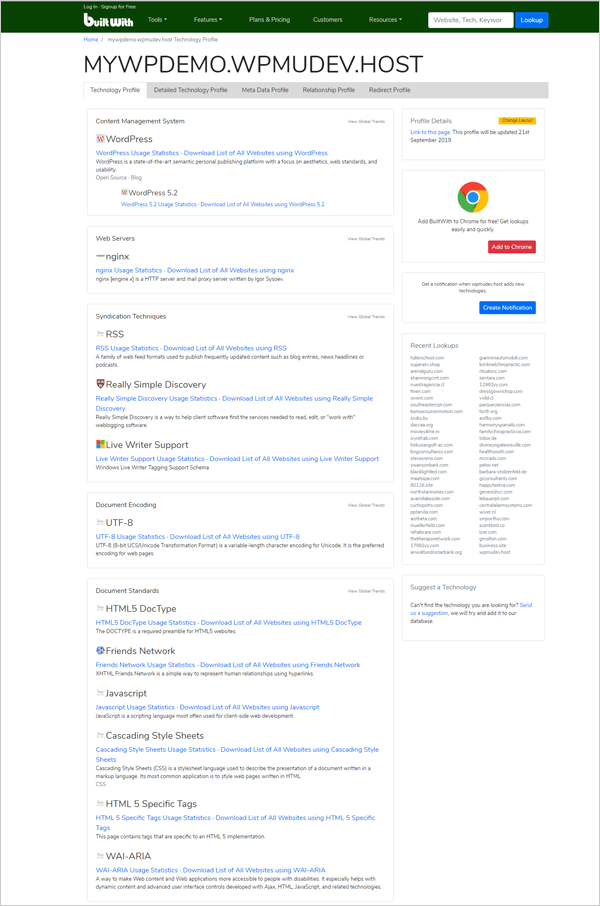
When it comes to keeping domains and hosting separate or together based on ‘more options’, then, you can pick providers who are dedicated to either domains or hosting, or go with a larger, vertically-integrated conglomerate. Your choice.
Security
According to reports on website hacking by Sucuri, there were 50 million sites in 2016 that were reported as phishing scams or distributing malware, which are both hallmarks of a hacked site. In 2018, the Sucuri team analyzed over 25,000 CMS websites infected with malware and over 4 million files, to determine the main sources of security threats to CMS platforms like WordPress.

Since WordPress is the world’s most popular CMS platform, it is also the main target of hackers and malware. Unfortunately, spam and hacking are a real problem and a reality. In fact, the Akismet plugin stops 7.5 million pieces of spam per hour.
In theory, keeping your domain hosted with your site means a hacker would need fewer steps to gain control of your WordPress site, your hosting account and your domain records. The reality, however, is that most larger domain and hosting companies regularly improve their security measures and harden their security protocols to protect against cyber data breaches. In fact, security is often compromised by users themselves through poor security practices, such as not using strong passwords, using the same passwords for everything, or sharing passwords with others, not keeping software up-to-date, and a host of other factors.
With domain security, look for domain management features like:
- Auto-renew – Setting your domain to automatically renew registration prevents the domain from expiring and becoming available for someone else to purchase.
- Domain registry or registrar locking – this prevents your domain settings from being modified by someone else without your knowledge or permission.
- Domain privacy – this lets you hide your personal contact information from public view and prevent thieves from accessing and using this information to impersonate you or fool you into accessing your domain.

With hosting, there are many security features to consider – everything from hardening servers with firewalls, to software, scripts, and applications, passwords, performing secure WordPress installations, and even your own security practices.
Some additional points:
- There are services that allow you to monitor the registration status of your domains. These services alert you via email when monitored domains are nearing expiration and when they change status. This lets you keep an eye on your domains (or anyone else’s).
- There are also services that let you monitor your domain for potential subdomain takeovers (subdomains pointing to third party services that are no longer being used, which get bought and/or hijacked by malicious hackers.)
- Some security features like SSL (for HTTPS) can be obtained from domain or hosting providers, or even SSL resellers.
See our ultimate guide to WordPress security for more details and make sure to complete our WordPress security checklist.
Human Error
No doubt you’re familiar with Murphy’s law (“Anything that can go wrong will go wrong.”) Even though Murphy’s Law predates the internet, it also describes it perfectly.
To err is human and “pobody’s nerfect.”
Accept it. Things can and will go wrong and the more you cluster things together, the more chances you have of experiencing a clusterfubar.
While it may seem more convenient to combine hosting and domains under one roof, it has its pitfalls. For example, if everything’s tied together and your credit card expires or you forget to renew your domain and you’re not alerted, you could lose both. Your domain could expire and be auctioned off to someone else who then flips it to someone else later for a quick profit. Classic clusterfubar.
Unless you own a trademark attached to your domain, if you lose your domain, it can cost you a lot more to get it back.
And don’t discount administrative errors. Sometimes, just typing one wrong letter when setting up a domain or hosting account can create a whole lot of headaches.
So, whether you choose to keep your domain and hosting together or manage both separately, just remember that when it comes to human error, Murphy’s no furphy!
Stability
It’s possible that your site or host could experience outages. If your domain is hosted separately, you could temporarily redirect your domain to a backup site or maintenance mode page hosted elsewhere to minimize the downtime your visitors will experience.
While you could redirect your domain even if it’s registered with your hosting company, it doesn’t help if your entire hosting company experiences an outage and you can’t access your account at all.
If you’re just starting out and need to keep your costs as low as possible, one way to monitor whether your existing hosting service is stable or not is to sign up for a free domain monitoring service
Once again, this supports the argument for keeping domains and hosting separate. This allows you to host important sites with more reliable and stable hosting providers, or choose options that offer higher uptime guarantees, server monitoring, redundancy, automated backups and responsive 24/7 support.
Ownership
Specialization and competition also leads to diversification. Individuals and businesses of all sizes invest into registering domain portfolios as a way of securing digital assets to safeguard their brand, protect future business ideas, and even give them additional options or sources of income. In response to this demand, many domain providers now offer a range of new services to facilitate the buying, selling, and managing of domain portfolios.
Other than offering things like monetized domain parking, these domain services have little to do with hosting, but they are important when it comes to ownership and acquisition of digital assets. They also require people with different skill sets and areas of expertise to manage and advise clients.
Many hosting companies, on the other hand, don’t really care about things like owning domain portfolios or providing these kinds of services. Their main focus is leasing and maintaining servers and making sure that websites stay up and running. As mentioned earlier, some hosting companies will even offer free domains when you purchase their hosting package as an incentive to lock you into longer services contracts.

While there is nothing wrong with offering free incentives, make sure to always read the fine print before purchasing any web services and keep all records of domain and hosting registrations and renewals, account, login, and access details, and invoices and receipts for all purchases as proof of ownership.
Although it’s not as common as it used to be, it’s really important to check who owns what, especially with domain names. Depending on the terms of service you sign, your free domain could end up under the control of the hosting provider (e.g. they may have a clause where they automatically keep your domain if you cancel your hosting plan). Some may also register themselves as the owner of the domain, making you an administrator only with restricted access.
Claiming ownership of a domain that’s been registered to someone else is a much tougher battler to fight than trying to access a website that’s been taken over by hackers or even by your own hosting company for lack of payment. As long as you can access your domain records, all you need to do to get your site back is have a backup of your site files.
As mentioned before, something you can do to protect your ownership is check that your domain or hosting provider offers domain privacy so your identifiable information isn’t published in the WHOIS database and available for public perusal.
In fact, to check whether you are indeed the registered owner of your domain, just run a WHOIS check on your domain name (although this is getting harder to do as more owners are opting for domain privacy).

One last thing to keep in mind is that with hosting, you’re only leasing server space and there is no domain ownership either, you’re just leasing your domain from ICANN. Stop paying your hosting and domain renewal fees and you will quickly find out who really owns your services.
In Conclusive…
As digital needs of businesses evolve, domain and hosting providers must continue to adapt and provide new specialized services to remain competitive. This specialization makes it harder for smaller providers to offer ‘one-stop’ services, as these require more resources to support all the features and specific needs that businesses demand.
If you are a web developer or agency offering clients domain and hosting services, the good news is that you can pick and choose the options and services that will best suit your business model and your clients’ needs. Most domain and hosting providers offer management tools, dashboards, and even affiliate programs that will simplify your life and make running your business a whole lot easier and more profitable.
If you are a website owner just starting out, or building an online presence on a shoestring budget, it’s still a good idea to keep your domains and hosting separate, as you can save a lot of hassle managing assets as your website or business grows.
Of course, if bundling your domain and hosting together makes more sense for your business or website project, then by all means consider it. In the end, it all comes down to your needs and preferences. The goal of this post is simply to provide you with useful insights to help you better plan your web presence or digital business. We hope the above information has helped.
Tags:
Martin Aranovitch Martin Aranovitch is a blog editor and writer at WPMU DEV. He has been teaching businesses how to use WordPress effectively almost since the platform began. When he is not writing articles and tutorials, he’s bushwalking in the mountains or playing triangle. Connect with Martin on Facebook and his WordPress client training manual and free content management course websites.