Is your WordPress blogging work space too cluttered? If so, try this out next time you’re in there. Go to the upper right hand corner and click the “screen options” tab, like this:
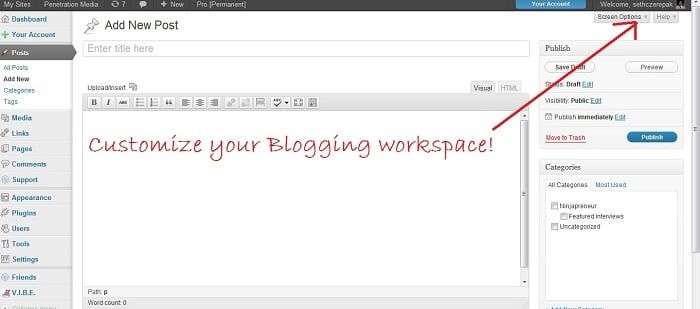
When you click that option, it brings up a couple of check boxes where you can hide unused features and even make your blogging work space display as one column:
This way you have more room to work and less clutter. If you find out that you need to unhide a feature, you can always go back to your screen options menu and make another change. The changes will remain even when you log out and back into your WordPress dashboard. Try it out.
Out of all the WordPress ecommerce plugins available, MarketPress has got to be the winner - easy to configure, powerful functionality, multiple gateways and more. A simply brilliant plugin!
Fully integrated with the SEOMoz API, complete with automatic links, sitemaps and SEO optimization of your WordPress setup - this is the only plugin you need to help you rank your site number 1 on Google - nothing else compares.
Would you like to add Facebook comments, registration, 'Like' buttons and autoposting to your WP site? Well, The Ultimate Facebook plugin has got that all covered!
To get a wiki up and running you used to need to install Mediawiki and toil away for days configuring it... not any more! This plugin gives you *all* the functionality you want from a wiki, in WordPress!!!
Simply insert google maps into posts, sidebars and pages - show directions, streetview, provide image overlays and do it all from a simple button and comprehensive widget.
Now there's no need to pay for a third party service to sign up, manage and send beautiful email newsletters to your subscriber base - this plugin has got the lot.
If you're thinking about starting a paid, or just private, membership site then this is truly the plugin you've been looking for. Easy to use, massively configurable and ready to go out of the box!
It's now incredibly easy to start your own Q&A site using nothing more than WordPress - The Q&A plugin simply and brilliantly transforms any site, or page, into a perfect support or Q&A environment.
Thanks a lot for your tips. Definitely useful for me in blogging.