After you’ve seen enough WordPress blogs, you might start to think that they all look alike with similar displays of posts, categories, and archives.
Want to do something a little more creative with your content? Check out the Category Grid View Gallery plugin. It offers you a visual way to display categories on your WordPress site. The plugin generates a grid view of the categories by grabbing the first images from posts within those categories.
Here’s a screenshot of Category Grid View Gallery in action, taken from the live demo:
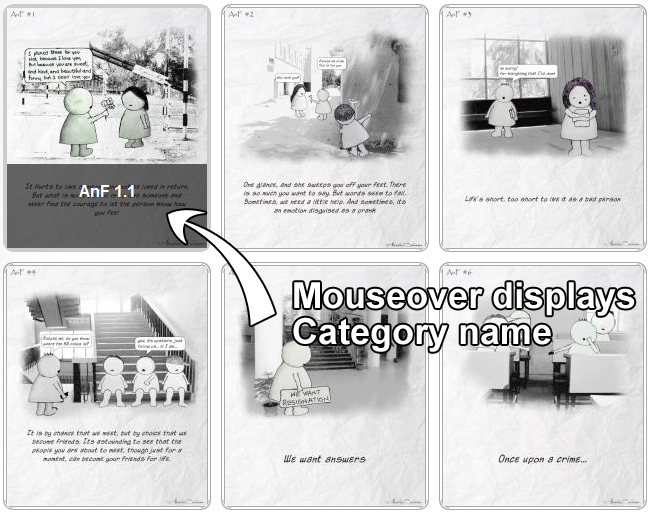
Highly configurable shortcode makes it easy to customize the gallery display
The best feature of this plugin is that it’s very easy for anyone to implement – simply paste in the shortcode on the page where you want the category grid gallery to display. The shortcode gives you the ability to:
Control which category to show
Number of posts to show
Posts to exclude
Size of the thumbnail
Whether or not to show the title
Category ordering options
Quality of thumbnails
Show posts only with specific tags
…and many more
Besides a highly configurable shortcode, the plugin also has a few more excellent features. Thumbnails are generated on the fly and dynamically resized for you, which is a huge time saver. The plugin’s author has built in a caching feature to reduce the load on the server. You also have the option to display posts in a popup lightbox-style window on click.
If you need a new creative way to display your blog, photo gallery, portfolio or featured posts, give the Category Grid View Gallery plugin a try. Download it for free from the WordPress plugin repository.
It's now incredibly easy to start your own Q&A site using nothing more than WordPress - The Q&A plugin simply and brilliantly transforms any site, or page, into a perfect support or Q&A environment.
If you're thinking about starting a paid, or just private, membership site then this is truly the plugin you've been looking for. Easy to use, massively configurable and ready to go out of the box!
Fully integrated with the SEOMoz API, complete with automatic links, sitemaps and SEO optimization of your WordPress setup - this is the only plugin you need to help you rank your site number 1 on Google - nothing else compares.
Now there's no need to pay for a third party service to sign up, manage and send beautiful email newsletters to your subscriber base - this plugin has got the lot.
To get a wiki up and running you used to need to install Mediawiki and toil away for days configuring it... not any more! This plugin gives you *all* the functionality you want from a wiki, in WordPress!!!
Out of all the WordPress ecommerce plugins available, MarketPress has got to be the winner - easy to configure, powerful functionality, multiple gateways and more. A simply brilliant plugin!
Would you like to add Facebook comments, registration, 'Like' buttons and autoposting to your WP site? Well, The Ultimate Facebook plugin has got that all covered!
thank you sarah for featuring my plugin on your site.. Really looks great. Just a correction. At mouseover it displays “post tilte” from which the image was taken.. and not the category name.
Say I have an artist studio website with ten artists. Each artist has their own bio page that has their images. I want to show a grid of all the categories with one image pulled from the most recent post from each category. Is this possible with this plugin? So it will show an image with the title above it being the title of the category. You click that image and it takes you to another grid with all the images from that category you clicked. If so how would I do it!?
You’d need to get in touch with the plugin’s developer to see if it’s possible. I haven’t looked at the plugin in a little while – it may have more options by now.
thank you sarah for featuring my plugin on your site.. Really looks great. Just a correction. At mouseover it displays “post tilte” from which the image was taken.. and not the category name.
Hey man..What’s happening your site and plugin are not available anymore!? Any news? Thank you…
looks like the plugin was found to have a security issue, hence it’s been removed everywhere..
which is a shame cos i’d really like to be using it!!!
Thanks Sarah for bringing this plugin to our attention. This is a great plugin that will make any blog look great!
I have a need for this plugin right now and this post really came at the right time…
Thanks Anshul for developing such a great plugin…
Anshul – Thanks for that clarification!
Great plugin, although haven’t try it yet ^^
Great plugin, but it would be superb if it works with network and show on the main site network blogs, with the newest articles from them
Great plugin! Thanks!
Thanks for the post!
Say I have an artist studio website with ten artists. Each artist has their own bio page that has their images. I want to show a grid of all the categories with one image pulled from the most recent post from each category. Is this possible with this plugin? So it will show an image with the title above it being the title of the category. You click that image and it takes you to another grid with all the images from that category you clicked. If so how would I do it!?
Thansk!
You’d need to get in touch with the plugin’s developer to see if it’s possible. I haven’t looked at the plugin in a little while – it may have more options by now.
Do you have any idea how can I obtain more columns and rows?
I have just a big column and I can’t obtain 3 columns for example. My column is just getting longer :)
got it. the problem was my visual editor (Standard wordpress) that added some html tags before the shortcode.
I’ve added the shortcode in HTML view and it works fine now.
How can we add numbers pagination this I have goggled lots of time but no luck.