A Visual History of The WordPress Project – Closing in on Two Decades
May 27, 2023 will mark twenty years since WordPress officially launched. Its humble beginnings, a conversation sparked between Matt Mullenweg (an American developer) and Mike Little (a British developer), in a quiet corner of the internet.
Its historical content nestled safely online, so you can see with your own eyes the very first stirrings of what would later become WordPress.
In this now-famous post, Matt lamented that the popular blogging platform b2/cafelog hadn’t been updated in a while, and proposed the idea of creating a fork from it, so it would “never be lost” and “free to the world”. First to comment was Mike, who voiced his interest in contributing.
And WordPress was born. Or more aptly, its first signs of life began in a coded womb.
With the anniversary approaching, and WordPress undergoing another makeover this past week, we thought we’d take a look back at these well-nigh two decades.
With the help of the Wayback Machine, we’re going to look at how WordPress.org itself has changed stylistically over the years.
For those of us who spend a lot of time on the platform, it will allow us to wax nostalgic.
A quick note regarding the format… if the site was effectively crawled by the Wayback Machine during May, I used those images. When it wasn’t, I went a little forward or a bit backward to find the richest source of captures for that year. In addition, when you see an image with wavy edges in the middle, it means I’ve cropped a section out. This was done to make extremely long graphics more reasonably sized, removing some text while retaining the visual scheme.
If you’d like to skip ahead to a particular year or section, click on any of these jump links:
- 2003 ~ The Start of Something Big
- 2004 ~ The Dark Column Arises
- 2005 ~ And The Award Goes To…
- 2006 ~ Read Between the Lines
- 2007 ~ Webware’s Top 100 Finalist
- 2008 ~ Blue Streak
- 2009 ~ Business is Booming
- 2010 ~ Dramatic Thematic
- 2011 ~ Monochromatic Moment
- 2012 ~ Sticking the Landing (Page)
- 2013 ~ Beefing Up Security
- 2014 ~ A Foot Longer
- 2015 ~ The City of Brotherly Love
- 2016 ~ London Calling
- 2017 ~ A New Dimension
- 2018 ~ A Blockbuster Year
- 2019 ~ Upward Mobility
- 2020 ~ Feeling Good
- 2021 ~ Around the Block and Back Again
- The Here and Now
- Full-court (Word)Press
Let’s get going!
2003 ~ The Start of Something Big
On May 27th, 2003, the first public version of WordPress—0.70—was released. The earliest screenshot I could locate was version 0.71, circa June 2003.

Home
WordPress’s initial landing pages were devoid of any images, save the patterned background.
Starting at the top, was the company wordmark, then a horizontal menu bar, followed by a manifesto-slash-descriptive site map. Below that was an early CTA, to sign up for announcements via email.
In the footer, the iconic “Code is Poetry” tagline, along with the WP version and valid code types (XHTML & CSS).
Everything but the footer is on a pure white background, framed by a graphic of repeating, mirror-image swirls in varying shades of gray (courtesy of Squid Fingers).
At this point, we already had a newer version, 0.72. This release had tweaked the front page content, removing the WP is the official branch of b2 text from the home page.

About
This early About page for the site contained seven linked subsections: Intro, Features, Testimonials, Screenshots, Future, Buttons, and Contact.
The main content here is split almost 50/50 between a description of what WordPress is, and the creatives behind it.
Of particular interest is mention of the origin of the WordPress name, with a bit of a grammar trip-up (“was actually comes”).

As the tale goes, Mullenweg’s friend, Christine (Tremoulet), based the name on Matt’s desire it be related to the printing press, since the word press almost single-handedly drove the branding process.
The name really couldn’t be more apt… fitting dual meanings of the word, both of which apply to the purpose of the platform. Press, as in the world of reporters, journalists, columnists, and photographers; and Press, as in the printing equipment, which enables the publishing of words.
Screenshots
Of additional significance in this About section, was the inclusion of Screenshots.
Smart move, as most users cared about more than just how everything worked; they wanted to see how everything looked, including the backend.

WordPress.org long ago dispensed with screenshot collections of the backend. Instead, during intermittent years, they would highlight one by tucking it in a corner of the home page.
Perhaps previews from the WP team became unnecessary once the platform became so popular and these were shared by users.

Here is a screenshot of one of the first Editor iterations:

As the image above bears witness, categories, comments, quicktags, and pings were all there from the beginning.
Docs
The Documentation page came next, and was divided into five parts: Intro, Tutorials, Template, Reference, and Developer.
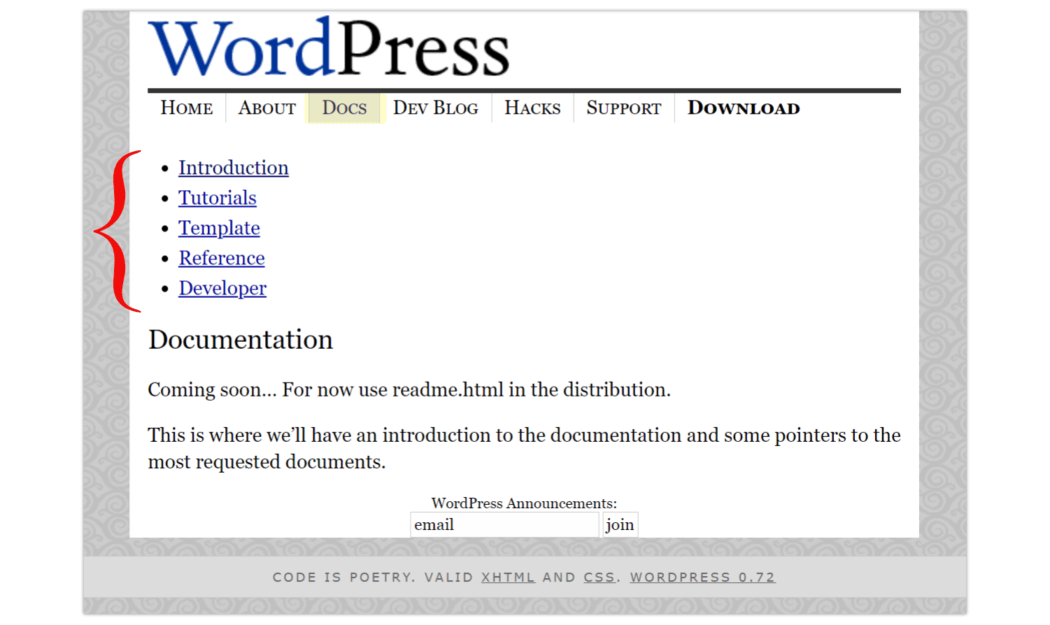
Most of the Doc sections were empty, with descriptions like “This is where…” or “Coming soon”.
The Reference and Developer sections, however, were well fleshed out.

Dev Blog
Early on, this section was one continuous blogroll, and quite long. With a single variation one year (see 2004), this became and remained the signature format.

Utilities
The next header/page was Utilities. This verbiage was short-lived, and soon changed to Hacks, which had its own forum.

Support
Support appeared to have seven sections, based on the bullet points. (Unfortunately, not all were visible or clickable in the captures caught by Wayback Machine.)
The main page here was the Forums, and it looked pretty active, even this early on.
There were 39 posts, with the Updated timespan ranging from 10 hours ago to 8 days ago.

Download
At this stage, the downloadable WordPress files were stored externally on SourceForge.


2004 ~ The Dark Column Arises
One thing that stands out this year was the dark column on the right side, where WordPress features were highlighted, or subsections were linked. This was a sitewide reformatting.

Home
A drop shadow was added around the main window, elevating it slightly from the background.
We also got our first landing page screenshot of the backend Editor screen.
About
The About page added a Requirements section this year.

Screenshots
Screenshots were included again as well. This time, we get a look at the updated Editor, as well as Categories, Links, Users, and Plugins.
In the Editor, Post Slug has been added, and Categories takes a more prominent spot.

Docs
The Documentation page has expanded to include sections on Installation, FAQs, Hosting, and Wiki.
This is the first time we see an actual section devoted to Hosting. Interestingly, they don’t recommend any specific hosts at this point; instead, advise against one in particular, actually suggesting to avoid them.

Dev Blog
The blog section is much different this year. The new dark, right-side column includes the sections Front Page, Archives, and RSS 2.0 Feed.
Front Page is the default landing page, and displays the blogroll, but it’s only for most recent posts. To see anything prior, you’d need to head to the Archives section, which includes links listed by post title, and sorted by date.

Donate
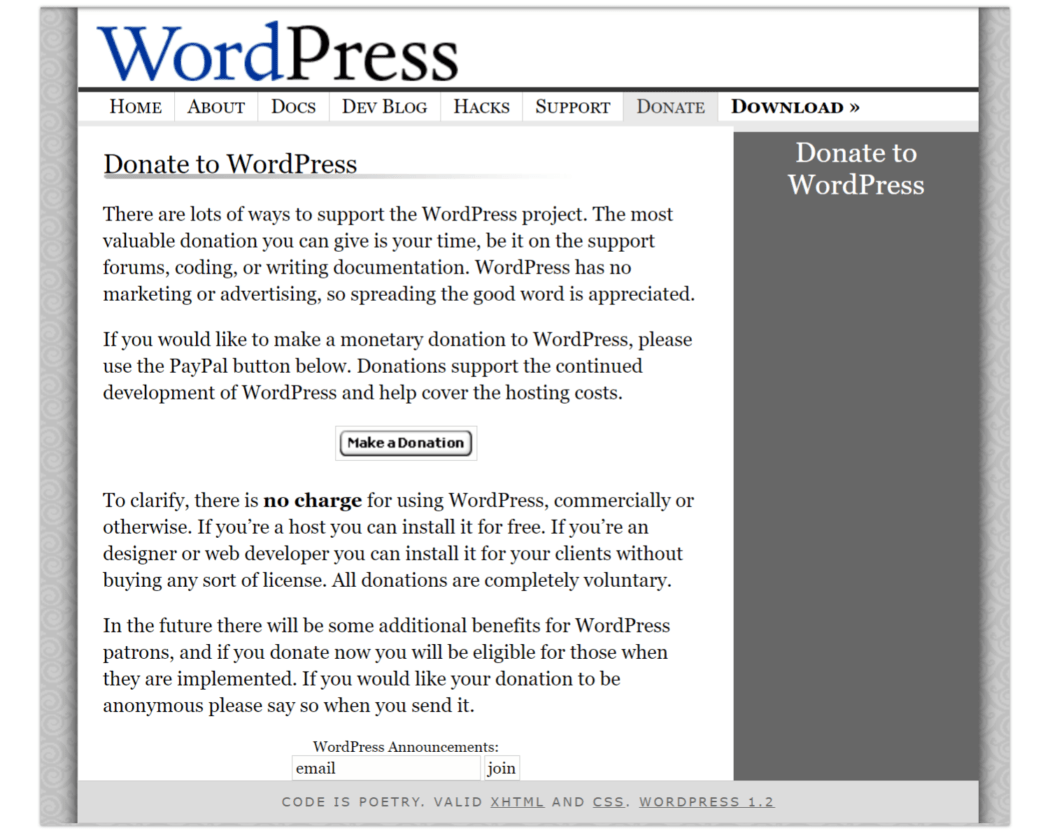
A Donate header/page had been added.
If you scroll further down on that page, you’ll see a vague promise of “additional benefits” for those who contribute.
Any early adopters take part in that? Wondering if they ever panned out, and what they were.
Download
A Notification section was added, where interested parties could sign up for Beta announcements.

2005 ~ And The Award Goes To…
WordPress received its first award! Impressive, considering it was honored for what was only its second year up and running.

Home
A simple blue rectangle graced the top of the WP.org site, declaring Web Application of the Year.
This honor was bestowed upon them by ArsTechnica, as voted by forum goers asked to choose “the best web application or development framework of the year” (for 2004).
The Hacks section had been removed, and there were three brand new items: Extend, Hosting, and Donate.
Extend was devoted to Themes and Plugins. As for Hosting, this was the first we see it given a section all its own.

About
Looking at the Future section of the About page, we see what I believe to be the earliest advertisement… for Mozilla Firefox.
Also, they moved from an itemized, to-do list format on this page, to a more generic “exciting things are coming” type of summary, stating that development moved too fast to keep the list status updated.

Screenshots
We’re starting to see more than just shades of gray!!
In the Screenshots section, you’ll notice they’ve begun advertising their “new theme system”, with a selection of a few colorful samples, and a link to view the “hundreds” of options available. So now we get sample visuals of both the back end, and the front end.
Oh, and the Dashboard makes its debut!

Here are some of those screenshots, blown up for better viewing:


Extend
The Extend section is where themes and plugins resided.

You could access themes here, perusing the library using a horizontal scroll. There were also links here to other theme resources, such as a list of themes on the codex, and a blogging pro theme gallery.

The plugins page was really just a placeholder at this point, indicating that content was coming soon.

Docs
Wiki Documentation was new in Docs this year.
Formatting wasn’t the cleanest this early on, but the content was extensive.

Blog
The blog was simplified this year, in terms of menu breakouts.
The section header was changed from Dev Blog, to just Blog. Gone are the sidebar links for Front Page, Archives, and RSS Feed. It’s just running blog posts, pure and simple. The Archives sidebar menu doesn’t reappear until late 2021.

Support
A Hot Mess Hot Tags section was added to Support this year.

Hosting
Hosting got its own page this year! There were four featured hosting companies initially listed: Blue Host, TextDrive, DreamHost, and Laughing Squid.
These were sandwiched between an Introductory paragraph, and a Host Feedback section.
The Intro mentioned that there were hundreds of thousands of web hosts to choose from, with WP listing who they believed to be the “best and the brightest”.
Host Feedback provided an email you could write to if you encountered issues with a host. If warranted, WordPress would act as arbiter to find a solution.

Donate
The donate page has more content/details than last year.
A section was added regarding web hosting partners who donated a portion of their fees back into WordPress.
Another section indicated what donations to WordPress had been used for thus far, and what their plans were for donations going forward.
This was the last year a separate Header/page for Donate was on WordPress.org.

Download
A new sidebar menu was added to the Download section this year, with five different categories: Stable Download, Beta Releases, Nightly Builds, Subversion Access, and Download Counter.

2006 ~ Read Between the Lines
In 2006 we see a lighter, cleaner look. The gray, swirly background image had been completely removed, as had the gray footer bar. In the footer, the “Code is Poetry” tagline remained, but the valid code types had been nixed.

Home
The first official WordPress logo appears in the header! It’s next to the wordmark, both of which sit atop a rectangular, light gray-to-white gradient background.
Lines have taken over in a big way. Here’s an accounting:
- Two full page-width lines sit midway and near the top of the header, behind the logo/wordmark area.
- There is also a single line beneath the logo/wordmark.
- Instead of a light gray highlight to indicate what section we’re in, we now get a bold, black line beneath the active header/page name.
- The line motif repeats in many areas across the site, such as navigational dividers, and subsection splitters.
Another big change: nav options are now on the left side.
About
A Domains section was added, and Future was removed.
Domains was a request NOT to use “WordPress” in any part of a domain name, to avoid infringement on their trademark.

Docs
The Docs content blew up in 2006.

It doubled in categories, going from 7 to 14. And all but one of these sections had in excess of twelve links.
There was also an additional item at the bottom of this section: Featured Article. The subject of this one was Permalinks—a built-in WordPress utility that would make your math formula links better looking and easier to remember.

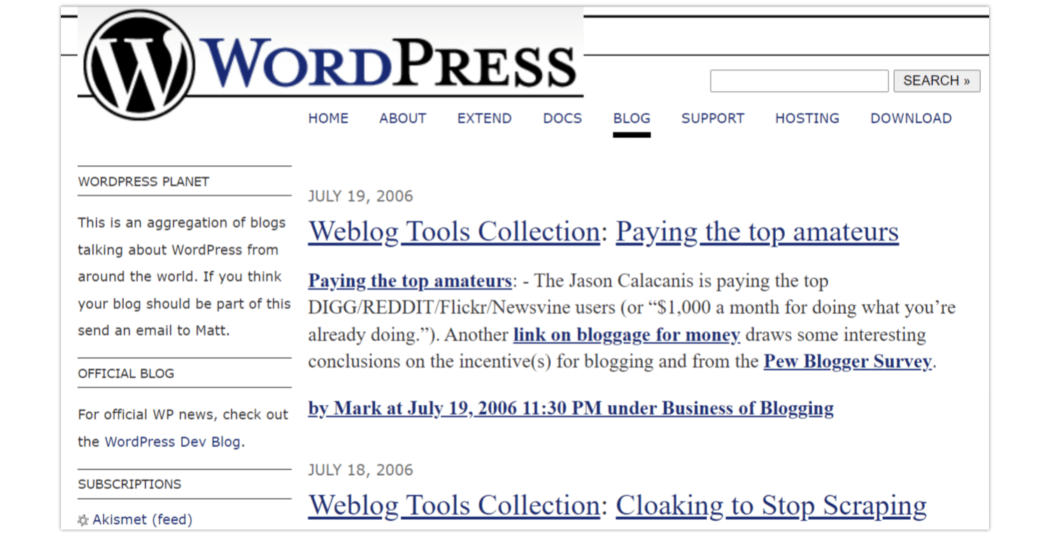
Blog
An additional link has been added on the Blog page. Called “WordPress Planet”, it was a collection of curated blogs from around the world, with WordPress being the common subject.
Support
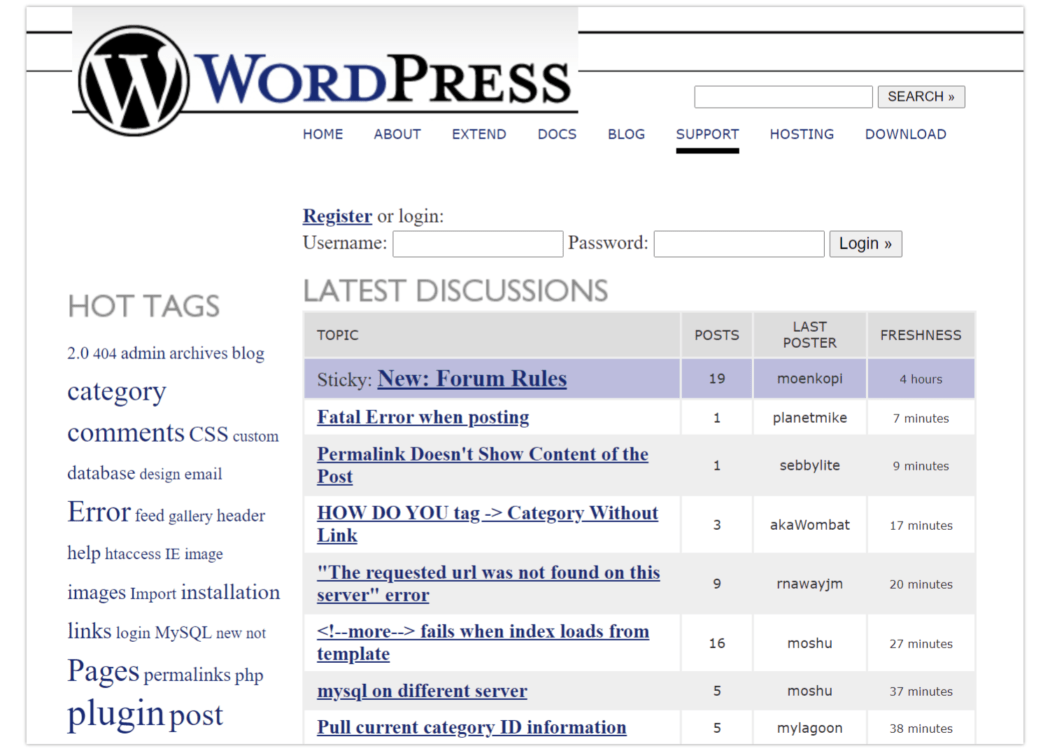
A few small formatting changes to Support this year provided some visual improvement to Hot Tags.
2007 ~ Webware’s Top 100 Finalist
Another award for WordPress this year!
Home
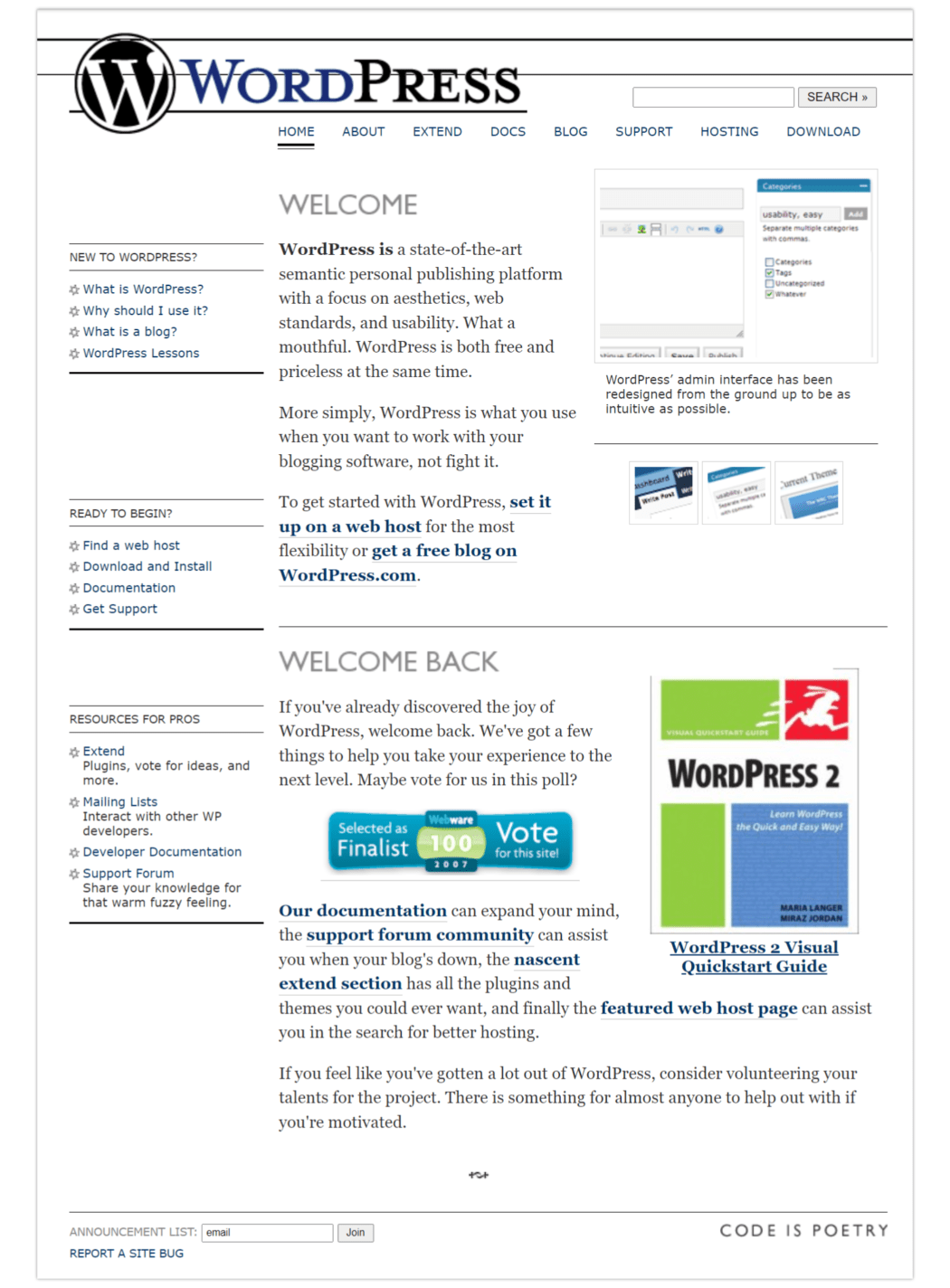
We’re still in the moment of many lines. The gradient background beneath the logo/wordmark has been removed. I’d like to say it looks better, but with those full-length double lines streaking through them, it detracts from the overall visual impression.
We see the first occurrence of a WordPress book, complete with an image of the cover and a link to purchase from Amazon.
There’s a graphic heralding WordPress being selected as a finalist in Webware’s Top 100 of 2007, with an appeal to vote for them (and an imbedded link to the website).

About
About got a new section this year – Roadmap. It detailed WP’s expected release schedule for the year, along with the version number (for WordPress core).
Additionally, there was a link to a bug tracker, which included respective milestones.
And finally, there was a list explaining the feature release numbers’ associated names. If you didn’t know, Matt et al were big jazz fans, so all of the names were well-loved musicians of the genre.

Extend
This year two more family members joined the Extend clan: Ideas and Kvetch! Both sections were for gathering user input.
Ideas was basically a suggestion box forum, while Kvetch (the Yiddish word for a person who complains a lot), was the gripe department.


Download
A Release Archive was added to the Download section this year, along with a disclaimer about prior versions being unsafe to use/not actively maintained.

2008 ~ Blue Streak
By 2008, the homepage had taken on a bolder look with a dark header area, and some pops of bright color. The overall effect of this new theme is cleaner and easier on the eyes, with the solid black header, a white and gray logo/wordmark, and a sky blue background on the upper half of the page.
This is greatly aided by the preponderance of lines having been removed (including going back to highlighting the active header tab, instead of the clunky underline).
Page content positioning has improved, and there is better use of the white space. Content has been organized in tidy rows and columns with some alternating color, resulting in a much more polished look.

Home
As far as Header/page changes, Support had been renamed to Forums.
Although Download still had its own header/page, it was also featured on the Home page, in the form of a bright orange button. The header tab was striking in the same bright orange, when not selected as the active page.
We’re met again with a visual and link for a WordPress book, this time one of the popular “For Dummies” series.
We also have a prominently placed screenshot of an example blog on the backend. It’s leaps and bounds more polished looking than the first versions were.
Also front & center is a simplified 3-step/how-to for WordPress, and a selection of WordPress Users that were well-known companies.
Additionally, there’s an excerpt from the most recent blog post on the home page, just beneath the section header: From the Blog.
Finally, the footer bar becomes more than a tagline, with the addition of a handful of helpful links, such as Privacy, GPL, and WordPress.com, along with a direct link to Matt Mullenweg’s personal blog.
Buried here with the other internal links, was Browse Happy, which was externally linked to a WordPress recommendation for Microsoft’s Internet Explorer.

About
The About section saw major changes this year.
Five new sections were added: Books, Logos and Graphics, Fan Art, GNU Public License, and Privacy Policy. Additionally, two sections were removed: Buttons and Screenshots.

The graphics that were under Buttons had been moved to Fan Art, with some nice colorful additions. (Prior to that, they were all black & white.)
Logos & Graphics offered a wide variety of the WordPress logo & wordmark, in assorted formats, sizes, and color options.

Extend
According to the WordPress blog, the very first WordPress for mobile was released in August of 2008: the Open Source iPhone app. I couldn’t locate it anywhere on screenshot grabs; I believe it was downloadable only from the iTunes store.
By now, the Themes directory was fully formed, including sections devoted to Featured Themes, Most Popular, and Newest Themes.

The same goes for Plugins. Though there had been a Plugin directory prior, it was revamped and formatted to match the new Theme directory.

Themes & plugins both had stats, including number of downloads, as well as the addition of a star rating system, and a more integrated support area.
From this point on, I thought it would be fun to include the most popular plugin & theme for each calendar year.


Blog
The sidebar menu was back this year, with a single section: Categories.

Forums
Forums replaced the Support page, from this year through 2012. After that, they were permanently switched back.

Download
This year, a Legacy 2.0 Branch was added to the Download section.

2009 ~ Business is Booming
By October 2009, the Open Source CMS MarketShare Report concluded that WordPress enjoyed the greatest brand strength of any open-source content management system.
WordPress was one of three leaders in both rate of adoption and brand strength as measured in this annual report.
Home
This year saw only a few minor changes to the home page.
A new header/page, Showcase, had been added, and About had been moved in pecking order.
We see some nice strides were taken on the translating front. A yellow bar, located midway on the home page, indicated that WordPress was available in the French language (en Français!).
There is still a download button on the Home page, but it’s a shade of blue now.
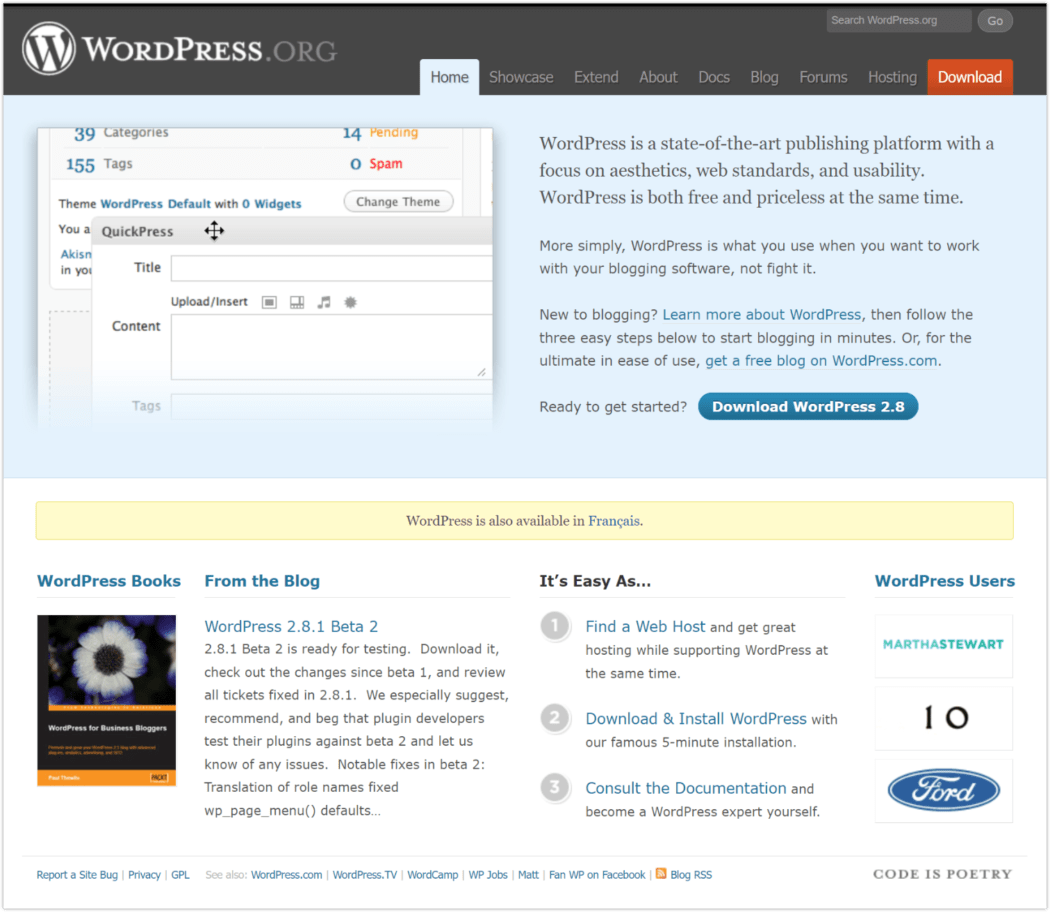
I compiled images for some of the new footer links, so we could get a look at them. Fair warning: WP.TV was a jarring sight at this early stage.


Showcase
This is the expansion of the “WordPress Users” section, giving it more real estate via its own page. Just like it sounds, this was a showcase of featured sites that used WordPress, as well as a selection of those that were recently added.

Since this is such a great representative time capsule of what WordPress especially liked the look of, I’ll include the top site(s) for each year going forward.
Extend
The Themes section was further subdivided this year, with the main page title renamed to Free Themes Directory, and a subcategory beneath it for Commercial Themes.


About
A new section, Philosophy, was added this year. It speaks to the freedoms of use under the GPL, and how to embrace/not circumvent them.

Docs
In line with the sitewide reformatting that took place this year, the sidebar menu has been moved to the right side.

Another addition this year was the section on WordPress Site Reviews. This gave users a chance to have their site reviewed by volunteers in the community.

Blog
The blog Categories had to new entries this year: Cousins, and Features.
Cousins, though given a section all its own, was a single post by Matt M, entirely about BuddyPress.


Download
Sometime mid year, the Legacy 2.0 Branch section disappeared. Even though it was promised to be maintained until 2010, it would seem it faded away before reaching the finish line.
The 2.0 Files were still available in the Release Archive, but came with the warning not to use anything earlier than 2.8, as it was the only version still being actively maintained.

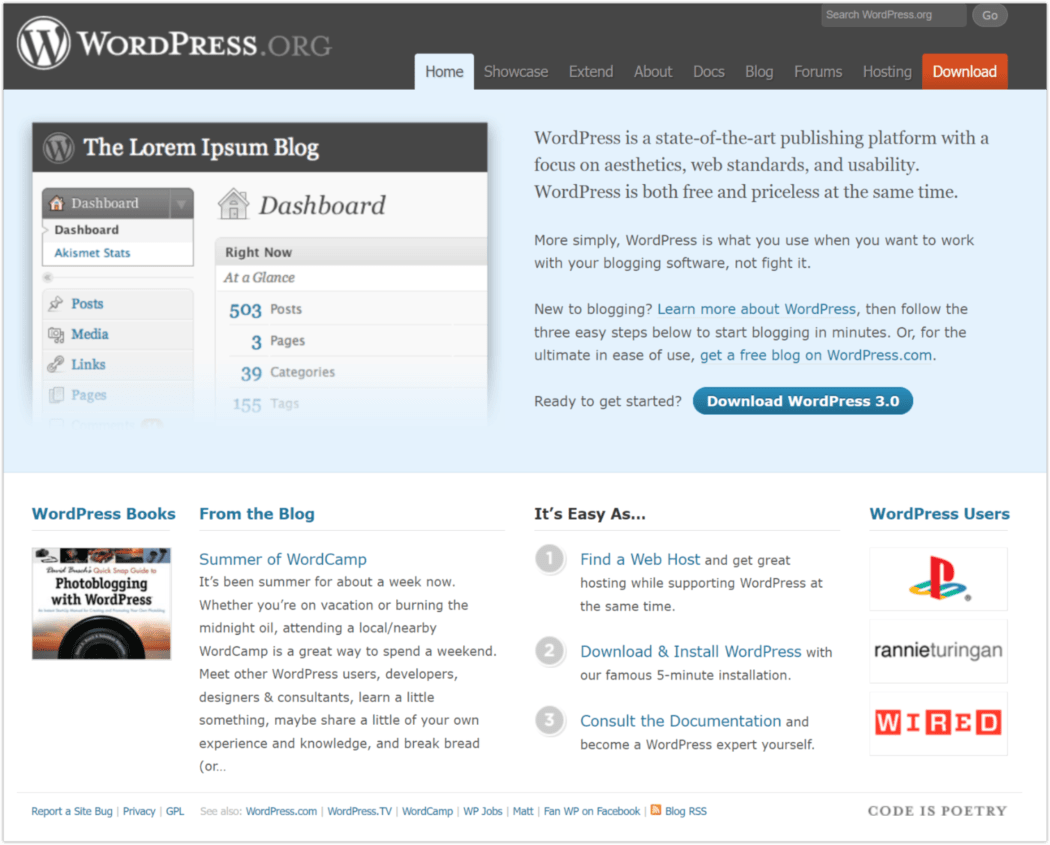
2010 ~ Dramatic Thematic
The first in the series of yearly-named default WordPress themes was introduced this year, and took off like wildfire.
The inaugural theme, Twenty Ten, made its debut with the release of WordPress 3.0.

With a prominently displayed header image, and a clean, minimal design focused on content, not only has it been the model for future WordPress themes, it’s been highly used as a template for blogs in general.
Home
One slight change is the removal of the midpage yellow bar with a language link. Language info could be found under Docs > International Features > Languages.
Showcase

Extend
WordPress apps for Android and BlackBerry officially debuted in February of 2010, without much fanfare. The iPhone app was up to version 2.2.
As mentioned above, the Twenty Ten theme was released this year, but was not yet the most popular. That honor went to Mystique. The most popular plugin was once again Akismet.


Blog
An additional, separate blog was added this year: Development P2. It was devoted to the core development team for the WordPress platform.

A Trac timeline was also added, so users could see how active the project was. Notations in the sidebar mentioned it was often updated 20-30 times a day.

2011 ~ Monochromatic Moment
The bright orange Download header/page tab had been swapped to an eye-catching red, while the button for downloading on the homepage remained the blue that was put in place last year.
By May of 2011 we see a return to a homepage swathed in shades of gray.

Home
The black header is now gray, the logo & wordmark are very dark gray, and the upper half of the page that had been blue is now a lighter gray.
This actually works well, creating a base that contrasts nicely with the spattering of color from images, links, and buttons.
There were some changes in the Footer as well. “License” and “GPLv2” had been added, and the “Fan WP on Facebook” was no longer a word link here, instead had its own row at the bottom with the FB icon.

Interestingly, though all the images I culled from Wayback Machine were purportedly from English pages, for some reason the Facebook button text displayed in Dutch.

There was also a WordPress survey at some point this year, with a link to take it in the site header. Annual surveys on WordPress continue to this day.


Showcase

Extend
This year, WordPress for mobile landed its own section under the Extend header/page, and had expanded to include two additional formats: WordPress for Windows Phone 7, and WordPress for Nokia.

FREE EBOOK
Your step-by-step roadmap to a profitable web dev business. From landing more clients to scaling like crazy.

FREE EBOOK
Plan, build, and launch your next WP site without a hitch. Our checklist makes the process easy and repeatable.
This is the first time we’ve had all the mobile apps collated together, with downloadable links directly from the WordPress site.
The popup tagline for Mobile was, “Take your Website on the go.”

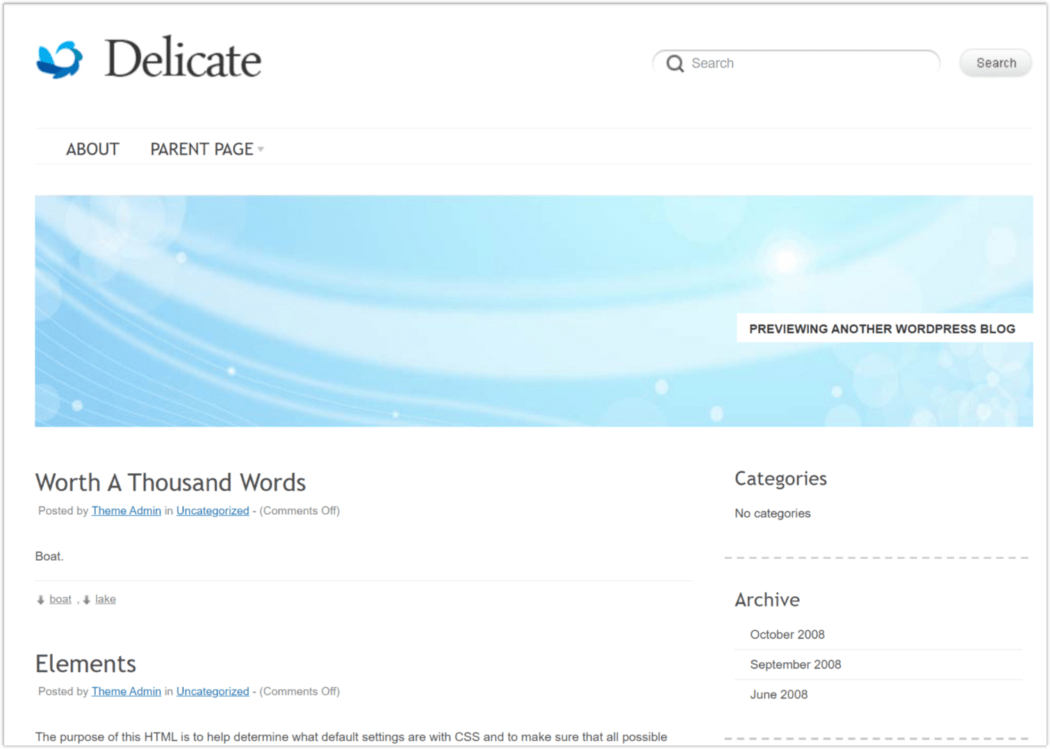
June of 2011 saw the second release in the series of yearly-named themes, with Twenty Eleven. Too late to rise to the top yet, it was bested by Delicate for most popular.
Contact Form 7 easily outranked all other plugins in popularity.

About
In 2011, a Statistics section was added under About. It contained two colored pie graphs, one depicting WordPress versions in use, the other representing PHP versions in use (both by percentage).

Download
The section Source Code was added to Download this year, along with the location of the GNU licensing information for it.

2012 ~ Sticking the Landing (Page)
By far, the biggest change this year was the rollout of the default site Landing Page. As this was now the de facto Home page, the Home header was redundant and completely removed.
Also, the Extend section is gone, and its components split into their own pages – Plugins, Themes, and Mobile.
Get Involved is another new Header/page. (More on that in the section below.)
Landing Page


Showcase

Themes
Twenty Eleven had risen to the top of the ranks in Themes, with Twenty Ten close behind.

Plugins
The Jetpack plugin reigned supreme, with a whopping 2,900,000 downloads.

Mobile
Mobile got it’s own header/tab this year. WordPress for WebOS had been added, so there were six different platform versions available.

Support
The Support header/page came back, and contained both the Forums and Docs sections.


Get Involved
Get Involved was a resource for learning more about the process of developing WordPress, and, if so inclined, how users could make their own contributions.
The header bar mapped out the subsections.

About
This year, the About page was moved in the header/tab display order, much further to the right.
There was also a new category: Swag. WordPress had gotten into the merch game, and dedicated a section on its front page to its namesake collection.


Blog
This year, Social Media icons for sharing posts had been added. Initially, there were three options–Twitter, Facebook, and Email.
Currently, only the Twitter & Facebook share icons remain; Email was removed this year (2022), and Google share made a brief appearance from 2013-2018.

2013 ~ Beefing Up Security
In June of this year, some of the 50 most downloaded WordPress plugins were discovered to be vulnerable to common Web attacks (i.e., SQL injection & XSS). A separate inspection revealed that seven of the top ten ecommerce plugins had similar issues.
In an effort to promote better security, WordPress released version 3.7 that October, which introduced automatic background updates, as well as a new password meter to encourage users to choose stronger passwords.

Landing Page
This year, we’ve circled back to the dark header. It’s a very deep, almost back shade, and the overlaid text areas are almost pure white. The upper half of the page remains light gray. It makes a bold statement.
The Download menu header is completely gone, and has been replaced with a bright blue Download button, sitting prominently in the header area (as well as repeated below, midpage).
The lower portion of the landing page remains sectioned into areas, similar to the prior year with the Blog excerpt, the 3-step how-to WP, and the highlighted sampling of WP Users.
The lower left area is where we see another change. Instead of WP Swag, we have a full color ad/link for Premium Themes.
Just as WP Users and Books would cycle the selections throughout the year, so did Premium Themes.

The footer bar shows some variance from last year, with the notable addition of a Twitter CTA button (follow @WordPress).
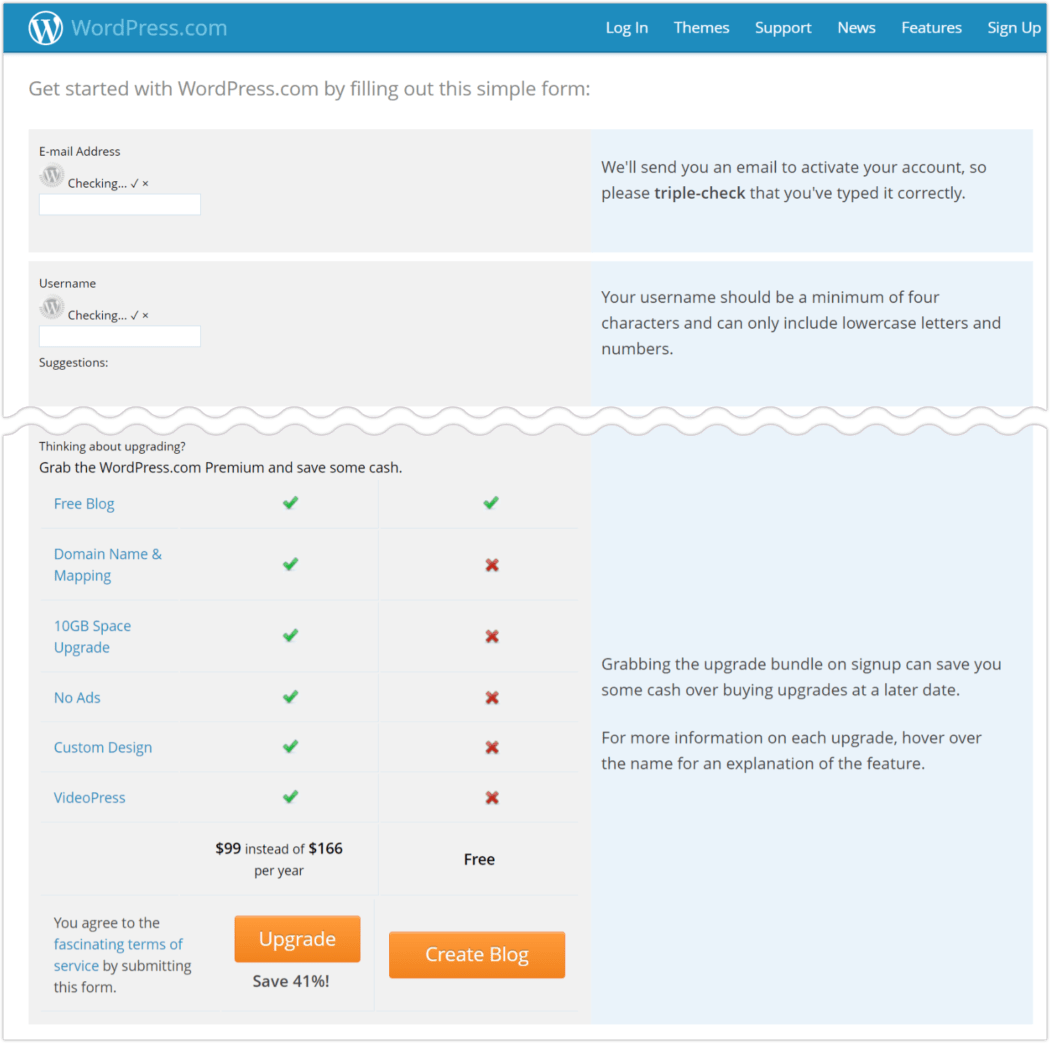
Additionally, most of the linked pages had big upgrades. The WordPress.com link was reworded to Hosted WordPress.com, and the page it linked to now included information on the paid version of the platform.
WP TV & WP Camps have both had serious visual improvements and look heaps better.
BuddyPress Social Layer and bbPress Forums are two new footer links. The former looks appealing; the latter was subpar.



Showcase

Themes
Most popular was Responsive, with Twenty Ten right behind it.

Plugins
Back on top this year is Contact Form 7.

About
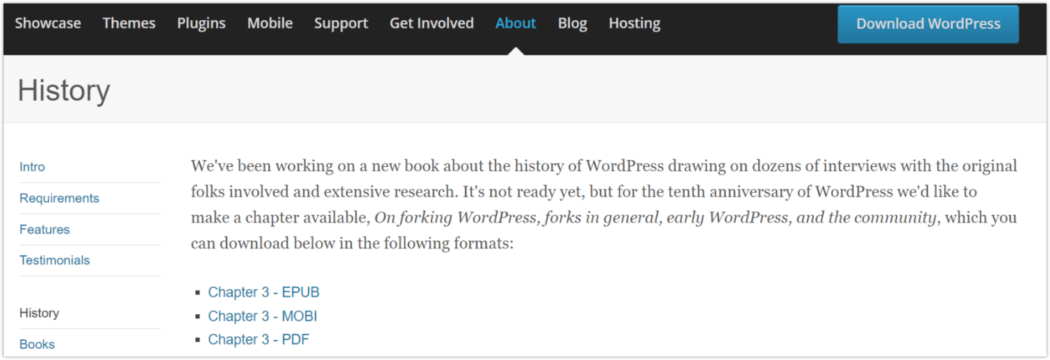
History was a new section under About this year.
The origins story of WordPress was still the intro in About. This History section detailed a book on WordPress history that was in the works, but had not yet been released.
In honor of WordPress’s 10th anniversary, one chapter was made available for download, for those who wanted to get a sneak peek.
Download
From this point forward, there was no longer a Download header tab. To get to the page, you needed to click on the dedicated Download button in the top portion of the website.
Additionally, a link button to Find and Download a Mobile App was added.

2014 ~ A Foot Longer
The Footer probably tripled in size this year, with many more content links included than in the past. About half of these were dupes of links already given real estate elsewhere, but they got a prominent spot sitewide in the bottom corridor.
The format in the Footer had gone from a single row to six columns, including one for the Facebook and Twitter buttons.
Mobile was featured prominently on the Landing Page, with a big visual showing WordPress on cell phones. This spotlighted the personalization it allowed, showing three different background colors on full display.

One completely new section in the greatly expanded Footer section was Learn. Prefaced by WP that this was a work in progress, it would be the source for handbooks, downloadable training materials, and info about educational events.

Showcase

Themes
This year, the annual default WordPress theme came out much earlier. Twenty Fourteen was released in November of 2013, so by May of 2014, it was already the most popular.

Plugins
Jetpack wriggled its way to the top again this year.

Mobile
The mobile platforms available this year were fewer; the Windows & Nokia phones had been dropped, and all of the iOS versions were grouped together on the mobile landing page.

Get Involved
Get Involved got some sweet improvements this year, with a much more elegant and clean design layout. There were eleven divisions within.

2015 ~ The City of Brotherly Love
On December 5, 2015, the Pennsylvania Convention Center opened its doors to nearly 2,000 bloggers, designers and more for its annual WordCamp US.
This was significant in that it was the first ever National WordCamp, and the largest WordCamp to date. In addition, for me personally, it was the one where WordCamp came to town. 😊
Held from Friday to Sunday, an additional 700 WordPress users watched an online livestream of the event, according to WordPress co-founder and lead developer, Matt Mullenweg.
“This is the largest WordCamp ever in the world,” he said in his annual State of the Word speech on Saturday evening. “Technology is at its very best when it brings people together.”
In celebration of the tech event, the city’s at-large Councilman, David Oh, presented a resolution to Mullenweg declaring Dec. 5 “WordPress Day” in Philadelphia.


Showcase

Themes
The Theme & Plugin pages had new formats this year, which were much more image dominant. Instead of just text names/links for themes & plugins, they were displayed as large thumbnails, and arranged neatly in rows.

Continuing the trend of releasing new annual themes the year prior allowed Twenty Fifteen to rise to the top of the leaderboard.

Plugins
Really Simple CAPTCHA won the popularity contest this year. Not a stand alone, this plugin was from the same brain that gave us Contact Form 7, and was made to work with CF7 (though it could be used with other plugins).

Mobile
The Blackberry mobile platform was dropped this year, leaving the real estate to the two kingpins in the smartphone/tablet realm – Apple and Android.

About
WordPress, who hurt you?
This year a massive section, Security, was added to About. It encouraged using the latest, stable version of WordPress. That’s where simplicity left the station.
It looks like a full-on thesis, with 29 footnotes to boot. The scroll was crazy, with pages upon pages of legalese.
It would be normal/expected at this point for WordPress to add more legal jargon to their site, having become such a large platform. But the size of the content leads me to believe they were smacked by a costly lawsuit, to go to this extent of verbiage. (That is conjecture; I have no facts to back it up.)

2016 ~ London Calling
Alert the Queen, and break out the tea & crumpets! This year, an English UK version of WordPress was added.
Take a gander at what the Landing Page looked like for our mates across the pond.

Showcase

Themes
This has become a trend now… the annual default theme, Twenty Sixteen, is top of the pops.

Plugins
Running neck and neck for most popular this year, Really Simple CAPTCHA plugin and its older sister Contact Form 7.

Support
There was a new feature under the main Docs page this year: WordPress Code Reference.
You could enter a search term here to get more information about WP functions, classes, methods, and hooks, or simply browse through listed topics.

2017 ~ A New Dimension
Visuals took a gigantic leap this year, with the Landing page going 2D.
Parallax scrolling made its way to WordPress’s front page, and has remained to this day. The length of the page is easily 2-3 times as long as it used to be, allowing for much more content to be seen before ever clicking further into the website.
<
2017 Landing Page with parallax scroll.
Landing Page
Starting this year and through to the present, the primary landing page on WordPress.org has remained the same.
The few changes have been negligible, such as the sporadic months that a splash banner for announcements was placed at the top (for WordCamp, State of the Word, etc), the removal of the “thank you” text overlay on the Community group pic, and which websites were highlighted in the showcase photos.
The front page stat for “#% of the web uses WordPress”, was of course updated to the correct percentage each year—always trending upwards. It went from 27% to 43% during the past six years.

Showcase

Themes
The last three annual default themes all sat on the throne of most popular this year, in descending order – Twenty Seventeen, Twenty Sixteen, & Twenty Fifteen.

Plugins
Yoast SEO ruled the plugin scene this year.

Support
Much like the rest of the site this year, Support got a makeover. And it’s a good look.
The main Support page, which was actually Forums, got the new thematic elements and some great UI improvements.
With some clean, large graphics in a nicely spaced segment of the page, access to Forums, Documentation, and the new Support Handbook, were just a click away.
There was also a handy, hard-to-miss search bar sitting at the top of the page.

2018 ~ A Blockbuster Year
This year made a huge impact on the WordPress community, with the introduction of the Gutenberg Block Editor.
The new WordPress content editor (aka “WordPress block editor”), Gutenberg was introduced in WordPress 5.0, which released on December 6, 2018.
Gutenberg has been a polarizing feature, with the yayers & naysayers both having and expressing strong feelings about it.

You could (and still can) use the Classic Editor if preferred, as it’s available as a plugin in the WordPress.org repository.

Showcase

Themes
Whether planned or unintentional, annual default theme creation was skipped this year. 2018 had no correlating Twenty Eighteen theme. Instead, Twenty Seventeen held its place as most popular.

Plugins
Yoast remained the toast of the town this year.

Mobile
The Mobile page was streamlined even more this year, combining all the iOS and Android platforms into one group.
Clicking on the Get a Mobile App button would take you to the WordPress mobile apps website.

About
This section got a major overhaul this year… content, format, colors, the whole shebang!
The page starts with a large font header: Democratize Publishing. Then just underneath: The freedom to build. The freedom to change. The freedom to share.
The page text starts with Our Mission, followed by a trifecta of categories: The Technology, The Details, & The People. These contain the sections that have historically been a part of About.
Beneath those is Our Story (the history of WordPress), A Bill of Rights (GPL info), then lastly, a pictograph of the “four freedoms” in WordPress.
The About page remains this same version today, to a T.

2019 ~ Upward Mobility
Mobile Apps got a big upgrade, presented with the byline “More Stats, Better Stats, Faster Stats: A Whole New Mobile Experience”.
New goodies included:
- Design – Numbers were easier to read, easier to compare, and easier to track over time.
- Insights Management – Choose what stats to include so at-a-glance updates include what’s most important to you. (Android only at time of release; coming soon to iOS.)
- Selective Timespan – The dedicated date bar on the days/weeks/months/years tabs, allowed exploration of date ranges.

Showcase
This is the second year in a row that The City University of New York was the top Showcase pick.

Themes
Since the WordPress yearly default themes are always winners in this area, I thought I’d look at what fell just behind them in votes.
That honor went to Hello Elementor this year, sitting in third place behind Twenty Nineteen and Twenty Seventeen. This theme is described as: a plain-vanilla & lightweight theme for Elementor page builder.

Plugins
A new category of Plugins had been placed at the top of the page: Block-Enabled. Like it sounds, these all related to the Gutenberg editor.
The usual suspects were the most popular again this year, so I broadened the playing field to include the top six. Besides Contact Form 7 (#1) & Yoast SEO (#2), the others were Akismet, Classic Editor, Jetpack, and WooCommerce.

Download
The prominent Download button on the website’s top area read “Get WordPress”, instead of the historical “Download”.
The click action on it remained the same, and would take you to the Download page. Which looked vastly different, as it had been themed to match the rest of the site.
The tagline (which first appeared in the 2017 revamp), was repeated here: Priceless, and also free.

2020 ~ Feeling Good
WordPress 5.6, “Simone,” named in honor of American performer and civil rights activist Nina Simone, was released in 2020.
A first in WordPress history, this release was led by a squad of all women. The new version included many enhancements, and a new default theme – Twenty Twenty-One.
This release saw contributions from 605 volunteers who were involved with almost 350 Trac tickets and over 1,000 pull requests on GitHub.
With a brand-new default theme as a canvas, and support for an ever-growing collection of blocks as brushes, it made it possible to paint with words, pictures, sound, or rich embedded media.

Showcase

Themes
Sitting pretty between Twenty Twenty and Twenty Nineteen, Astra took the silver this year for the most popular theme.

Plugins
Lather, rinse, repeat… Contact Form 7 & Yoast SEO are the shiny haired plugin mavens this year.

Support
The Documentation page in Support finally caught up with its section mate, and got the polished, matching UI that Forums got in 2017.

Get Involved
By this year, the Get Involved divisions had expanded to eighteen.
While it originated in 2014, this year the WordPress initiative “Five for the Future” got a big, splashy page of its own under Get Involved.
Five for the Future was about encouraging individuals or companies to donate five percent of their resources to the continued development of WordPress, whether their area of expertise lay in tech, marketing, translation, training, or community.
The program (and the page) are still active today, with the clever tagline:
WordPress fuels more than a third of the web. Are you a part of it?

2021 ~ Around the Block and Back Again
Before the release of WordPress 5.0 in 2018, the Classic Editor plugin was published to help ease the transition to the new block editor.
At the time, WordPress promised to support the plugin through 2021. When the deadline hit, internal discussions renewed, and WordPress concluded that continuing to support the plugin through 2022 was the right call—for the project and the community.
If you’ve been putting off using the block editor, this is an excellent time to give it another shot. Since it first appeared in 2018, hundreds of WordPress contributors have made a lot of updates based on user feedback, so it’s come a long way.
Currently, the Classic Editor plugin is still available, as well as the Classic block inside Gutenberg, providing continued support in both editors.

Showcase
This is the third time for The City University of New York as top selection in Showcase.

Themes
The top three spots went to Twenty Twenty-One, Twenty Twenty, & Astra, once again proving the strength of WordPress’s series of yearly released default themes.

Plugins
Deja-vu on the top two plugins: Contact Form 7 & Yoast SEO once again took the highest honors. Just behind were Classic Editor, and Elementor Website Builder.

Mobile
The Mobile page underwent some slight UI tweaking, but the significant change is that mobile apps no longer direct you to the WordPress apps website.
Now, you go directly through your OS provider and get WordPress mobile through Apple’s App Store, or on Android’s Google Play.

Support
Forum Guidelines were added to the Support section this year, and were quite a lengthy topic. The legal team no doubt spent quite a lot of time on the content, aiming to be as inclusive as possible in covering the full gamut of possible issues.

Blog
By the end of this year, the Blog section finally introduced additional sidebar menu sections. Recent Posts, Recent Comments, and Archives were added in addition to the well-established Categories. The archives started with the current month, and went all the way back to the OG, April 2003.

Hosting
Hosting is the WordPress site section that has had the fewest changes over the years, even to this day. I wanted to revisit it anyway, since this is the last year in our lookback.
Aside from some minor reformatting and site wide thematic changes, Hosting has pretty much been the same since it got its own page in 2005. It was always a very short list, with five to six recommendations early on, trimmed to four and three as the years progressed.
In 2011, a “To Be Listed on This Page” text box was added, stating WordPress was not currently soliciting new listings, but you could send them an email application if you wanted to get on their radar.
In 2016, the text was edited, removing the “We’re not currently soliciting”, and adding “We’ll be looking at this list several times a year … for hosts to submit themselves for inclusion”.
Despite the “completely arbitrary” part remaining intact, there wasn’t much variance in the hosting companies promoted. In fact, the same three hosting companies have been listed for the past four years: Bluehost, Dreamhost, and SiteGround.
Two of the three have been consistently promoted since WordPress first created the Hosting section. That dynamic duo (or should I say, static duo)… Bluehost and Dreamhost.

Download
The Download page expanded again this year. It’s a longer scroll to get to the actual Download button, which sits below a section for Hosting. Very similar to the main/Landing page in format.

The Here and Now
That brings us to the present—2022—just one year shy of WordPress’s 20th anniversary!
WordPress has gone through tremendous changes and umpteen iterations over the past nineteen years, but through it all has continued to thrive.
Once thing that has never changed… the Code is Poetry tagline. From it’s first day going live to the moment I am typing this, Mullenweg’s mantra has remained in the footer of WordPress.
Over the course of WordPress’s life, the wildly varying images, layouts, colors, fonts and formats have provided a visually rich journey that could justifiably be labeled an epic era in online history.
I’ll close this chapter with one last graphical dalliance… a selection of years from co-founder Matt’s personal blog, from its initial creation to the present.


Full-court (Word)Press
WordPress has made it to a span of almost two decades through the combined efforts of throngs of people the world over.
While it initially focused on blogging, WordPress has become much more. It’s the world’s most popular website builder, with 43% of the web built upon it. More bloggers, small businesses, and Fortune 500 companies use WordPress than all other options combined.

WordPress has always, and will always, be free. As an open-source software, it is the very principle it was built upon.
Wherever you may be, WordPress can go with you. Some elements require web connectivity, but many can be done offline.
Your WordPress website can be a fun pastime, or a highly lucrative business, depending on your desire. The best part is, no matter what your site started as, it can always be changed to something else should it’s evolution lead there.
WordPress is always looking for contributors to better its platform. If you’d like to help it grow from the backend, whether you’re a budding developer, a designer, or just want to be a part of something universally significant, it’s easy to join the WordPress community.
Thanks for taking this stroll down memory lane with us. Here’s to the brilliant minds that have made WordPress what it is today, as well as the millions whose work revolves around the WordPress world.
Cheers to all of us who will continue to propel it forward over the next twenty years!
Janette Burhans Janette Burhans is a content creator at WPMU DEV, who writes blog articles and the weekly WhiP & Roundup emails. Her professional career as an author and artist spans over two decades, half of those in the world of WordPress. Her writing has been featured in Glamour magazine, and her personal blog, Platinum Pink. Connect with Janette on Twitter.