
Maybe one of the least used functions in all of WordPress is the Category Description.
Many of you may be saying, “The what?”
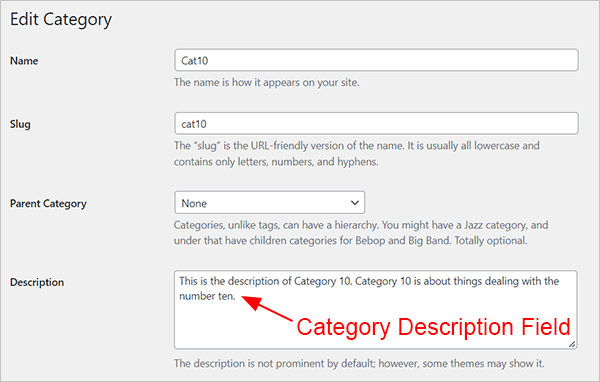
Although it may not sound familiar, you’ve probably seen the field for the category description countless times. It’s that box that most of us skip over when we’re setting up or editing our categories.
If you fill that box in, however, you can then display what’s written in it with the following piece of code (provided your theme doesn’t already use the category description function, as many don’t). Just put this in your theme wherever you’d like – for example, at the top of your category template (usually category.php or archive.php).
<?php echo category_description( $category_id ); ?>
Featured Plugin - WordPress Infinite SEO Plugin
An Example
Here’s a quick example. I filled out my category description box, and then I placed the code above in my archive.php file.
Use HTML in Your Category Description
By default you cannot use HTML in your category description box. However, there is a workaround for that. Simply put the following in your functions.php file after the opening <? php. (Appearance > Editor > Theme Functions – functions.php)
remove_filter('pre_term_description', 'wp_filter_kses');
Once you’ve done that, you can insert whatever HTML you like in your description box. Here’s an example of a headline, an image, and wrapped text at the top of a category page.
Why Use a Category Description
Not everyone will need or want a category description, but it may be able to liven up your site (especially if you use HTML), give your users useful information, and of course, it may even help out the SEO of your category pages.
Featured Plugin - WordPress Google Maps Plugin
Photo: Urban graffiti Boy. Vector Cartoon from BigStock


Thanks so much for this post. This was exactly what I needed for my site. Worked without a hitch so far.
Justin – Glad it helped.
Great post!! but I have one question Joseph.
I’m working with “Lucid” theme, and it doesn’t have arhive.php file, so I don’t know where to put the code to display the descriptions of each category. I have tried to put it in several places, like in single.php file, on the top of it as I have read in some posts that it may work, but in my case, it works just like a “hover”. When you put the mouse on it, it gives you a kind o “alt” with the whole descripition, which is not the solution I need of course.
Do you know where should I place the code to display the description field on each category page??btw, the html thing in the description is great!! I hope I would be able to display it to see the results!!:)
Jon,
If you have category.php file, it will go there. This page will give you a list of the possible template files: http://codex.wordpress.org/Category_Templates
The file closest to the top in this list will be used (so, for example, if you have a category.php file and an archive.php file, the category.php file will be used).
category-slug.php (e.g. category-news.php)
category-ID.php (e.g. category-6.php)
category.php
archive.php
index.php
Hope this helps.
It helped!! I only have index.php from that list, so I’ll put the code there I guess! The thing is, where should I type it? This is the whole index.php code
I think, typing the code in the correct place, it should work.
For some reason the php code didn’t appear… I’ll try to put it again
Jon – I don’t think it’s going to appear here. You can paste it here (http://pastebin.com/) and then leave a link.
In any case, you put the code wherever you want to info to appear.
Hey,
Nice tip .
I wonder is there a option to exclude certain categories from dispalying descriptions? For example I might have many empty ones, that I don’t need the feature on them.
Gil – If there’s nothing written in the box, then nothing should display.
I have worked out myself trying to get people to do this for me, i even offer to pay to get this service but thanks to you.
This tips works faster than magic, i used it and its the best tip have seen so far.
thanks for your help
robedu – glad it helped