How to Add Google Search Console to WordPress
So, are you thinking of adding WordPress to Google Search Console (formerly Google Webmaster Tools)? If so, read on as we let you know how to do this using free plugins and get set up with Google, too.
Google Search Console was made to help webmasters check indexing status and optimize visibility of their websites — which is definitely a good thing.
When you have a clearer understanding of where your site ranks, you can improve it, and work towards a spot on that coveted first page of Google.
It helps significantly when it comes to monitoring and maintaining your WordPress site’s search presence and ranking. And you don’t have to be mega-tech savvy to accomplish getting it working, so it’s easy to set up for yourself, or your clients (whew!).
In this tutorial, I’ll show you how, with the help of plugins, you can be up-and-running with WordPress and Google Search Console in minutes.
Here’s what I’ll be going over:
- “Okay, Google. What is a Google Search Console for WordPress?”
- Add Your Site to Google Search Console
- Going on a Code Trip
- That Sync-ing Feeling
- Rank You Very Much!
Also, to really “be in the know” of SEO, feel free to check out our SEO startup guide.
“Okay, Google. What is a Google Search Console for WordPress?”
Glad you asked…
According to, well, Google, “Google Search Console is a free service offered by Google that helps you monitor, maintain, and troubleshoot your site’s presence in Google Search results.
You don’t have to sign up for Search Console to be included in Google Search results, but the Search Console helps you understand and improve how Google sees your site.”
We all know what WordPress is, so now it’s just combining the two.
In a nutshell, if you’d like to get your website growing, you should add it to the Google Search Console tool ASAP. It’s much more effective than trying to water it.

Google Search Console’s information, tools, and reports can help you:
- Confirm that Google can locate and crawl your WordPress website.
- Fix indexing issues and request re-indexing of new or updated content.
- See what sites link to your website.
- View Google Search traffic data from your website.
- Get alerts when Google encounters spam, indexing, or other issues on your WordPress site.
- Troubleshoot any issues for AMP, mobile, usability, and other various Search features.
Is it Right for Me?
If you have a website, the answer is ‘yes.’ It’s beneficial for business owners, SEO specialists, marketers, site administrators, and web developers.
Even if you’re new to creating websites, it’s for you. Google makes using a Google Search Console with WordPress easy peasy.
And with that, off we go! Here’s how you add a WordPress site to Google Search Console.
Add Your Site to Google Search Console
Head over to the Google Search Console website and click on the ‘Start Now’ button.

Next, sign in with your Google / Gmail account. Don’t have one? Just go here and get set up. Once you’re signed in, you can continue on with Google Search Console and get started.
Now that you’re logged in, you’ll be prompted to enter your website URL. This is the fun part (at least I think so) where you have to verify that you own the site — or have access to it.
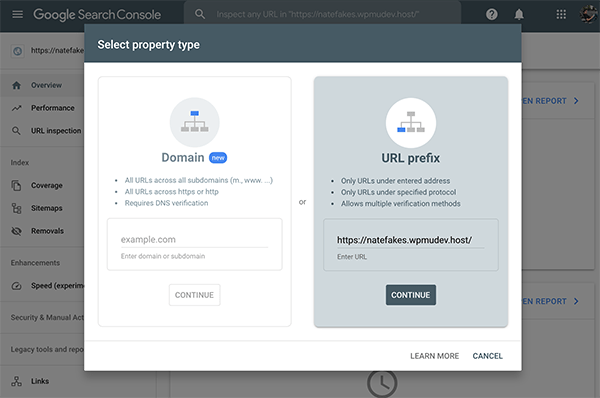
You have two options for this when it comes to site verification. You can use a domain name or URL prefix.

The main difference is this:
Domain Property is a domain-level property that has all subdomains (www, m, etc) and multiple protocols (https, http, ftp). When it comes to verification, it’s DNS record verification only.
URL-Prefix Property has only URLs with the specified prefix. This includes the protocol (http:/http). So, if you’re looking to have your property match any protocol or subdomain, you may want to add a domain property instead. For verification, there are many types; including HTML file upload, HTML tag, DNS record, and more.
Choose the best option for you, enter your URL, and hit ‘continue’.
Once entered, you’ll be prompted to download the file and upload it to your website for verification.

If you go this route, you’ll need to login to your WordPress hosting cPanel or connect to your hosting account using FTP (file transfer protocol).
Finally, you’ll need to upload the HTML verification file inside the /public_html/folder of the website.
“Wait… that sounds complicated. I thought you mentioned this was easy!”
Hey, uploading files into your hosting account isn’t THAT bad, but I hear you. If you’re not down with uploading and don’t want to go that route, there are plenty of options. You’ll notice below it says: Other verification methods.
Here, you can choose between an HTML tag, Google Analytics, Google Tag Manager, or Domain name provider.
You can use the method that works best for you. But okay, it’s easy you want, huh?
To help make it as simple as possible, we’re going to go with the HTML tag option.
This option for verification, along with other options, can be found directly below the HTML file download section.

We’re going this route because this, along with a header and footer plugin, makes it easy to verify your website in a snap.
How? Well, for one, they allow you to add snippets of code without worrying about breaking your site by adding code in the wrong place.
That’s a convincing enough reason for you, or anyone, looking for simplicity.
Going on a Code Trip
To get you to where you want to go, there are several plugin options:
- Header Footer Code Manager: An easy interface to add to your header and footer, or above or below your page.
- Header Footer & Post Injections: Simple plugin to copy and paste code in a centralized place to manage them all.
- Code Snippets: An easy and clean way to run PHP code snippets on your site.
They each have their own unique way of pasting the code, but it’s really as simple as it sounds: copying and pasting.

FREE EBOOK
Your step-by-step roadmap to a profitable web dev business. From landing more clients to scaling like crazy.

FREE EBOOK
Plan, build, and launch your next WP site without a hitch. Our checklist makes the process easy and repeatable.
Just copy and pasting code into a box. And they all essentially work the same and are all free.
You can find other examples and more of what you can do with your header and footer in this article.
For this tutorial, we’ll use Header Footer Code Manager.

First, download and install the plugin, then activate it.

Then, once activated, you have an option to add a new Snippet. A Snippet is a box where the code will go.

Add a new one. From there, you can name it whatever you’d like. Considering this is for Google Search Console, you probably want to name it that so it doesn’t get confusing.
You can also choose a location for it. Go with the default header option. Also, leave the Device Display on ‘Show on All Devices’.

If you scroll down a bit, you’ll see the area where you can paste code.
Simply take the code from the HTML Tag option on Google Search Console, and paste it in the area where it says Snippet/Code.

Be sure to hit ‘Save’. (Always important, right?)
When you have your code pasted in your site, you’ll go back to Google Search Console and hit ‘Verify’. If you did it correctly, it’ll light up in green.

If not, you’ll get red. (Cue sad trombone.)

IF you get red, it’s probably a simple accident that caused it. Hey, it happens…
That Sync-ing Feeling
An easy mistake to make is to copy the WRONG code from the preferred method. For example, if you take the code from HTML tag, but you used Google Analytics, it won’t work.
Or, if you have several sites that you’re connecting and you take the code from the wrong site, that won’t work either. It’s all easy to do, so just double-check if it’s not syncing.
If you STILL can’t get it to sync, try clearing the cache. A solid cache plugin like Hummingbird can help.
Once you get the “green light”, congratulations, your WordPress site is connected for Google Search Console.
Keep in mind, data can take several days before it starts to appear. However, data collection for a property starts when someone adds the property to any Search Console account, even before there is verification.

Data will continue to collect as long as that user has the property in their account.
Rank You Very Much!
Now that you’re up-and-running with Google Search Console, there’s a lot more you can do to get that SEO up to par.
Google makes hundreds of changes to search each year. Though most of them are minor, some of them aren’t. Either way, that’s a lot to keep up with.
We’d be doing you a disservice if we didn’t mention our very own, SmartCrawl, to help boost your PageRank and drive an increased amount of traffic to your site. Oh, and did we mention it’s completely free?
She’s known for her easy one-click setup, automatic sitemaps, improved social sharing, real-time keyword, content analysis, and scans and reports.
Get SmartCrawl here, at WordPress.org, for free!
You can also integrate Google Analytics with the help of Beehive. It’s a free, simple plugin that allows you to track detailed analytics on your site.
It’s like our example plugins to use with Google Search Console, except made for Google Analytics.
You simply copy and paste the code into Beehive, and eliminate the fear of messing up your website by adding it (code) to the wrong place. Screwing up your website can…sting.
Download Beehive for free here.
Don’t tap on the brakes when it comes to Google rankings and search optimization and be sure to add your site to Google Search Console.
With all the information provided to you today, good keywords, optimizing images, amazing content, and more – you should be in the driver’s seat of your SEO in no time.
And need help or support? Remember that we’re here 24/7. Also, be sure to check out Beehive Pro and SmartCrawl Pro as part of a WPMU DEV membership if you’re interested.
Start with a free trial for a risk-free way to test the premium plugins and support out for yourself first.
N. Fakes Nathanael Fakes is a blog writer and cartoonist at WPMU DEV. He’s worked with WordPress for over a decade. Beyond WordPress, he’s a published author, syndicated cartoonist, and donut enthusiast. Connect with Nate on Instagram and learn more about his work on his comics website.