Introducing Snapshot: A Database Backup and Restore Solution for WordPress

February 15, 2012  | 
10 Comments

Your WordPress site is your most valuable online possession, often the accumulation of years of posts, links, users, comments, media – your entire virtual presence. To maintain your site can be a labor of love, necessity or both, but sometimes the best intentioned maintenance can result in a disastrous crash. Perhaps you screwed up your site with a bad plugin and you need a way to fix your messed up tables. Snapshot has your back.

Backup and Restore with One Click

Snapshot is a new, easy-to-use plugin for creating quick snapshots of your database. It’s especially useful for testing and rolling out new functionality to your website. You can play with new plugin and/or theme settings with the full knowledge that you’ll be able to roll back your database tables.

If you’ve ever irreversibly screwed up your database while testing a new WordPress plugin, then you know how scary that can be.

Fret not! If you’re using Snapshot, you can always make a quick backup and restore point for your database before trying new plugins. It’s like your site’s own personal safety net, affording you the ability to try out new features and settings with confidence.

This plugin is not just quick and easy, it is also extremely versatile, allowing you to preserve posts, comments, taxonomies and as few or as many database tables as you like.

Then if you ever need to, restoring your content is as simple as clicking the “Restore” button.
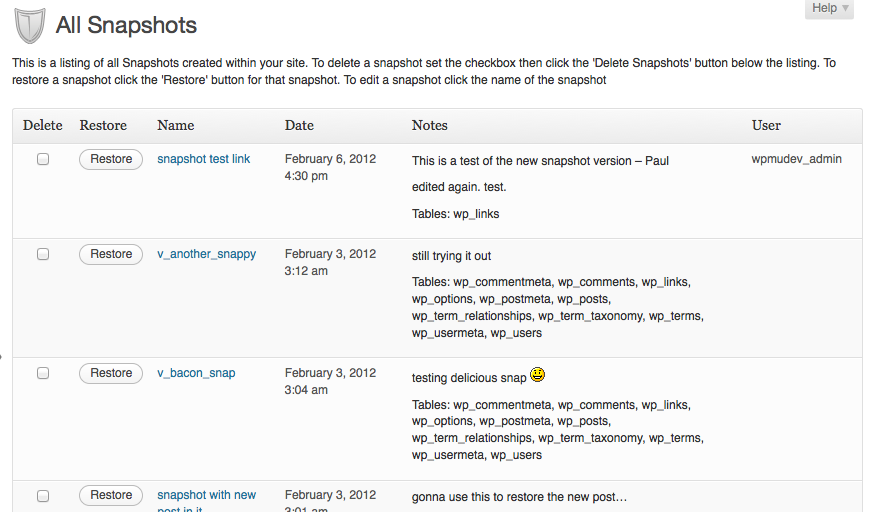
Customizable restore points enable you to make notes about each snapshop as well, helping you to keep track of your backups. The backups currently go to a designated backup folder but we’re also adding in the ability to send your backup to a few of the most popular storage services, such as Amazon S3 and DropBox.

“I already have a service that does that for me.”

Certainly, you could pay a monthly or yearly fee for another backup service like BackupBuddy or VaultPress. Or you could become a WPMU DEV Member and get instant access to the Snapshot plugin and 300+ other exclusive WordPress plugins. From $35 per month, you get unlimited access to every theme, every plugin and unlimited support. It’s everything you need for a perfect WordPress and BuddyPress site. Become a member today and start protecting your most valuable online possession, your content!

Featured Plugin - Easily integrate your WordPress site with Facebook

Would you like to add Facebook comments, registration, 'Like' buttons and autoposting to your WP site? Well, The Ultimate Facebook plugin has got that all covered!
Find out more

Featured Plugin - Turn any WordPress page into a fully featured wiki!

To get a wiki up and running you used to need to install Mediawiki and toil away for days configuring it... not any more! This plugin gives you *all* the functionality you want from a wiki, in WordPress!!!
Find out more

Featured Plugin - Send beautiful html email newsletters, from WordPress!

Now there's no need to pay for a third party service to sign up, manage and send beautiful email newsletters to your subscriber base - this plugin has got the lot.
Find out more

Featured Plugin - Host sites, get paid, just like WordPress.com

If you've ever wondered how you could offer a paid site management and hosting service, then this is the plugin for you. Offer a freemium or paid service, for any niche you like, it's powered Edublogs.org to success already!
Find out more

Featured Plugin - Start Your Own Powerful Membership Site

If you're thinking about starting a paid, or just private, membership site then this is truly the plugin you've been looking for. Easy to use, massively configurable and ready to go out of the box!
Find out more

Featured Plugin - Every great SEO tweak you need, in one snazzy bundle

Fully integrated with the SEOMoz API, complete with automatic links, sitemaps and SEO optimization of your WordPress setup - this is the only plugin you need to help you rank your site number 1 on Google - nothing else compares.
Find out more

Featured Plugin - Open an Online Store with MarketPress

Out of all the WordPress ecommerce plugins available, this has got to be the winner - easy to configure, powerful functionality, multiple gateways and more. A simply brilliant plugin!
Find out more

Featured Plugin - Add bottom corner (or anywhere else) chat to your site

No javascript required, no third part chat engine, just fully featured chat right in your own database on your own WP sites - couldn't be easier.
Find out more

Featured Plugin - WordPress + Google Maps = Perfect

Simply insert google maps into posts, sidebars and pages - show directions, streetview, provide image overlays and do it all from a simple button and comprehensive widget.
Find out more

10 Responses to Introducing Snapshot: A Database Backup and Restore Solution for WordPress

  1. I did not know the Snapshot WordPress Plugin. Thanks for the info. But it does not do automatic backups and does not backup files. You can do everything with Website 2 Backup.

  2. Is it possible to download/upload snapshots from other installations?

  3. To be actually useful, this needs an automatic option as well as facility to send off-site to cloudfiles or similar.

  4. Sarah have you ever seen Database Sharding video? This maybe useful, pretty cool technology. http://vimeo.com/26742356
    Peace

  5. Seriously? I just bought BackupBuddy last week. :/ Two questions to compare:

    Does this plugin work as a premium in Pro Sites?

    Does this have function to migrate sites from one server to another or one domain to another, etc.?

    Thanks.

    • No it doesn’t currently do this. We’re working on adding more features in. The main idea of this one is to be able to roll back your database during theme and plugin testing, though it’s also useful for backing up your tables before making some major changes.

  6. I really like the plugin. How about adding Multisite and Buddypress compatibility? And the importing snapshots from other sites would be great for testing purposes.

  7. Can this plugin be used at the Network level of a WP MU or does it need to be installed per site?

    • Do I understand correctly that this plugin does not help if a problem with the db makes it impossible to log in. There is no way from outside your installation to be able to import backup db -using MySQL within cpanel as an example?

      Thanks

Click on a tab to select how you'd like to leave your comment

Leave a Reply

Your email address will not be published. Required fields are marked *

*

You may use these HTML tags and attributes: <a href="" title=""> <abbr title=""> <acronym title=""> <b> <blockquote cite=""> <cite> <code> <del datetime=""> <em> <i> <q cite=""> <strike> <strong>

Subscribe without commenting