Jetpack 1.7 Adds Custom CSS to the WordPress Dashboard

Jetpack updates seem to be cruising right along these days. The 1.7 release includes one of the most useful new features to date – the Custom CSS module.
This new addition allows you to override or replace your theme’s CSS in the dashboard. No child theme is required for this custom CSS file, although you will still need a child theme if you want to customize your theme’s template files.

You can configure the module by turning it on in Jetpack and then navigating to Appearance >> Edit CSS.
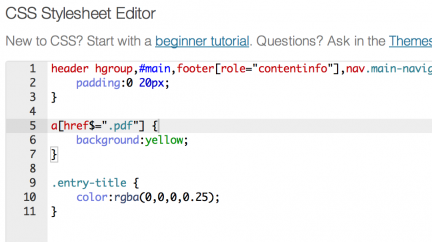
When you first configure the CSS module you’ll see this very helpful note in the comments:

By default, your stylesheet will be loaded after the theme stylesheets, which means that your rules can take precedence and override the theme CSS rules. Just write here what you want to change, you don’t need to copy all your theme’s stylesheet content.

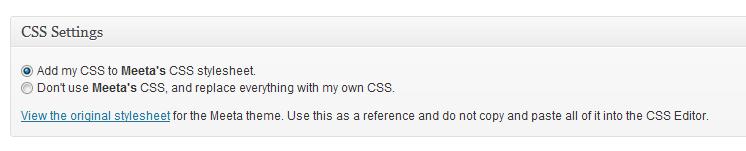
On the custom CSS page you will have the option to add the CSS to your theme’s stylesheet or simple replace it with your own custom CSS:

The Custom CSS Module Features:

  • Colorful Syntax highlighter with auto-indentation
  • immediate feedback on the validity of your CSS
  • Revisions saved, in case you make an error
  • Preview button
  • Link to the original stylesheet

Sounds like it could make your life a bit easier, doesn’t it?

The Custom CSS module isn’t the only thing that’s new in the Jetpack 1.7 update. Other nice fixes include:

  • Jetpack Comments UI improvements: After you submit a comment, the fullpage load on jetpack.wordpress.com has been removed so that everything stays on your site
  • Unofficial sharing buttons now have counts for Twitter, Facebook and LinkedIn
  • Tons of bug fixes which you can find at the Jetpack changelog

The Custom CSS module provides an easy interface for people who like to dabble a bit with the CSS of their themes without having to use FTP or dive into the theme folder. This is a fantastic new addition and you’ll want to update any of your WordPress sites that already use Jetpack so that you can take advantage of everything new.

Featured Plugin - WordPress Q&A Site Plugin

It's now incredibly easy to start your own Q&A site using nothing more than WordPress - The Q&A plugin simply and brilliantly transforms any site, or page, into a perfect support or Q&A environment.
Find out more

Featured Plugin - WordPress Appointments Plugin

Take, set and manage appointments and client bookings without having to leave WordPress. Appointments+ makes it easy.
Find out more

Featured Plugin - WordPress Ecommerce Shopping Cart Plugin

Out of all the WordPress ecommerce plugins available, MarketPress has got to be the winner - easy to configure, powerful functionality, multiple gateways and more. A simply brilliant plugin!
Find out more

Featured Plugin - WordPress Pop-Up Chat Plugin

No javascript required, no third part chat engine, just fully featured chat right in your own database on your own WP sites - couldn't be easier.
Find out more

Featured Plugin - WordPress Wiki Plugin

To get a wiki up and running you used to need to install Mediawiki and toil away for days configuring it... not any more! This plugin gives you *all* the functionality you want from a wiki, in WordPress!!!
Find out more

Featured Plugin - WordPress Infinite SEO Plugin

Fully integrated with the SEOMoz API, complete with automatic links, sitemaps and SEO optimization of your WordPress setup - this is the only plugin you need to help you rank your site number 1 on Google - nothing else compares.
Find out more

Featured Plugin - WordPress Membership Site Plugin

If you're thinking about starting a paid, or just private, membership site then this is truly the plugin you've been looking for. Easy to use, massively configurable and ready to go out of the box!
Find out more

Featured Plugin - WordPress Facebook Plugin

Would you like to add Facebook comments, registration, 'Like' buttons and autoposting to your WP site? Well, The Ultimate Facebook plugin has got that all covered!
Find out more

Featured Plugin - WordPress Google Maps Plugin

Simply insert google maps into posts, sidebars and pages - show directions, streetview, provide image overlays and do it all from a simple button and comprehensive widget.
Find out more

Comments (4)

  1. Nice feature. It includes a nonce and has a nifty editor.

    Sadly, it still allows users to insert almost any URL within the CSS, so on a multisite install users could include content from an unapproved source – such as porn sites or sites exploiting security vulnerabilities such as user-escalation, session hijacking, mitm or even browser bugs. There *should* be a whitelist to enable “approved” domains to link thru, or forbid linking outside the current site via root-relative URLs.

    • This was actually one of my first thoughts as well.
      There’s concern that injections will be used to exploit any possible vulnerabilities.
      It’s definitely a great addition, but I hope that many users have sufficient security setup for their sites to block potentially harmful queries.

  2. I love this and would use it more, but annoyingly when saving it removes any commented sections I have in my CSS, marking them as invalid code.

    It also doesn’t Add (APPEND) CSS to the stylesheet. Just adds a separate custom CSS link into the HTML.

    Which I wouldn’t mind if I could comment things out in it!

Participate