Best Free Form Builder Plugins WordPress 2019
There’s no shortage of free amazing form plugins to make data collection in WordPress a breeze. I noticed that a lot of form plugins in the WordPress plugin repository appear feature-rich, but once you install them, most features aren’t available unless you upgrade.
I call this, upsell hell. Especially since some form plugins charge you for every extension that adds another feature, so it can get really expensive really fast.
That’s not a problem when you have an enterprise site, but what about the times that you’re building a little site for a friend as a favor and you need to keep costs in check?
So in this post, we’re going to answer the question of what is the best free WordPress contact form plugin? We’ll look at some of the most popular form plugins and see what the free version really includes.
Judging The Best Free Form Builder WordPress
Cutting through the marketing hype was a lot more tricky than I thought, since the plugin pages in the repository had every feature the form includes, but it didn’t say which features are premium and which are free. At least with Gravity Forms, you know what you’re going to pay since they don’t have a free version. That’s also why they’re not on the list. We’re focusing on the freebies.
To find the best form plugin for WordPress and determine what was actually included free, I installed each one on my test site and built a form. If there was an extension that was created by the form developers that was free, I counted the features as included for free.
Some form plugins, such as Contact Form 7, have lots of free extensions in the WordPress repository, but they’re of varying quality since they’re not by the original developer, so I did not include these free features in my assessment. This is more because assessing the independent extensions for each plugin would be its own blog post. If you want to include them in your own assessment go for it!
The Best Free Form Builder WordPress Plugin
I listed the plugins in order by feature-richness. The plugins with the most free features, integrations, form types, etc. I listed near the top. The ones with the least free features I listed near the bottom.
Forminator

Now I know what you’re thinking; of course, I would list WPMU DEV’s Forminator as the best WordPress form plugin at the very top. How modest ;)
While other form plugins have similar features, I found that Forminator offers you premium features for free, no strings attached. You don’t even need to be a WPMU DEV member or sign up for a free trial. This is the same plugin that is available to everyone in the WordPress plugin repository.
And we don’t just include premium features that should be basic, like spam protection, the ability to store entries in the database and multi-page forms.
Forminator gives away valuable time-saving and money-making features for nothing. Nada.
- Integrations with other apps, such as Zapier, Google Sheets and a bunch of email marketing apps.
- Integrations with popular payment portals for a simple eCommerce solution. In fact, with if you’re using Stripe, you’re really going to love how someone can make a payment without leaving the page.
- Codeless styling so you can create the look you want without tinkering with CSS.
- Conditional Logic so you can create dynamic forms.
- Calculations so your forms can “do the math” for you.
You get full access to 24 advanced fields so you can get your data validation on. With Forminator’s form preview button, you can view your form as you’re building it and designing it, without having to embed it on a page first to see if it looks right.
Forminator is also the only free plugin that allows you to create forms AND polls, submissions, quizzes, and submit blog posts from a form. And it has a powerful API that you can access for free and use to build your own custom extensions.
Something that’s really important for our European friends is advanced features to help you stay compliant with GDPR. You can adjust how long data is retained, set how long to keep an IP before it is anonymized and there’s even a field for a GDPR checkbox. You’re welcome.
Get your copy of Forminator and prepare yourself to feel like you stole it because you got so many awesome things for free. What’s the catch you say? No catch!
Caldera Forms

Next up on our list of feature-rich plugins is Caldera Forms. Out of all the forms on the list, Caldera Forms surprised me the most because I thought it was going to be lower on the list, but there are a lot of premium features that are available for free.
Also, they have a nice selection of templates to get you started that are included with the free version. Forminator only has design templates for now.
The free version of Caldera Forms gives you:
- Conditional logic
- The ability to submit blog posts with a form
- Calculations
- Some free integrations: Postmatic, Slack, Payfast and Easy Digital Downloads
- A couple of fancy form fields: a TinyMCE WYSIWYG editor and a color picker
I noticed that out of all the plugins I tried, Caldera Forms had the most unique features that weren’t available in the other plugins. In some cases, no other plugin had these features.
For instance, no other free plugin has an Easy Digital Downloads integration or form revisions, which if you make a lot of changes, can be very useful. It was also the only form with a color picker field and only Ninja Forms also has a TinyMCE WYSIWYG editor.
Ninja Forms

With 1 million installs of the free version, Ninja Forms is the third most popular form plugin in the WordPress repository.
When looking it over I was neither impressed nor disappointed. The basic features you expect from a quality form plugin are there, plus a couple of extras. And even though there is no codeless styling option, some premium themes are optimized for Ninja Forms so your forms match the rest of your site effortlessly.
Calculations and a TinyMCE WYSIWYG editor are some nice free bonuses. And you do get some templates which I like since they give you a head start.
They also give you a lot of fields right out of the box. I thought special fields designed to collect information like URLs, address, phone numbers, and emails were included in all form plugins, but further down the list, I learned this wasn’t true. Ninja Forms, however, does give you 26 useful field types, which I appreciate.
What I don’t like about Ninja Forms is the pricing. Out of all the form plugins, the premium version is the most expensive at $99/year for one site and all the different extensions have different prices so it can add up quickly. Plus it can be confusing to figure out what the whole thing is ultimately going to cost.
Now I know we’re focusing on the free features of these plugins. I bring up the paid upgrades for Ninja Forms in particular because the steep increase in price might become a problem in some use cases.
For example, sometimes I’ll try to do a good deed and take the time to build something for a non-profit or a close friend, using a free tool. Later, they’ll ask for a simple additional feature and I’ll say something dumb like “not a problem, I’ll get that added for you” thinking that spending like $30-40 bucks isn’t that big a deal only to find out it’s going to cost more like $150. Then you have to have that awkward conversation that makes you feel like a jerk or rebuild the form on a lower cost alternative and feel resentful.
I’ve included the premium pricing for all the plugins in the Airtable so you can use it when making your decision. This does not include the pricing of additional extensions though.
Formidable Forms (Lite)

Formidable Forms is another plugin that I was neither impressed or disappointed by. It was one of the easier plugins to use because it had one of the better designed-interfaces.

FREE EBOOK
Your step-by-step roadmap to a profitable web dev business. From landing more clients to scaling like crazy.

FREE EBOOK
Plan, build, and launch your next WP site without a hitch. Our checklist makes the process easy and repeatable.
Formidable was also the only other form plugin besides Forminator that includes a codeless styling module. You can see your edits on a sample form as you make them without having to open another window. There’s also a section where you can add custom CSS, which can be useful for some multisite installations.
Formidable does not charge you per add-on once you decide to upgrade, but you may need a higher plan in order to be able to access all the features.
Formidable Forms Lite felt adequate. Nothing fancy, but enough to get the job done. You can import/export forms, store/export entries in the database, protect your form from spam and use merge tags when creating your emails.
What would make me pick Formidable Forms over others (if Forminator wasn’t an option) is the codeless style editor because of how easy it is to use.
Contact Form 7

What can I say about Contact Form 7 that hasn’t been said already? With 5 million installs it is the most popular free form plugin in the WordPress repository and there are a bunch of free extensions written by others to improve the functionality.
As I mentioned earlier, I didn’t include these extensions in my assessment because IMO using a lot of plugins/extensions designed by random people makes it more likely that something will go wrong with every plugin you add. If you like to live on the wild side with a cool devil-may-care attitude, then go for it.
Contact Form 7 feels like it’s the form plugin the dinosaurs used. Even though it totally gets the job done, the interface is as bare bones as it gets. To add features you add code snippets. To add fields you add merge tags. No drag and drop editors here.
Entries aren’t stored in the database so you need to make sure your email delivery game is strong otherwise you’re not going to get that data. This is so risky because SMTP issues happen more often than you think, so you could miss out on valuable opportunities.
There are some bonus features you wouldn’t expect from such a simple solution. The ability to create quizzes, upload files, and a Constant Contact integration comes to mind.
If you’ve been making do with Contact Form 7 specifically because it’s free, then you’re going to love Forminator.
WP Forms (Lite)
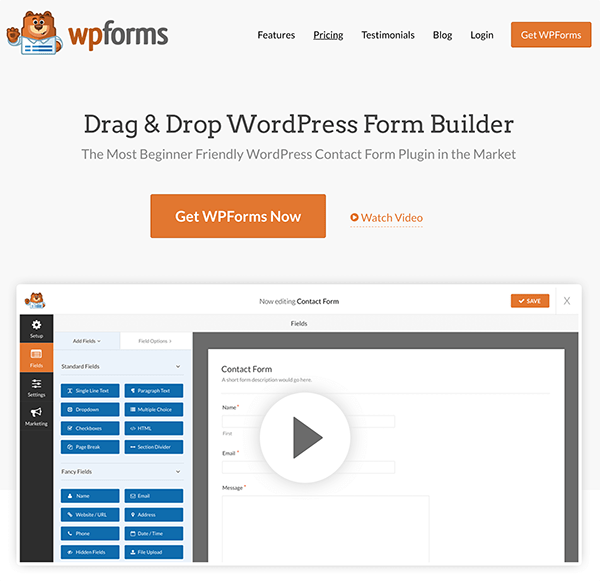
WP Forms is the second most popular form plugin in the repository with 2 million installs. TBH it was my least favorite even though it has a beautifully designed WordPress drag and drop form builder interface.
When they say lite, they mean super lite. WP Forms (Lite) felt more like a free sample so you can see how things are laid out than an actual usable plugin you can use if you’re trying to save a few bucks.
I found myself saying “really!? you don’t include blank?” a lot. I don’t talk to plugins often, only when they disappoint me and WP Forms did that a lot.
For instance, the free version doesn’t store entries in the database. I expect that from bare-bones form plugin, but not WP Forms.
Also, there are only 8 fields to choose from:
- Single line text
- Paragraph text
- Dropdown
- Multiple Choice
- Checkbox
- Numbers
- Name
You’re not going to give me an address, phone number or URL field? :( How am I supposed to validate that the data is correct? Even the lite version of Formidable forms has 13 fields to choose from.
There isn’t even spam protection so good luck with that.
The two bonus features it does come with is a free Constant Contact extension and templates. Seriously after using all these other form plugins the one thing I didn’t know I wanted was templates.
But yeah, WP Forms, not my favorite. The bear is cute though. The bare interface on the other hand…not cute.
Final Side-by-Side Comparison
So what is the best free WordPress form plugin? Here is how everyone’s final score compares head to head.
That’s Everything on Choosing the Best Free Form Plugin in WordPress
Forms are one of those things that can take your site from good to great and the plugin you choose for your forms makes all the difference. With a simple form plugin, you can create basic things like a contact form or newsletter signup, whereas a more powerful form builder becomes a data collection powerhouse that you can use to sell products, onboard clients, automate your workflows, or build apps.
Usually, these advanced plugin features come at a steep price, but with the free version of Forminator, we’ve made these super valuable features available completely free. Download Forminator from the WordPress plugin repository for free to get started.
Love Forminator? Sign up for a free trial to access our all-in-one WordPress platform including powerful site management tools, fully managed hosting, premium plugins, support for any WordPress issue, and more.
Tags:
Felicia Ceballos-Marroquin Felicia is a WordPress expert, specializing in web design/development, search engine optimization, Genesis, and enterprise WordPress multisite. She is a former WPMU DEV author, where she put her decade-plus of WordPress expertise to good use, writing friendly tutorials with soul.