The Ultimate Guide to Image Optimization for WordPress
Images are one of the most important elements on your site and getting them right can be the difference between a popular site that provides an awesome user experience and one that doesn’t get any traffic or conversions. But images are, well, complicated.
There’s a lot you need to do to get them perfect so you get the most benefit.
In this ultimate WordPress Image Optimization guide, I’m going to give you all the information you need to optimize your images. We’re going to go through everything:
- How to prep your images before upload
- How to optimize WordPress for your images
- How to identify images so they improve your SEO
- How to serve images efficiently
We’ll cover all the important subtopics and information we’ve shared in our previous image optimization posts as concisely as possible (including our complete guide to SEO for images), so you’ll be a WordPress image optimizer in no time. If you’d like a much more thorough explanation of these topics, I’ve included links throughout this post to our in-depth tutorials.
Preparing Your Images
- Composing Images
- Sizing and Cropping Images
- How to serve scaled images
- Cropping Images
- Using the Right Image Format for the Job
- Image Titles
- Bulk Image Editors
Optimizing Your Images in WordPress
Image SEO
- Image Title
- Alt Text
- Image Caption
- Other Elements on the Page Near the Image
- Sitemaps
- Social Media Tags
Serving Images
If you’re wondering what the best WordPress image optimizer is, look no further than our very own Smush Pro. Combine it with Hummingbird and SmartCrawl SEO, as all three can dramatically improve the performance of your images. You can try all three on your site with a no-risk free trial.
Looking to optimize images on a low traffic, individual, or hobby site? We also have a free version of Smush available on WordPress.org.
How to Optimize Images
Before you ever upload an image to WordPress, you need to make sure that your image is the best it can be when you make it. You need to compose it properly, size it perfectly, use the appropriate image format and give it a descriptive file name.
Composing Images
The most important question when creating your images is the following:
Is this image necessary?
Images take a lot of resources to deliver to your visitors. They’re “expensive” site assets so you shouldn’t use them just to fill a space. Create original images that enhance your content and use inexpensive assets, such as headings and text, instead of images to communicate and add style whenever possible.
Never add text to your images. This practice doesn’t follow accessibility best practices and if your images shrink down to be mobile-responsive, then the text will be smaller and harder to read. Plus, images with text need to be of much higher quality to preserve the fine detail of the letters. Don’t waste resources, create the text over your images with CSS instead, for better results.
Giving up images is hard, I know. They can really make your site look great, but according to research on site performance, sessions that convert users had 38% fewer images than sessions that didn’t convert, so more images don’t add to the bottom line.
Sizing and Cropping Images
When it comes to images, size matters! And bigger is not better. GTmetrix and Google PageSpeed Insights recommend scaling your images to fit the container they will inhabit to improve performance.

Images that are oversized for their container need to be manually shrunk by the browser. This wastes time and data when loading your web pages, without providing any benefit in performance and quality.
How to Reduce Image Size in WordPress
The first step is to use the developer tools in your browser to find out the different sizes of the image containers on your site.
Watch our quick tutorial on how to detect incorrectly sized images in WordPress.
Then use an image editor to resize the image to fit the largest container it will inhabit on your site. If you want to use Retina images on your site, you’ll need double both the width and height of the largest container. We’ll talk more about Retina images below.
If you’re scaling a new image for your site, then all that’s left is to upload the image and use it in the container it was sized for. If you’re correcting an existing image on the site, upload the image and replace the URL of the old image with the new one.
Smush Pro can also resize your images automatically. So if you have a mature site with lots of images, let Smush take care of the scaling. Try Smush Pro free.
Cropping Images
When cropping your images, try to create tighter crops and cut the excess detail and space from the image.
4:3 and 16:9 ratios are better for image SEO, so if your goal is to get the image ranked in image search, aim for an image that is not panoramic or tall and skinny.
Using the Right Image Format for the Job
Are you using PNGs for everything? Be honest. The best way to optimize images in WordPress without a plugin is to use the right image format.
Each file type was designed for a specific use case and has its own strengths and weaknesses.
Additional image file capabilities (such as transparency), unnecessary detail and too many colors all add bloat to your images. Sometimes, these are necessary and other times they’re not.
The key is to use the appropriate image file with the right capabilities to suit your needs.
We put together a downloadable PDF cheat sheet for you to be able to refer to! Click here to get your copy

WordPress Image Resize Compression
There are two kinds of image graphics types, vector images, and raster images.
Vector images are mathematically generated geometric shapes that can be resized without a loss of quality.
Raster images consist of tiny blocks called pixels arranged on a grid. Raster images only appear high quality at the size they were meant to be displayed at or smaller. Otherwise, the image will appear pixelated.
WordPress Image Compression
Another thing to keep in mind when choosing your image file type is the type of image compression that each one uses as this will affect the quality of the image when it is decoded and appears on your site.
Lossy Compression permanently removes image data when the image is compressed. Some detail is imperceivable to the human eye, so this doesn’t always create a visible loss of quality.
Generally, lossy compression between 75-100% will maintain the integrity and high quality of the image, yet at 75% the image is half as large. Most social networks compress their images between the 70-85% range when you upload them.
Lossless compression preserves all the data so nothing is lost and the image can be reproduced exactly with no loss in quality. The downside is a much larger file size. Here’s a comparison.
Image File Types
JPEG
JPEG images are best for large photographs.
- JPEGS are the standard file type produced by consumer cameras and mobile devices.
- JPEGS can contain millions of colors and uses lossy compression to produce a small file size.
- They’re supported in all major browsers.
- JPEGs don’t support transparency or animation.
PNG
PNG images are best when preserving detail (such as screenshot text) is critical.
- PNGs utilize lossless image compression, so they’re larger than comparable JPEGs.
- There are 3 kinds of PNGs:
- PNG-8 supports 256 indexed colors and is like the GIF of PNGs.
- PNG-24 supports 24-bit colors to create a palette of millions of colors so it’s more like a JPEG.
- PNG-32 supports 24-bit colors plus an extra alpha channel for advanced transparency capabilities.
- All three PNG types support transparency, but they do so in different ways. You can get a full explanation of the different types of PNGs and how they handle transparency in this post.
WebP
WebP is Google’s open-source image format that combines the best of JPEG and PNG, but with much smaller file size. They’re close to being widely supported.
There are two types of WebP image files
- The first is known simply as WebP and uses lossy compression. It’s like the WebP version of a JPEG.
- The second type is known as WebP Lossless and it is more like the PNG equivalent because it uses lossless compression.
If you’re wondering how to create WebP files for WordPress, you can use a plugin to do this for you. In fact, the Smush Pro CDN converts images to WebP. If someone visits your site on a browser that supports WebP, Smush will convert your images and serve up WebP images. If they’re on a browser that doesn’t support WebP, they’ll get your everyday JPEG or PNG.
SVG
SVG is an XML-based markup language that allows you to create two-dimensional shapes to create vector graphics. It’s best suited for simple shapes such as logos, graphs, flags, icons, and geometric shapes.
- SVGs don’t work well for photographs.
- They’re compatible with all browsers.
- Since they’re technically a markup language, WordPress doesn’t allow SVGs by default to prevent malware injection. You should only allow trusted users who understand the risks of using SVGs the ability to use them on your site.
GIF
GIFs are great for animating dumb memes and not much else.
- GIFs produce exceptionally large file sizes, especially if the image includes animations. For animations, MP4s or WebM files have a smaller file size.
- GIFs have a limited color palette of 256 colors and support transparency.
- They’re compatible with all browsers.
- There’s no consensus on how to pronounce them so who needs ‘em.

Image Titles
Once you’ve selected the right format in which to save your image, you need to change the default image title generated by your camera.
Give your images succinct and descriptive titles. Use your keywords if they appropriately describe the image. If your keywords don’t describe your image, don’t use them in the image title. I’ll show you a more appropriate place for them in the SEO section of this post.
Bulk Image Editors
Creating a batch of images for a new site or going back to fix all the issues with the images currently on your site can take a lot of time. Luckily, there are several tools that can help you process your image in bulk.
Lightroom Classic was designed to manage non-destructive edits to your images. Use it to bulk scale, crop or rename the JPEG images from your camera.
Photoshop can help you bulk edit PNGs or JPEGs. Use the image processor or create custom Photoshop Actions to record a complex sequence of edits and then apply them to other images.

FREE EBOOK
Your step-by-step roadmap to a profitable web dev business. From landing more clients to scaling like crazy.

FREE EBOOK
Plan, build, and launch your next WP site without a hitch. Our checklist makes the process easy and repeatable.
Optimizing Your Images in WordPress
Preparing your images correctly can prevent a lot of problems before they begin. Once you’ve got your images ready, then WordPress has some awesome features to help you manage your images and make them look their best.
WordPress Default Image Sizes
Every time you upload an image into the WordPress media library, WordPress creates the following additional image size by default:
- Thumbnail
- Medium
- Medium Large
- Large
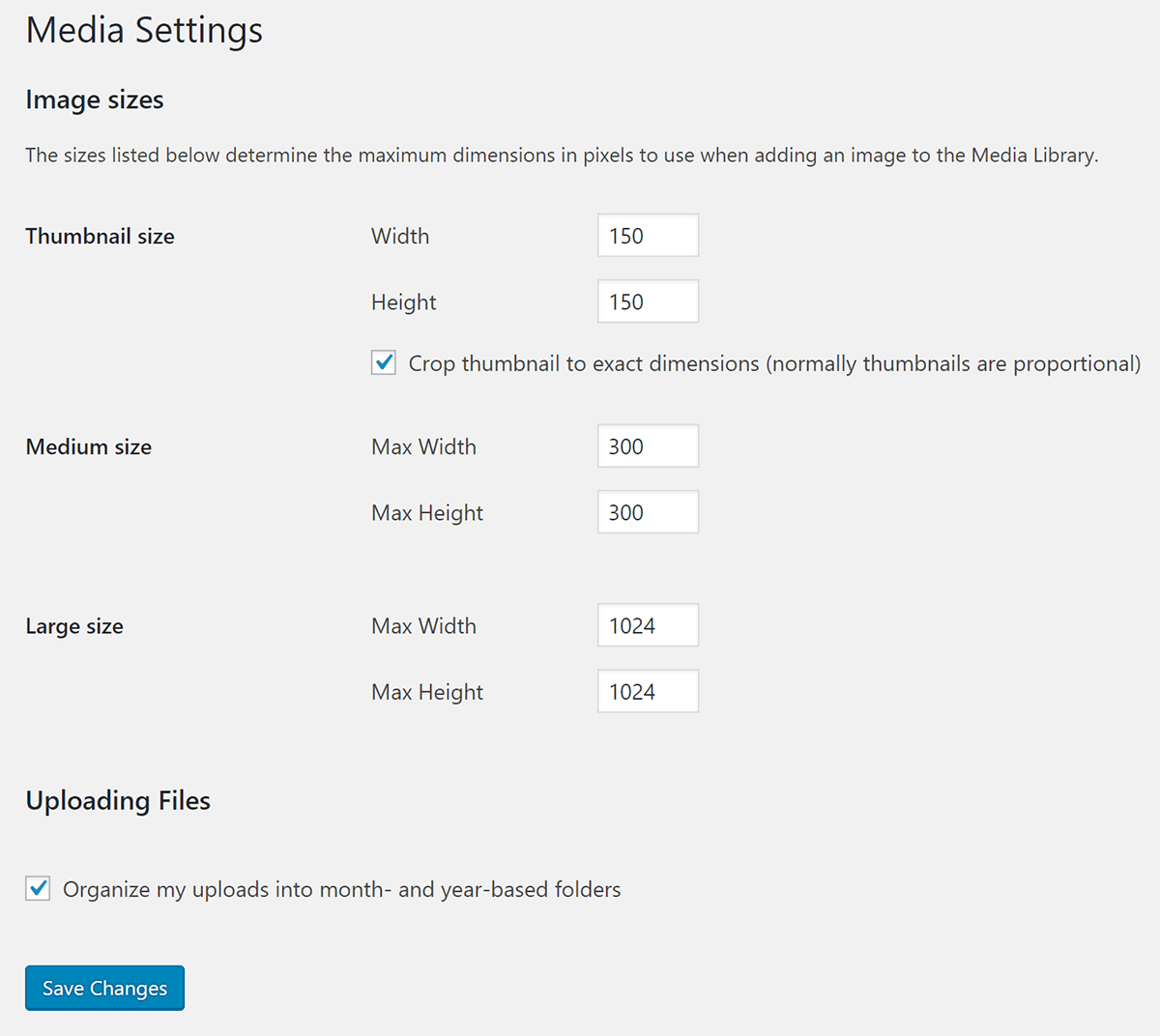
If your theme specifies additional image sizes for your archive page, the home page, etc. WordPress creates those as well. WordPress also preserves the original size you upload and names it Full as in full-size.
To do less work manually resizing your images for the different containers on your site, you can adjust the defaults in the Media > Settings section or add custom sizes so you’ll have more options to choose from. Just avoid going overboard and creating images for every conceivable purpose or else you’re going to burn through the disk space on your hosting server.
When you make a change to the way that WordPress creates additional images, then it doesn’t update the images that are already in your media library. To change the images you’ve already uploaded, you’ll have to use the popular Regenerate Thumbnails plugin.
You’ll need to regenerate thumbnails if you’re doing any of the following:
- modifying the WordPress default image sizes
- adding custom image sizes or
- switching over to a new theme that has different custom sizes.
Responsive Images
One of the uses for all the varying image sizes is so WordPress can serve responsive images.
Responsive image functionality was introduced in WordPress version 4.4 and is enabled by default. It works by using the srcset attribute to give the browser a list of multiple images at various sizes to choose from.
Instead of downloading and serving the largest image file every time, the browser loads the appropriate size file for the device. If the visitor is using a mobile device, they’ll receive a smaller image in the srcset. If they’re visiting your site on a desktop Retina device, then they’ll receive the huge full-size Retina-ready file.
WordPress writes the srcset code and adds images to the set automatically, but it’s still a good idea that nothing in your theme or plugins is interfering with this process as a part of your image optimization audit.
Retina Images
Retina and other high definition screens have 4x as many pixels. To preserve the detail and sharpness of your images on high definition screens, you need to create Retina images with enough data to fill all those new pixels and then only serve them to Retina devices.
How to serve Retina images in WordPress
Step 1: Produce images with double the pixel dimensions
To produce Retina images in WordPress with enough data for every pixel, you need to double the pixel dimensions for every image you upload.
- If you have a large hero image that is 1600px wide and 400px tall, you need to produce an image that is 3200px wide and 800px tall.
- If the width of your blog is 800px, then the images for your blog posts will have to have a width of 1600px and so forth.
You only need to double the pixel dimensions for the largest possible size that your image will display at. You do NOT need to create images with double dimensions for every possible responsive size.
Step 2: Serve Retina Images to Retina devices
Option 1: One of the better ways to serve Retina images is by using the srcset attribute. You simply add Retina images to the source set that WordPress uses to generate responsive images.
Option 2: Install and Configure the free WordPress Retina 2x plugin.
Step 3: Upload your Retina Images to WordPress and Use Them on Your Site
When you use the Retina image on your site, use the image variation that is half the width and height of the full size.

Next-Gen WebP Files
Since next-generation images such as WebP are not widely supported, we can also use srcset to serve WebP images for compatible browsers.
First, you’ll need to use a WebP converter to convert existing images in your media library as well as future uploads. Then you need to determine if the visitor’s browser supports WebP images.
Finally, you can use srcset or a different method to serve WebP images if they are supported or a legacy file format like PNG or JPEG if they aren’t.
Smush Pro can convert the images that use the tag on your site to WebP and serve them to compatible browsers with her CDN. You’ll need to use a different method for CSS background images though. Get a free trial and see what a difference it makes for your site.
Check out the video below for an example of how to use a WordPress image optimizer to serve next-gen images.
Image SEO
Image SEO has gained importance recently and there’s a lot of opportunities to drive traffic with images. Unlike written content, where duplicate content is penalized, with images, the best-optimized image will “win” in search results and be the best ranked.
Properly identifying your images using the right HTML attributes can help your images be discovered in image search, not to mention improving web accessibility, which is very important.
Here are the important images attributes you need to fill out for every image.
Image Title
The image title in WordPress is different from the file name title. The file title you add when creating an image in Photoshop or other image editor is more important than the image title field in the WordPress media library. The former contributes to SEO, that latter can be left out entirely.
Alt Text
Alt text isn’t just important for SEO, it’s also important for accessibility.
To write an effective alt tag for your image, you’ll want to write a succinct description that communicates what the image contains or is trying to convey to someone who can’t see the image, either because they’re using a screen reader, or can’t download the image. Additionally, the alternative text used in the Alt Text attribute depends on the type of image being used in your content.
Read our comprehensive guide to writing image alt tags in WordPress to get the balance of SEO and accessibility just right.

Image Caption
Captions and the other text surrounding your image, give your image context. They also help Google understand what the image is about. Not all images need a caption, but captions function similarly to call outs in the body text. Because they’re set apart from the rest of your text and highlighted, they’re four times as likely to be read.
Other Elements on the Page Near the Image
Google also takes the whole page into account when trying to understand your images. What is the page title? What is the URL? Even though these are not related to your image directly, Google uses them as a ranking factor. Include your keywords and related phrases in your page title, page URL and image URL if possible.
Image Sitemaps
In order to make sure that Google indexes all your images, you need to create an image sitemap. Sitemaps are especially important if you update your content frequently, have an eCommerce site or if you have a new site and want Google to index your images as quickly as possible.
If you want an easy solution, you can use SmartCrawl to generate a sitemap.

Social Media Tags
Social media tags are a way for you to label your content, so when someone shares it on a social network, they share what you want them to share. Facebook, Twitter, LinkedIn, and Pinterest all support Open Graph, which is Facebook’s social media tags language. Twitter has its own meta tags but will recognize Open Graph data if Twitter social media tags aren’t available.
The important Open Graph tag for your images is og:image and allows you to specify what image you want Facebook and other social networks to display when someone shares your post.
Serving Images
The last thing you need to pay attention to when optimizing images is how your images are delivered. There are several tools you can use in WordPress to improve image optimization and PageSpeed. Smush Pro has lazy loading and her own CDN. Hummingbird can help with browser caching. Get a no-risk membership free trial and try the pro versions of both on your site.
Lazy Loading
Lazy loading is a technique for improving initial page speed and payload by deferring the loading of non-critical assets that are not currently in the browser viewport. To defer offscreen images in WordPress basically means to wait to load the images we can’t see yet.
Browser Caching
Caching is a reliable way to improve site speed for your visitors by storing assets in a cache for faster retrieval. With HTTP caching, the browser stores a copy of assets (such as images) downloaded via HTTP by the user in its cache so it will be able to retrieve them without making an additional trip to the server. This dramatically improves performance for repeat visitors when done properly.
Content Delivery Networks, CDN
Instead of only serving your images from your web server in a single location, – CDNs have locations all over the globe so the data transfer required to load your images happens much more quickly.
One thing to keep in mind if you’re using a CDN to serve your images is you’ll want to avoid changing CDNs or activating a CDN and deactivating. This will change the image URLs and can negatively impact your image SEO.
Additional Resources
For more detailed tutorials on image optimization, check out our other posts on the topic:
- How to Properly Resize and Serve Scaled Images with WordPress
- Best Image Formats for Websites Compared! PNG, JPG, GIF, and WebP
- How to Serve Images in Next-Gen Formats with WordPress
- How to Make Retina-Ready Images That Don’t Slow Down WordPress
- Default WordPress Image Sizes and How to add Custom Sizes
- The Complete Guide to SEO for Images
- How to Defer Offscreen Images in WordPress With Lazy Loading
- 6 Lazy Load Plugins to Make Your WordPress Site Faster
- Bulk Photo Editing for WordPress
That’s All There is to WordPress Image Optimization
There’s a lot to image optimization, so the smartest way to get started is to audit your site and see where your images stand. Focus on the most important things first, scaling images and adding alt text are two things that are time intensive, but can help you make a dramatic improvement.
Other image optimization tactics such as enabling lazy loading, using browser caching, adding a CDN, creating an image sitemap, using next-gen images can be done in one fell swoop with a WordPress image optimizer like Smush Pro. So if you don’t have a lot of time or are managing a bunch of sites, using a WordPress automatic image compression plugin is good places to start.
Lastly, using powerful bulk image editors such as Lightroom and Photoshop can help you with improving individual images much more quickly.
If you’re serious about improving your image optimization game, look no further than WPMU DEV’s optimization trifecta: Hummingbird, SmartCrawl and the crazy popular Smush Pro. Smush Pro is the best WordPress image optimizer because it does it all. You can try all three on your site with a free trial. If you’ve never taken image optimization seriously, you’re going to be pleasantly surprised by how much your site’s performance will improve.
Tags:
Felicia Ceballos-Marroquin Felicia is a WordPress expert, specializing in web design/development, search engine optimization, Genesis, and enterprise WordPress multisite. She is a former WPMU DEV author, where she put her decade-plus of WordPress expertise to good use, writing friendly tutorials with soul.