Usernoise Modal Feedback: A Free WordPress Contact Form That Just Works

August 16, 2011  | 
28 Comments

WordPress sites are always in need of a good contact form. Are you looking for a feedback/contact form that works, right out of the box, with attractive aesthetics and a simple yet full-featured form? Look no further than the free Usernoise Modal Feedback Contact Form plugin.

Why Usernoise?

For starters, if you don’t have a contact form of some kind on your website, you are missing out on an integral tool for evaluating your site’s performance: user feedback. Also, Usernoise is robust and effective, so simple to use that it promises you will not need to change even one line of code in your site.

Simply put, Usernoise “just works.”

Just upload and activate. You don’t even need to adjust the settings unless you want to change its colors or disable extra fields such as feedback type and title. Usernoise is ready to go out of the box. Plus, it looks great! Since its release last month, it has been downloaded nearly 1500 times and received ten 5-star ratings. Here’s what it looks like:
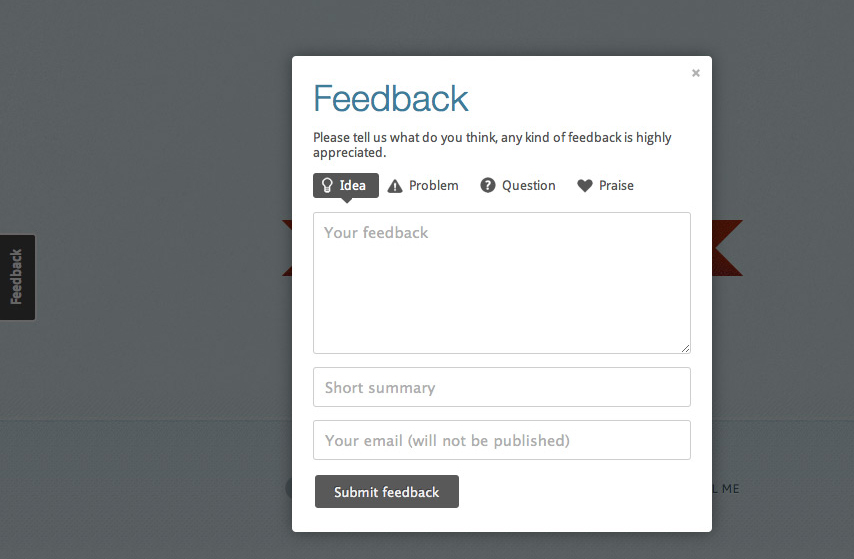
Install this simple, free plugin and you’ll have an ajax feedback form that will let your visitors submit ideas, problems, questions or praise. Notifications of new messages pop up right in your admin navigation bar, making it simple and convenient to stay up to date on what your visitors are thinking.

Usernoise also records all of the messages submitted through your site:
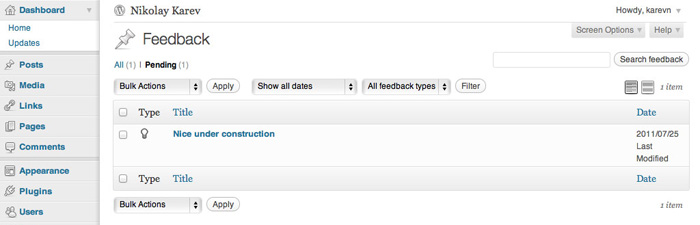
Options include the ability to change the form and button content easily from within the admin area, the ability to disable fields that you don’t need, and support across IE7, Firefox, Chrome, Safari, Opera, and Safari on iPad. The flexible typography feature even causes the text to automatically match your site’s style.

What about spam?

The Usernoise contact form is virtually spam-proof. This is the beauty of having a modal contact form. The form is not visible to robots because it is loaded with ajax when the page is loaded and therefore the bots don’t see it.

Giving your readers a chance to provide feedback is not just a decent idea. It’s an absolute necessity. A contact form can let you know what’s working, what isn’t working, what people love, what people are curious about, and what people really don’t like about your web presence. If your WordPress site lacks a solid contact point for gleaning valuable communication from your readers, install the Usernoise plugin today and see how easy it can really be to strike up a conversation.

Featured Plugin - Open an Online Store with MarketPress

Out of all the WordPress ecommerce plugins available, this has got to be the winner - easy to configure, powerful functionality, multiple gateways and more. A simply brilliant plugin!
Find out more

Featured Plugin - Host sites, get paid, just like WordPress.com

If you've ever wondered how you could offer a paid site management and hosting service, then this is the plugin for you. Offer a freemium or paid service, for any niche you like, it's powered Edublogs.org to success already!
Find out more

Featured Plugin - Every great SEO tweak you need, in one snazzy bundle

Fully integrated with the SEOMoz API, complete with automatic links, sitemaps and SEO optimization of your WordPress setup - this is the only plugin you need to help you rank your site number 1 on Google - nothing else compares.
Find out more

Featured Plugin - Start Your Own Powerful Membership Site

If you're thinking about starting a paid, or just private, membership site then this is truly the plugin you've been looking for. Easy to use, massively configurable and ready to go out of the box!
Find out more

Featured Plugin - Easily integrate your WordPress site with Facebook

Would you like to add Facebook comments, registration, 'Like' buttons and autoposting to your WP site? Well, The Ultimate Facebook plugin has got that all covered!
Find out more

Featured Plugin - Start your own Quora / StackOverflow / Yahoo Q&A site

It's now incredibly easy to start your own Q&A site using nothing more than WordPress - The Q&A plugin simply and brilliantly transforms any site, or page, into a perfect support or Q&A environment.
Find out more

Featured Plugin - WordPress + Google Maps = Perfect

Simply insert google maps into posts, sidebars and pages - show directions, streetview, provide image overlays and do it all from a simple button and comprehensive widget.
Find out more

Featured Plugin - Send beautiful html email newsletters, from WordPress!

Now there's no need to pay for a third party service to sign up, manage and send beautiful email newsletters to your subscriber base - this plugin has got the lot.
Find out more

Featured Plugin - Turn any WordPress page into a fully featured wiki!

To get a wiki up and running you used to need to install Mediawiki and toil away for days configuring it... not any more! This plugin gives you *all* the functionality you want from a wiki, in WordPress!!!
Find out more

28 Responses to Usernoise Modal Feedback: A Free WordPress Contact Form That Just Works

  1. I gave it a try and realized it does way more than it says: it creates a custom post type for the feedback and you can review and reply to the feedbacks left on your site…
    Kinda way more than a contact form is supposed to do and it creates its own top level menu in the dashboard admin menu…

  2. I’m going to download it and let you know what I think!

  3. Great plugin! I have two problems though:

    1. When I click “Usernoise” in my admin navigation bar and no feedback found, it says “All (1)” above and there are no messages. When there’s one new message it says “All (2)” and there is just one message. Is it a bug or something?

    2. I recently changed my e-mail in “Users > Your Profile”, but when someone send me a feedback message I got notified by e-mail in my old e-mail address. How does the plugin know my old e-mail anyway?

    Thank you.

  4. I would like to know if it submit the received messages as Posts , just like TDO mini forms

    As Mark stopped the development of ‘ TDO mini forms ‘ , an alternate option is needed.

    • I just found an Option ” Reviewed ” under . I don’t understand it’s exact purpose

      Can I trace the user where he submitted the form from? I mean a link of the page from where the user submit the message? SO that we can trace the problem where he faced

      Thanks !

  5. Hi Nikolay Karev !

    As an Admin of WordPress based site, can I receive a notification on every message a visitor/user submit using contact form? I mean that I need a complete message with email address like any other contact form does

    Thank you!

  6. Wow, a contact form with catchy design, so how about its performance? Does it generate a lot of javascript and image files?

    • It only loads a couple of images (I am going to avoid that in future), and not much of JS (a couple of files – facebox and own JS file). All the files are loaded at the footer, so Usernoise does not affect the performance much. Regarding serverside part – it adds about 30ms to page generation time — not too much.

  7. Is there any way to trigger the modal by a link in a post?

  8. How accessible is the plugin? Does it work with screen readers or JS disabled?

  9. I installed the plugin but don’t know how to make it work on my contact page or post. There must be something you have to do to install it? Any help would be greatly appreciated! Thanks, Mike

  10. Thank you very much for this, ive been looking for ages for a good feedback solution for wordpress. It works like a charm

  11. Hey! love this contact form!
    Have a question which probably has a very simple answer but can’t work out the solution… there it goes:

    Wanna trigger the contact form from one of the predefied menu bars on wordpress menu manager… but dunno which link i have to input in the menu custom form in order to wordpress to validate it! When linking to href=”javascript: usernoise.window.show(); return false;” wordpress doesn’t validate it and it just disappears.

    So basically…. how to call this javascript from one of my top or side menus?

    Well, thanks and keep up the good work! :)

  12. Good news, guys. I am pretty close to releasing an extended Usernoise version – Usernoise Pro. Check it out at http://usernoise.karevn.com

  13. can you let me know how to style the text on the passive tab? Mine shows a serif font, yet there are no serif fonts in my theme and I have chosen helvetica in the plugin settings? Thanks

  14. Hi, I’m getting a usernoise.window is null or not an object error in Internet Explorer 8 & 9

    It’s working fine in Firefox / Chrome. The website is linked in the comment. Do you have any advice for this?

  15. hi, is there a usernoise alike also available for non wp platforms? or something similar? cheers dimitri

Click on a tab to select how you'd like to leave your comment

Leave a Reply

Your email address will not be published. Required fields are marked *

*

You may use these HTML tags and attributes: <a href="" title=""> <abbr title=""> <acronym title=""> <b> <blockquote cite=""> <cite> <code> <del datetime=""> <em> <i> <q cite=""> <strike> <strong>

Subscribe without commenting