It’s a happy day in the world of WordPress. The 3.5 “Elvin” release is now ready for download. Yes, that’s right, the 3.5 release has been dubbed “Elvin” – not as in elves but rather named for jazz drummer Elvin Jones. Curious about what’s new? Here’s a quick summary:
WordPress Media Completely Re-Envisioned

This release includes massive changes to the WordPress media library. You’re simply going to love how easy it is to add new media to WordPress. It provides a totally new experience for uploading photos and creating galleries.
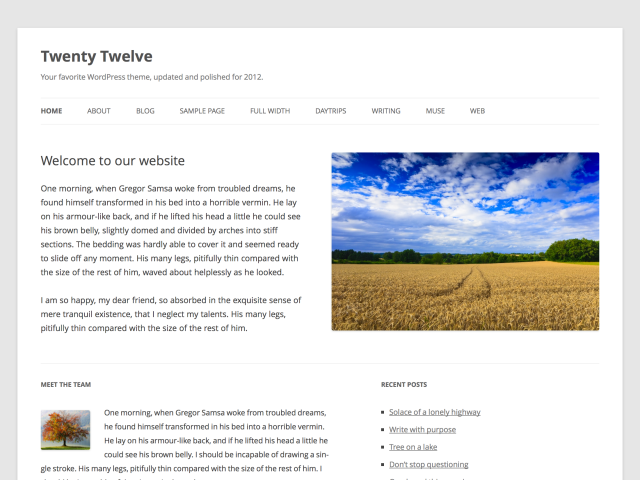
New Twenty Twelve Default Theme
The new Twenty Twelve theme is the best default theme yet! It’s fully responsive and makes use of the beautiful “Open Sans” Font. It also includes a Front Page Template, support for all kinds of post formats and a No-sidebar Layout.
Lots of Extras for Developers
WordPress 3.5 includes a ton of improvements for developers. Here’s a short summary of all the most exciting additions:
- New Tumblr Importer
- Links manager removed from new installs
- Multisite switch_to_blog() is now faster and more reliable
- You can now install Multisite in a sub-directory.
- New external libraries: Underscore, Backbone JS libraries
- WP_Comment_Query and WP_User_Query classes now support meta queries just like WP_Query.
- Post objects are now instances of a WP_Post class
- WP_Image_Editor class abstracts image editing functionality such as cropping and scaling, and uses ImageMagick when available.
View the WordPress 3.5 introduction video to get a quick preview of what you have to look forward to when you upgrade:
Of course, if you’re a WPMU DEV customer, then you can rest assured that all of our plugins and themes are already fully compatible with WordPress 3.5 so there’s nothing to worry about when upgrading your installs. With our new release compatibility guarantee you’ll always be able to upgrade to the latest version of WordPress and will never be stuck with old plugins.
I know you’re all dying to drop what you’re doing, call this day a wash, and go play with 3.5. So, put your elf shoes on, crank up some Elvin Jones jazz music, and start upgrading your sites to WordPress 3.5!
Thanks Sarah!
Good to know will be updating my 30+ sites soon then! Thanks for the update
Can the new 3.5 version import images from ipad photo / cameraroll ? …. i mean can wordpress via browser get access to add images to posts from ipads cameraroll?
@marcus I don’t believe so – just via the WordPress for iOS app – which is becoming quite good!
Looks great, and good to know it is finally out, but based upon past history I will leave the “early adopters” to sort of the bugs. Generally, I wait until at least the first update to start migrating my own sites and clients sites over. Plus that gives extra time for other plug-in developers to get things updated because not everyone is on the ball as the good folks here at WPMU. Happy Holidays.
Thanks a lot for the Update! Have been looking forward to the media handling update.
its buggy as hell for me the widget page wont let me open the widget drop downs at all
the mufti file uploader does nothing when i click the select files button
the admin sidebar don’t have the slide out menus
the update page wont let me select all themes or plugins
is it just me or is it really buggy
OK, HUGE problem… WP3.5 isn’t loading jquery.js, therefore none of the javascript within wp-admin is functioning..
I’ll need to find an older version of WP to continue running my site. #FIX PLEASE
Same here on 1 site. A different site on 3.5 has no problems… Getting confused…
Noticed this on: http://wordpress.org/support/topic/troubleshooting-wordpress-35-master-list
So I will disable plugins and change themes to see what is the cause.
KNOWN ISSUES
jquery
Plugins and themes which use their own jQuery without properly compensating for WP’s will break. This isn’t new by any means. In fact, we’ve always said that replacing or overriding jQuery will bust things, and we don’t let people do it anymore in plugins or themes hosted here. That doesn’t stop people from doing it, though.
We’ve come up with some awesome directions to help you debug your jQuery issues: http://codex.wordpress.org/Using_Your_Browser_to_Diagnose_JavaScript_Errors
Don’t worry, if that was greek to you, do the usual turning off plugins and switching themes to figure out which one it is, and then tell the dev ‘Hey, you’re doing_it_wrong() and breaking things!’
In all cases, make sure you’re using the latest version of themes and plugins. For example, TwentyTen and TwentyEleven themes got an upgrade. Also many plugins have updated and will now work with 3.5. Make sure you upgrade them first before coming for help.
Well, I just switched all themes to TwentyTwelve and disabled all plugins in network level and for all sites in the network.
Didn’t help…. :(
This helped for me:
Add
define(‘SCRIPT_DEBUG’, true);
into wp-config.php just before the ‘thats all, stop editing’
Thanks for sharing Jon
For me it’s fixed, the plugin Bulletproof was the cause and also fixed it for me.
Details: http://wordpress.org/support/topic/jquery-issue?replies=9#post-3556165
Gr,
Age
My membership premium plugin is acting up now. its some how affecting the way my categories and widgets display on my front page. I have several widgets that are meant to display posts from several categories but now they all show the same category for users not logged into worpress.
Nice release. Glad to hear WPMUDEV assets are ready to go.
Looks great.. I’m gonna try this out. Love to see the release.. :)
Great news! Just waiting to dive in the final 3.5 version. And one more thing, why Elvin Jones? :)
Well, why not Elvin Jones? I´m happy about WordPress versions being named after jazz musicians. Now my question is: who will WordPress 4.0 honor? Art Blakey?
After upgrading the plugin menu disappear. where do I find it?
Thanks
Found it, it has a new name ;-)
Great Share :)
Here´s my own tribute to Elvin: http://www.wpthemedetector.com/a-different-kind-of-theme-wordpress-3-5-named-elvin/
Thanks Sarah for a quick, clean and concise article with not a lot of other words to cloud the subject. :)
Maybe I’m just being dense, but it seems like the new Media manager is a step backwards. I used to be able to upload an image, set it as ‘featured,’ then insert the image in to the post.
Now, it seems setting the featured image and inserting into post happen on two different screens which kind of hurts my work flow. Am I missing something here?
awesome post as always sarah!
However, I just updated and wondering if anyone else has experienced the same issues as me –
The update says successful
the version number changes to 3.5 but…
no twenty twelve theme showing and no new features added. Media library looks same and the only think i can see that has changed is the text ” version 3.5 ” at bottom of dashboard?
thanks for this post and i look forward to using 3.5
Thanks! I had a similar problem with no Twenty Twelve theme showing. I just had to manually download it from the WP theme directory and upload it to my themes folder. Not sure why the files weren’t included in the upgrade on my dev site. But it was fairly easy to fix.