The Ultimate Mega Guide to Speeding Up WordPress
It goes without saying that having a site that’s quick and reliable is important — especially when practically everything we do online can be done in an instant. These days, there’s no patience for slow sites.
Luckily, when it comes to improving site speed for WordPress, there’s a ton you can do to increase speed and keep your users, customers, and search engines happy.
In this article, we’ll be covering 24 fixes that will dramatically improve your own site’s loading time, including both general speed and development-related improvements.
This isn’t just another “X tips for speeding up WordPress” tutorial. In this definitive, step-by-step guide we go through every aspect of optimizing and speeding up your WordPress site.
We’ll be looking at:
- Why Page Speed Matters
- Why a Website is Slow
- How to Increase Your Website’s Speed
- Conclusion
Why Page Speed Matters
If you make a living from your site, page speed is something you can’t afford to ignore. Awhile back, Loadstorm merged a few research findings into a nice infographic, which shows that a single second increase in page load times leads to a 7% loss in conversions, 11% fewer page views, and a 16% decrease in customer satisfaction.
Turn that statistic on the end and for all intents and purposes, decreasing your website’s load time by 1 second could earn you an easy 7% increase in profits.
People also seem to forget that the quality of internet service is not uniform across the world, even if you use a CDN and optimize everything.
Your page may load in 2 seconds for you in New York, 2.3 seconds for your friend in Dublin, but it may only load in 4-5 seconds in India.
By optimizing further you may only lower your loading time in the US by 0.3 seconds, but you may decrease it by 1.8 in India which would lead to more sales. Don’t forget that the web is huge and any number you see cited is an average and any number you experience is a single sample of a hugely varied set.
In addition to all the direct benefits, it is a well-known fact that page speed has a big impact on your SEO. Some articles shed light on correlations between Google and a fast site. One thing’s for sure: better speed = higher ranking in Google’s eyes.
If you’re environmentally conscientious you can think of this as an exercise in reducing your carbon footprint. A speedier website is usually the result of less processing, fewer requests, and less data, which means that the computers that handle your website work less, reducing their heat output, which in turn means less cooling needed. The effect is probably unnoticeable on a single server level but would be measurable at scale.
How to Begin
I’ll split this article into three parts. Initially, I’ll talk about some general considerations and try and get the nuances of the speed issues out in the open.
The next two sections will focus on improvements any user can make and improvements coders can make. There will be some overlap in these last two sections. I urge non-coders to look at both sections, many speed-increasing tactics can be implemented by following simple guides, even though they may have some related code.
By the end, I hope everyone will be able to take at least a couple of the ideas and apply them immediately to make the web a faster place for us all!
Why is a Website Slow?
Understanding this is key to making smart decisions down the line. There is a huge difference between a site running slowly because it is on a low-cost server, and being slow because of inefficient code or massive images being loaded.
Note that the following list doesn’t contain items that can always be “fixed.” I’ll list all the separate layers that add to your speed. Our job – later on – will be to optimize this speed. For now, let’s learn about all the components.
1. Basic Technology
The language and basic technology you use to run your website will determine how fast the code is processed on the server. If you use HTML only this is less of an issue, but most websites use server-side programming.
You may use ASP.net, PHP, or maybe HHVM to execute PHP code. There is not a lot a mere mortal can do to increase speed in the basic languages.
While I am no expert, I believe that ASP.net technically has the capability to be faster than PHP, but the differences are negligible.
HHVM started outperforming PHP as it was released, but the two technologies started engaging in a (friendly) war and now it seems the new PHP 7 will outperform HHVM which will hopefully induce a performance-increasing loop from these technologies making us end-users very happy.
One area where you can make a difference is how your server is configured. For example, servers can be configured to send data in a compressed format, known as gzip compression. This is a simple setting you can turn on or off, obviously turning it on will increase your speed. We’ll look at some of these techniques further down.
2. Content Management System
As a general rule, any CMS system will be slower than a properly made static HTML site. While it is true that total page caching can minimize speed differences, caches sometimes need to be purged, logged-in users usually don’t get cached versions, and administering content always takes up more resources.
With that said, a well-built CMS system will do much more good than harm. It will be more secure, you’ll be able to add content a lot more easily and they offer a ton of features you can implement any time. All the well-known CMS systems fall under the “well-made” category so WordPress, Joomla, Drupal, and others are just fine from a speed point of view.
Speed issues may be more common in some systems than others, but this usually has to do with additional code being used such as themes, plugins, extensions, and such. We’ll take a look at these further down.
The reason content management systems are slower than static sites is that they need to connect to a server, the server needs to process a request, generate HTML code and send that back to your browser, during the processing there may be many database queries that need to be run which also increase loading times.
Most systems have mechanisms to optimize this process which is why websites tend to load in a couple of seconds – making these systems a viable solution.
3. Extensions
I mean extensions in a completely general sense here: any code that is used on top of your CMS. For WordPress, this means themes and plugins, for Joomla and Drupal they may be called templates and extensions.
More often than not, themes and plugins are not created by the same people who made the CMS itself. This means that if the developers aren’t completely up to speed on current best practices they make errors.
While coding, there are numerous ways you can make sub-optimal code without actually triggering an error.
For example: if you think about your data needs you may get away with querying the database once during an operation.
If you didn’t think things through, you may use three. In fact, depending on your needs three queries can sometimes be faster than one, so carefully choosing your methods is very important.
This is roughly how things go downhill very fast. We’ll take a look at some of the specific coding techniques that slow down your code below. For now, the takeaway is that extensions add a layer of loading time to your site.
With WordPress, the negatives are somewhat magnified by the fact that the community is so open. This is a wonderful aspect of WordPress, which should never be changed, but it does have its drawbacks. It makes it extremely easy to contribute bad code. Nothing can stop you (nor should it) from creating a horribly-coded theme and then selling it if you want.
4. Servers & Hosting
Your server is a big component in determining your website speed, especially during high traffic times. Let’s separate these two terms first and learn some more about how they affect speed.
Your server is a physical computer somewhere that has similar properties to your computer at home. It has memory, CPUs, hard drive space, and other parameters that dictate how it performs.
Your hosting plan is essentially a bundle of services tied to a server. This would include things like automatic backups, server management, and so on.

For our purposes, the most important factor of a hosting plan is whether you are on a shared plan, a VPS or a dedicated server.
Shared, VPS and Dedicated Servers
These three terms represent different types of hosting methodologies. Somewhat simplified: they determine how many people use the same server for their website as you do.
- On a shared service, you might get hundreds of people on the same server. This means that a hundred people share the same hard drive space, memory, CPU speed, and bandwidth. Resources are not shared evenly, a faulty site may use up 80% of a server’s resources, leaving 99 other users with the remaining 20% or worse.
- A VPS (Virtual Private Server) is still shared, but usually between fewer users, and the resources are evenly distributed. If there are 5 users on the same server, they would each get 20% of memory for example. If one user tries to go above it their website may fail, but the websites of other users will be just fine.
- On a dedicated server, you are the sole user of the server and all its resources. This completely negates the “bad neighbor” effect that shared services bring to the table and you have more resources at your disposal than with a VPS (usually).
We offer fully dedicated managed WordPress hosting here at WPMU DEV. Our hosting plans all come with dedicated IP, automated updates, WAF, malware scanning, and much more to ensure your site stays up to speed.
Server Parameters
As I mentioned, the server your website is on has some key properties which will determine its speed. Essentially: the higher the performance of your server, the better your website will perform.
There is, of course, a limit to this. If you have a small WordPress website with a view count in the tens of thousands a month it doesn’t really matter if your server has 1 GB of RAM or 8 GB. Further down, when we look at what you can do to increase your speed I’ll talk about when to change hosts and servers, we’ll discuss this issue there.
One more property that will make a difference is your server location. This is fairly logical. If the server is in San Francisco, you will receive data from it faster if you are in San Diego (about 500 miles) than if you are in Melbourne, Australia (about 8000 miles).
Data tends to shake a leg when it gets going in fiber-optic cables – reaching near light-speed – but once it gets close to your house it slows down to the speeds your ISP provides. It also needs to pass through firewalls, routers, and other magical things that tend to slow things down.
Distance tends to affect the speed at which you make requests most. What I mean by this is that downloading a 1GB file from Melbourne would take very nearly the same amount of time as it does if you download the same file from San Diego. However, downloading 1,024 files which are 1MB in size will take a lot longer if you are further away.
Why does this matter for us? When a website loads it can make a large number of requests. This includes stylesheets, images, javascript files, and others. By minimizing requests, we can maximize speeds.
The Client Computer
The age of the computer you are using can also greatly affect your perceived connection speed. I have a slightly battered iPad here at home and my connection seems much slower on that device than it does on my iMac.
There could be a number of reasons for this, but I believe the main one is age. The degradation of components has caused the iPad to use memory less efficiently – it processes content slower and is generally less responsive.
Up until recently, this was not a huge issue since most of the computing was done on the server. With the rise of more powerful clients and – more importantly – new web technologies, websites are tapping into client-side processing power.
This will mean a lot faster and smoother animations, for example, but it will also mean that slower devices will suffer.
In conclusion, the speed of any given website is determined by the basic technology of your site, your content management system, your server, and your hosting, and the client computer.
How to Increase Your Website’s Speed
I promised two sides to this coin: methods for developers and methods for non-developers. Note that this doesn’t mean that all tips for non-developers are easy to set up. I will be making the distinction based on how code-oriented the method is.
Basically: anything that you need to do in the code of a theme or plugin will go into the developer section, everything else goes into the general section.
Let’s begin.
General Speed Increases
By general speed increases, I am referring to all the methods, tips and tricks you can perform without touching website code (themes and plugins). You may need to edit some server files and use terminal commands, but in general, these speed increases will not be made by your developer, unless you have someone in-house who also knows a thing or two about servers.
Here’s a generous helping of things to do. I tried to follow the list I laid out in the “why is a website slow?” section to make things easier on you.
1. Update Your Core Technologies
99.99999999% of us won’t be able to optimize our PHP, but we can make sure it is updated. In my experience, the more expensive your host, the more rigorously they update PHP for you in a managed environment. Many lower-end servers will actually update your PHP version if you ask, but won’t do it automatically.
If you take a look at some PHP benchmarks, for example, you can see why this is important.
As you can see, various updates to PHP itself can make a huge impact.

How to go about updating your PHP version will be different – depending on your host. If you log in to your host, search for “PHP Configuration”. You may find a select box that allows you to switch to different versions.
Before you make the switch, there are some dangers to updating PHP. The code for your website and your files won’t unexpectedly disappear, but if you have very old code running, you may bump into unexpected issues. If you are uncertain, make sure to ask your host if you can downgrade if things go south.
For more on PHP and using cPanel to update it, check out this brief video.
This one should go without saying by now, but I still see some sites running old WordPress versions. CMS updates generally don’t provide a huge speed increase from one version to the next, but they do patch security issues.
Holes in your security can lead to malicious code being injected into your site which can make things slowly grind to a halt over time.
In addition, CMS updates tend to optimize the system, allowing better code to be written for it. As a result, your database will be less crowded, your queries will be faster, translating to a speed increase average over time.
What you can expect if you are diligent in your updates is a much longer time between speed decreases due to simple database congestion for example.
To see the best practices in updating your WordPress and keeping it less vulnerable, be sure to read our article, 7 Quick & Easy WordPress Security Vulnerability Fixes.
This is something we’ll be revisiting in detail in the developers’ section because it is much easier to fix while writing a theme or a plugin. There are some things you can do as a user to make things better, though.
First of all, to figure out how many requests your site is making you can use a bunch of tools. You can see all requests in your browser’s developer tools, or you can use a web-based tool like Pingdom to get a nice overview.
When adding content to your site you increase requests by adding images or other media items. You basically add one request per item.
If you add galleries to your posts and the first 5 images are displayed on your archive pages as well, you could be looking at as many as 60-70 requests on a single page.
If you are a photographer, an artist, or an image loving person you probably don’t want to add fewer images. In these cases decreasing your posts per page settings, or showing fewer images on your archive lists may be a good way to go.
To decrease your posts per page go to the reading settings in WordPress and lower it to 8 or 6.
Consider cutting back on plugins that affect the front-end of the website. Many plugins add their own styles and scripts, disabling them will save you 1-2 requests if the plugin is well-coded or as many as 7-8 if it was a wasteful product.
Switching themes could also save you a lot of requests, although in many cases this is not a viable option. I’ve noticed that premium themes in particular – ones that offer absolutely every feature – tend to load way too many scripts and styles unnecessarily.
Lazy loading images is a powerful tool that can make your site seem faster. In reality, you are not decreasing the requests but you are staggering out the need to load them. The idea behind lazy loading is that images that appear further down the page don’t really need to be shown until the user scrolls near them.
We have a great article comparing 6 lazy load plugins, take a look there for more info.
One of the best methods to decrease requests is concatenation. This is what we will talk about in detail in the coders’ section. Instead of loading 10 JavaScript files, you could essentially copy-paste them one after another into a single file. This would mean that instead of downloading 10 files averaging 20kb, you could download a single 200kb file which is way faster. This is easy enough to do when coding the site, but a lot more difficult after the fact.
A plugin like Merge + Minify + Refresh automate the process somewhat, but I’ve had mixed results. Give it a go, if they work you might see a significant reduction in requests made.
All of this being said, we recommend using our very own lazy load plugin, Smush.

Smush is the most popular all-in-one image optimization plugin, due to her having everything needed to make your images load faster.
Activating lazy loading with Smush is done in one click. Additionally, you can adjust your settings once lazy loading is activated (though it’s not necessary in most cases).
Plus, it’s a free plugin to use.
While I particularly hate posts that contain pagination within them, in some cases it may make sense to split a post into multiple pages. Please don’t do it to increase page views, but if you have a hyper-mega-super resource that lists your favorite 500 hotels with images, it may be a good idea to split it into sections of 25 – 50.
4. Remove Unnecessary and Wasteful Plugins
Plugins not only increase your requests but could cause all sorts of other issues like memory, or even security leaks. A great plugin called P3 (Plugin Performance Profiler) can help you identify the most problematic culprits.
You can also deactivate anything you rarely use. I often use tools like Regenerate Thumbnails, Theme Check, or indeed P3. While these are invaluable when in use, I need each about once a month. When not using them I disable them to make sure they have absolutely zero performance impact.
5. Remove Unnecessary Eye-Candy
There are many – primarily JavaScript-driven – design elements and modules on sites that may look nice, but don’t really make sense. Let me give you two examples.
The first example deals with frustrating elements. Let’s assume you have a user menu that folds out with a cool animation when you hover over it. When a user first sees it they’ll think that it’s pretty cool. However, after the third usage they’ll become increasingly annoyed – why should they have to wait a second for the darned menu to appear?
This is usually caused by programmers and site owners not using the site in the same way as their users. Users will most probably use the login link or form in the header. Make sure to give your users a fluid experience, not one that just looks cool but is frustrating in the long run.
Aside from the purely visual UX aspect, your website will gain some speed benefits. There will be fewer elements to animate, less Javascript in total which will all translate to either a website that is actually faster or one that seems faster – which is the same thing.
The second example is all about efficiency and conversion. My favorite example here is sliders. Almost every single research article points to the same conclusion: sliders are simply horrible. No one uses them, they take up too much space, they decrease your SEO and take a huge toll on your site’s speed.
I want to stress that for a business the goal of your website is not to look pretty. Looking pretty is a tool that is used to achieve the real goal: making money. If all research points to the fact that you should burn that slider to the ground. If this increases your revenue do you really care?
In an ideal world, you should look at all elements of your site and make some decisions or at least educated guesses. Read up on the topic, do your research, and most of all, measure the outcome.
Also, keep in mind that in some cases total removal is fine, in other cases you’ll want to replace an element. Simply removing your slider may lead to lower conversion rates, but maybe replacing it with simple text and links would increase it way above the level of the slider’s effect.

FREE EBOOK
Your step-by-step roadmap to a profitable web dev business. From landing more clients to scaling like crazy.

FREE EBOOK
Plan, build, and launch your next WP site without a hitch. Our checklist makes the process easy and repeatable.
To me, CDNs are the magic bullet of websites, they make everything a lot simpler and faster. There are two reasons I love to use CDNs: they allow me to host images off-server and they decrease image load times.
For this article, the latter reason is what we will focus on, though only briefly – I like hosting images off-server because it frees my content from my media. I can change my domain. I can move from host to host. my media is always in the same place. An average website’s database and theme would take up maybe 10-25 Mb. However, there may be 2Gb of images to transfer as well. If these are all hosted off-server, you only need to worry about the 25 Mb which isn’t a lot.
Back to speed! The idea behind a CDN (Content Delivery Network) is to place requested resources geographically closer to you.
We have our own CDN here at WPMU DEV that leverages the StackPath servers. It works extremely well in most key locations.
If you’d like to put this into practice read our roundup on top CDN services to help you get started. Many – such as Amazon Cloudfront – have WordPress integration plugins, which means you can set and forget.
Caching is probably the number one method to use because it can lead to the most drastic improvements. The idea behind caching can be understood with a simple analogy. Remember when you first learned addition in school? You physically needed to count out 5+4. You used your fingers or whatever was at hand (my Mom taught me with sugar cubes) to count it out.
Nowadays I’m betting you just remember the answer and automatically know that it is 9. Your brain has essentially cached the result for you, you no longer need to count up to it.
With websites there is a plot twist – the result of the equation is not always the same! Here’s why. Imagine a website that has nothing more than your name and the current year displayed. The content of this website only changes once a year. However, each time you load the site the server calculates what the current year is.
What caching can do is essentially save an HTML copy of the website for a given time. In our example above we could set the cache to expire once a day. This means that once a day the website would load normally: it would detect a request, get the server to process the code, and spit back the result as HTML. It would also save the resulting HTML in memory.
The next time someone loads the site the cache would load the HTML from memory, instead of getting the server to process it. This may not be much for an example as simple as this but for an average site, this could shave seconds off the loading time.
What I’ve just described was a full page cache, there are many other types – caching is a profession in itself. Luckily, you can get started very easily if you work with WordPress.
We have an article on The Best WordPress Caching Plugins Compared here on our blog – give the article a read and take your pick!
One of the choices in this article is our very own Hummingbird plugin.

Hummingbird is free to use and features an effective browser cache for caching any site. She’ll load pages faster with her full-page, Gravatar, and browser cache tool.
There are a bazillion settings for each plugin, I recommend reading up on each setting to get the best performance.
That said, in my experience, if you use only the basic settings you will achieve at least 80% of the maximum speed gains so it’s worth getting started even if you’re a relative newbie.
You should also be aware that better caching can be achieved on the server level. Some managed WordPress solutions offer caching on a server level which will always be faster. Many of these hosts don’t allow you to install caching plugins, simply because it would just lead to a slower site.
Over time your database will acquire some deadweight, this is pretty much unavoidable. There are two major parts to this equation: unused data and database-level overhead.
Unused data could come from a number of places. If you have some custom solutions for deleting users, perhaps the methods used don’t delete associated user metadata. This could leave hundreds of rows in the database that aren’t attached to anyone.
You could also have used a number of custom fields in the database which are no longer needed. Since these custom fields may have been added to hundreds of posts we’re talking about hundreds – if not thousands – of rows.
Cleaning this up is not hugely difficult. Jenni McKinnon wrote a great article about keeping your database squeaky clean and I talk about this at length in the “Clean Up And Migrate The Database” section of my How To Rebuild Your Website article on this blog.
For the database level overhead, you can use a tool built into MySQL which takes care of it for you automatically – this is called table optimization. It is very much like disk defragmentation for hard drives. Take a look at the “Optimize Your Tables” section of Jenni’s post to see how this is done.
We’ve already talked about using fewer images, let’s turn our attention to those you actually do have to use. Compressing images could make them smaller by 30% – 80% without any noticeable difference.
One of the best tools to use is, of course, our very own WP Smush, which is used by over 1 million WordPress installations. You can even resize images automatically.
I personally use Imageoptim for OS X to mass-optimize images or you can use the popular RIOT on Windows.
This can be another potentially huge speed gain. Gzip compression compresses various assets before sending them to your browser for interpretation. This is something that needs to be set up on your server. Take a look at this GTmetrix article for a quick tutorial on how to make this happen.
The reason this helps so much is that CSS and HTML uses a lot of repeated content. The more patterns you have in your content the better it can be compressed. A very rudimentary example:
If you have “Daniel is Awesome” 100 times in your website’s code (and why wouldn’t you?!) you could replace that text with “12d” saving a ton of space. This is the essence of any compression and the more (and longer) patterns you have the higher compression you can achieve.
Our own Hummingbird can help with Gzip compression — for free. Be sure to check out our article on how to optimize Hummingbird for more information.
This may not speed up your website directly, but it takes a load off your server, especially if you have a popular site. Hotlinking is when an image is served on a different website from your server.
In other words, instead of saving your image and uploading it to my own server I just link to it on your server, effectively stealing your bandwidth. This is just like stealing someone else’s Wifi.
Luckily this can be prevented with some .htaccess magic. Read how to get this done in this short article from JavascriptKit.
There is a lot to consider with this. Of course, as I mentioned earlier, we offer hosting that should work great for your needs (in fact, we think we offer the best hosting on the planet). However, you do have options.
My very short, oversimplified guide is the following: do not use shared hosting unless you absolutely have to, or you have a lot of sites you don’t really use at all. These cost around $4/month and that’s about what you get. Unreliable service is prone to going down due to others overusing resources.
Another option is managed WordPress hosting (like we have). This type of hosting offers a more WordPress-centric approach. On a VPS you could run any application you like, managed WP hosting obviously only allows WordPress.
As a result, the servers are built specifically with WordPress in mind, offer server-level caching and other goodies that will make your WordPress site run like the blazes.
On the flip-side, there may be some restrictions on what you can and can not do. The host may disable some plugins and themes due to speed or security concerns. At the end of the day, these all serve a good purpose but may be off-putting to some.
If you’re looking for a good host we have a WPMU DEV hosting review, where you can take a look around and choose the one you like best after seeing the comparisons. I recommend talking to customer service and explaining your exact needs, they’ll help you decide what you need and you’ll also get a feel for the level of support you can expect.
This won’t speed up your website but will alert you when something goes wrong and you’ll be able to catch a downward trend in time. Reacting to a speed issue before it gets noticeable is a great way to retain happy users!
Domain monitoring services like Pingdom and others can automatically test your site regularly and automatically.
If you’re a WPMU DEV member, your site status is measured in the Performance tab of The Hub. Plus, you can set up performance tests and uptime reports.
14. Themes
A number of WordPress themes provide a theme optimization section (e.g. Avada).
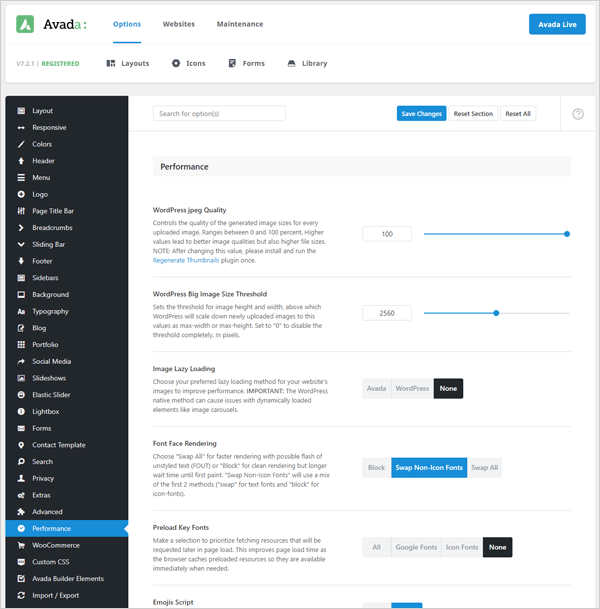
Configuring these options in your theme can make a huge difference to your overall site speed, especially themes used with popular page builder plugins like Elementor, WPBakery, Divi, etc. which add additional code that can slow down your page loading speeds.
It’s not something you may have ever considered, but believe it or not, fonts can weigh down your WordPress site and cause extended loading times.
When it comes to Google fonts, they also have to be requested and loaded. That goes for every font on the page — which can make your site lag.
WP Rocket has a feature for optimizing Google fonts. Another option is Swap Google Fonts Display, which can also help.
Additionally, it’s recommended to use one font for your entire site.
Development-Related Speed Increases
Developers like to say that website speed declines are – more often than not – the user’s fault. There is, of course, some truth to this, but I think many developers write code, which is akin to lying by omission.
Technically the code is not faulty, it does not contain errors, it doesn’t try to actively slow down your site. However, it doesn’t do a lot to increase speed or ensure it stays speedy for a while. There is absolutely no malevolence behind this, it’s just how a lot of our code has developed.
Here are some of the things we developers can do to ensure that our products run smoothly and help keep declining performance at bay for as long as possible.
This seems like such a simple little task, yet few developers seem to really understand what it means. There’s no way you’re going to know everything about something as big as WordPress. What you can do is pick up on signs when you should do research. In other words: know your craft and learn more continuously.
Let me give you my favorite example. Have you ever had to pull a large number of meta fields for a post? Perhaps using get_post_meta() 20 times in close proximity? You may think this is wasteful, it seems like we are making 20 database requests.
I’ve seen people use the WPDB class to directly grab all post meta and use array functions to rearrange and get the post meta they need. While I appreciate the intention behind it, it is completely misplaced.
The first time you use get_post_meta() it actually grabs all post meta all by itself and caches the result. Any subsequent calls to the same post will use the cached data, not the database directly.
Before you make any decisions like the one above, make sure to consult the WordPress Codex and read up on relevant materials.
Here I go again with the requests… As a developer, this one is on you. If your theme or plugin uses tons of Javascript and CSS please concatenate them! I personally like to spread my scripts and styles into lots and lots of files because this is better for development.
Here is where Hummingbird can help again with handling requests.
Another powerful tool you have at your disposal is sprites. Sprites are concatenated images. Instead of loading all your social icons separately you can combine them into a single image and use that image as the background, positioning it just right so that only the area you need is visible. Twitter uses sprites, as do many, many other large websites due to their request-friendly properties.
When I need a sprite I usually use the excellent online tool Stitches. This tool allows you to upload images and arranges these for you optimally, generating the styles you need automatically.
Concatenation and minification usually go hand-in-hand. Once you’ve made your final files it’s high-time to make them as small as possible. After all, your browser doesn’t need all your nice comments, spaces, line breaks, indentations – it is perfectly happy with a mass of unreadable code.
I also use Hummingbird for this, but there are other build tools like Grunt and web-based tools for specific tasks like linting, image optimization, modification, and so on.
Hummingbird can take care of this for you in the Asset Optimization area.

When activated, this will increase the apparent speed of the website. It doesn’t decrease requests or file sizes but it does make sure essential content is loaded first. In addition, if a script gets stuck it doesn’t prevent the content from being loaded.
Other content can also be prioritized, just like placing scripts in the footer. If your sidebar contains related info and non-essential content (like it probably should) you could make sure it is loaded later than the main content.
This is not always an option of course but if you try and load important content as soon as possible you’ll end up with a site that seems faster and possibly ranks higher from an SEO point of view as well.
When outputting images in WordPress you can specify the image size to use. Most often you know how big these images will be: featured images, small post icons, avatars and so on.
Using the add_image_size() function you can specify these image sizes. This means that whenever an image is uploaded, WordPress will actually create a copy of the uploaded image at that size.
The idea here is that if we need a 600×320 image we should grab an image of that exact size for two reasons:
- If we grab a larger image we’re wasting bandwidth and decreasing speed
- Resizing an image – whether we’re down or upsizing – takes processing power on the client size and will also decrease image quality
Of course, our own Smush can definitely help as well when it comes to proper image sizes. Be sure to find out more here.
7. Decrease and Optimize Queries
Database queries can lead to significant speed drops mainly due to memory usage. I’ve worked on a project where the server crashed so many times due to faulty queries that the host disabled the site temporarily.
There are two tactics to use here. Decreasing and optimizing queries. Not that as I discussed above, optimizing could actually mean increasing the number of queries to replace a particularly resource-guzzling one.
First of all, avoid raw database queries in WordPress. There are legions of functions at your disposal to get everything from posts to comments, custom taxonomies, and metadata.
If you do need to write a query yourself make sure to use the WPDB class, for maximum safety and efficiency. Try to avoid joining tables or other complex things, in many cases, it is better to use two separate but far faster queries.
There are tons of tools to figure out if your queries are well written and to see all queries run during a request.
You can use the Query Monitor plugin or use define('SAVEQUERIES', true) in your config file and print all queries via $wpdb->queries.
You also have the option to log slow MySQL queries. This is turned on for many hosts or you can turn it on yourself, or ask your host to do it for you. You can find more information on this topic on the MySQL website.
8. Utilize Activation, Deactivation, and Uninstall Hooks
Many things a plugin achieves don’t actually need to be done on each request. Creating additional roles, regenerating rewriting rules, adding custom database tables, and so on are just a couple of them.
You should wrap these in an activation function, which will only run when the plugin is activated. This cuts back on processing, thus speeding things up.
On the other hand, you should make sure to remove some of these on deactivation and remove some of your components completely using the deactivation and uninstallation hooks.
This helps the WordPress database remain pristine, delaying the time that it will slow down due to overhead. When this does inevitably happen, a simple optimization will be enough to get things back on track again.
Yes, it’s true that clients and general users make their own websites slow in many cases but this is largely a factor of better educating them. Creating end-user documentation will help the site remain speedy, increasing client satisfaction and even lowering your workload in the long run.
Focus specifically on those aspects which can cause problems such as proper plugin usage, not installing 24 analytics tools all at once, and so on.
Conclusion: Speed is Not Everything
I’d like to stress that while speed is extremely important, it is not everything. Taken to the extreme, you could disable images altogether and use almost no styling and JavaScript. This could lower your page load time to 345ms but would it really serve any purpose other than a pointless speed race? Always keep in mind what the goal of your website is.
If it is to make you money, you should put everything in the service of that goal. A goal is usually achieved through the clever balancing of multiple tools, website speed is just one of those tools.
You’ll need to make the website visually appealing, you need to make it user-friendly and you need to provide the necessary information for your users. This usually means making a compromise in other areas.
You should also weigh the financial and time cost of speeding up your website. Paying someone $2,000 or spending a month lowering your average load time from 3.4 seconds to 1.8 seconds may be well worth it, but the lower you go the harder it gets.
Spending another $2,000 or a month to get it from 1.8 to 1.2 may not be a good choice, you could spend that money or time to get additional sales leads, on marketing or just taking your team on a holiday.
I hope that this guide will help you to make your site a little bit faster – if you only do one or two things listed that’s already awesome. Every little bit counts.
Mike, one of our amazing readers has created a case study about how he sped up his site from 4.23s to 1.33s. It’s especially interesting because Mike is not a WordPress guru, he’s approaching it from an advanced user’s point of view.
For more information, be sure to check out our Performance Optimization Guide. It will show you how to adjust all of your settings for peak performance with our plugins Smush Pro and Hummingbird Pro.
Also, be sure to read about how to check your WordPress site’s speed with the new GTmetrix.
Contributors
This article was written in collaboration with:

Jared Schweers – Key Element Media.
Key Element Media is a full-service digital marketing firm, specializing in Web Design, SEO, and PPC ad management.
***
Note: We do not accept articles from external sources. WPMU DEV members, however, may contribute ideas and suggestions for tutorials and articles on our blog.
Tags:
Daniel Pataki Daniel is the CTO at Kinsta and has written for many outstanding publications like WPMU DEV and Smashing Magazine. In his spare time, you'll find him playing board games or planning the next amazing office game like the not-at-all-destructive Megaball.