Deliver Knockout HTML Emails With These WordPress Plugins
There are some heavy hitters when it comes to WordPress email plugins that can help build your contact lists, send automated HTML emails, newsletters, and more. Which ones deliver the knockout punch and reign supreme as champions? Stay tuned, because we’re going to let these plugins duke it out and see who wins the title for your WordPress website.
“In this corner, weighing in on the digital scale at 16 GB of RAM is…”
We’ll be featuring some competitive email plugins that are HTML ready (to rumble). We’ll size them up and show you some specific features of each one.
By the time you get through this match, er – article – you’ll have a good idea of what will work best for you.

Punching-out Good HTML Emails.
By default, WordPress does not send out HTML emails but sends them out as plain text. HTML emails work more consistently for your email subscribers in terms of looks and functionality.
So it’s important to have a plugin to help if you’re wanting to send your readers information via emails or newsletters that look more professional (e.g. including a logo in the signature).
Of course, to get them to opt-in in the first place, they need a compelling reason why. A well-crafted message, attractive form, and specific placement on your website can do the trick.
Then, when done right, readers will opt in to and subscribe to your content.
So yes, sending professional emails instead of generic ones is important. Especially if you want to be taken seriously.
The Ultimate (In)boxing Match.
There are different divisions out there when it comes to a great WordPress email plugin, so let’s check out tonight’s matchups.
We’ll go over four very distinctive choices.
All are a bit different, all are free, and all offer various solutions to building lists, and ultimately deliver the perfect HTML emails.
So, let’s get ready to rumble!
Ding! Ding! Ding!
Email Posts to Subscribers
The Email Posts to Subscribers by Gopi Ramasamy (aka Gopiplus) has great reviews and was made to automatically deliver a newsletter to subscribers that feature your latest blog posts.
You can schedule the newsletter daily or weekly. It has 10 default templates available, or if you have the itch to create your own, it’s possible using their visual editor.
It’s a nice “set it and forget it” plugin. Once you have it running, you won’t have to worry about scheduling your email. This automates all of that for you.
I started by checking out their live subscription demo, entered my email, grabbed some popcorn and had ringside seats to see what it looked like when it arrived in my inbox.
Sure enough, an email popped up shortly after hitting ‘submit’. Once I verified it, I received their welcome email.
Nice.
It got me excited, so let’s activate this bad boy (or girl) and check it out.
The plugin comes up as Email Posts in the dashboard. From here, you can dig into everything it has to offer; including the General Settings, Confirmation Email, Welcome Email, and more.

The main settings area. When viewing the subscribers’ area, it’s a very simple way of checking out all of your email subscribers’ information.

You can create groups and organize your subscribers. It’s also nice to be able to import and export them here.
That way, if you ever wanted to add your list to an email service like MailChimp, or add your list to your WordPress campaign, it’s very simple to do.
Of course, to get subscribers in the first place, you need to have a way of doing that. You can manually add them into their system, or provide an opt-in box.
The box is then added to your sidebar in the Widgets area.

The Email Posts to Subscribers widget. You can add as much detailed information as you’d like here. I made just a very simple opt-in for the sake of this demo.

If you don’t want to add the opt-in as a widget, you also have the option of adding a shortcode to a post or page.
And with that, we’re ready to start collecting emails!
Now, let’s get into setting up email campaigns and more.
When setting up your emails, there’s a list of nine pre-made templates you can choose from.

All available email templates. 
An example of one of their pre-made templates I put together. You can create your own, too.
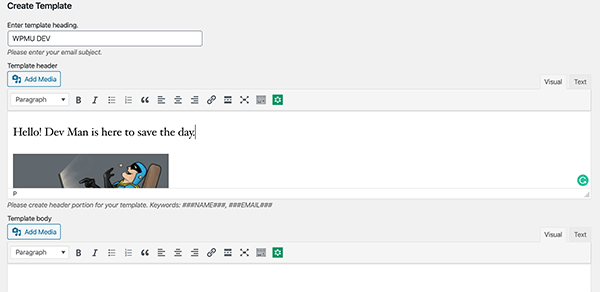
An example of our own. In the Mail Configuration area, you can schedule your posts or newsletters to go out specifically how you would like. The Status shows you what you have set up.

You can specify exactly how you’d like to have your posts sent. Assigning roles can simply be done in the Roles and Capabilities area.
Once you have an email or campaign sent, they have reports worth viewing to see how they did based on open rates, status, last run, and more. Our test campaign went out okay and we received a report back saying that it was successful.
 For a free plugin, this one blew me away on all of the options and more that could give a major email provider a run for its money. Any automation is good, and there are even options for Google reCAPTCHA, a throttling mechanism to protect against spam submissions, and plenty more features that you’ll have to try for yourself.
Email Subscribers & Newsletters -- Simple and Effective Newsletter System
As soon as the Email Subscribers & Newsletters — Simple and Effective Newsletter System by Icegram plugin is activated, they already have you covered.
How?
A welcome message stating “80% done!” and a big thumbs up appears. They’ve done a lot of the work already for you to get your email subscription in shape.
All the essentials are included in this free plugin. If you want to take it to the next level and add a few premium options, you can upgrade and Go Pro.
They make it simple to get started (again, they already had a lot of the legwork done) and I hopped right in.
Everything is accessible from your dashboard under Email Subscribers.
The first section shows your audience. It provides all of the emails, subscriptions, unsubscribes, and opens.
Here is also where you can upload/download your contacts, create lists, sync (which will automatically subscribe a person to a specific list when opting in), and manage lists.

Area of the Audience section. It’s very simplistic and easy to manage contacts in this area. I love how accessible it is and the straightforward information on where everything is at.
To get contacts, we need a form for our visitors to sign up on.
The… you guessed it – Forms section – is where you’ll go for this.
This is the brains of the form building operations, where you can easily name, describe, adjust form fields, and more.

The Edit Forms area. It’s a very simplistic opt-in as is. With some CSS knowledge, it can be edited accordingly with colors, style, etc.
When you have a form completed, it will give you a shortcode that can be used on any page or blog. You can also use the Widget and place it on your page that way.

The test form example I set up. To automate emailing your newsletter and blogs, that’s another very simple feature.
When you publish a new post, it will be emailed out automatically. It’s not quite as advanced as having weekly emails with all your posts or content sent.
Still, it is nice to just publish a blog and know that it will go out on its own in full HTML glory.

The Campaign area where you’ll edit post notifications. I set up a test email to myself and received exactly what I put down for what I wanted to include: Dev Man, of course.
FREE EBOOK
Your step-by-step roadmap to a profitable web dev business. From landing more clients to scaling like crazy.
FREE EBOOK
Plan, build, and launch your next WP site without a hitch. Our checklist makes the process easy and repeatable.

My test email. There are plenty of other functions that can be tweaked and adjusted to ensure your email marketing is flawless in the Settings area.

A snapshot of the Settings area. Here, you can set up a welcome email, confirmation email, security, and more.
In general, this is an awesome plugin that works well with any WordPress theme. Its simplicity sets it apart (in a good way), making it as easy as ever to get an email list growing and automate your blog posts to be delivered to your readers.
Newsletter
The Newsletter plugin by Stefano Lissa & The Newsletter Team is an entire newsletter and email marketing system for your WordPress blog.
It’s great for list building and you can create, send, and track HTML emails. Once activated, it packs a punch.
When you activate, you’re welcomed by a lavish dashboard, animations, and illustrations demonstrating all of its features. It’s a nice addition and shows that they’re not some “dull and ordinary” plugin.
Beyond visually being nice, it has all of the essential features for subscriptions to your email and/or newsletter.
The easy to use drag and drop composer makes building newsletters simple. And with the capability of having unlimited subscribers, unlimited newsletters, advanced targeting and more, this is worth a try.
Just having an endless amount of contacts at no cost is an advantage over professional email services that charge you based on the number of subscribers.
Let’s check this out!
Everything is accessible and clearly labeled right from the dashboard.

The Newsletter dashboard. You can see that the upper tabs have all of the ingredients you’ll need to include a subscription block and get your marketing in motion.

From the dashboard, all the main tabs are on top. There are a lot of capabilities here. Going over every detail that is included in this plugin would lead to a rather long article (and not entirely necessary considering how self-explanatory this plugin is), so to keep things simple, I’ll break down just a few essentials.
Let’s start with the Subscription Configuration. Like everything else, it’s very clear what the functions are and where they’re at.
For example, if I want to edit the opt-in feature, I click the List Building tab, Subscription Configuration, and then all the features are right here.

Where you can choose how visitors opt in, manage repeat subscriptions, override opt in, and edit notifications. I can see why this plugin is called Newsletter, because it truly lives up to its name as the highlight of the features — creating amazing newsletters.
The drag and drop feature streamlines the creation process, making it incredibly easy and efficient.
You can start by choosing a preset template. There’s everything from a simple call to action, invitation, or a big announcement.
Or, you can create your own with some coding knowledge.

The newsletter area. I’m going to just create a simple call to action newsletter.
I dragged the header block over and an image block, uploaded my own Dev Man.jpeg, and — in less than a minute — I had a newsletter ready to be delivered (possibly by Dev Man himself).

As you can see, you can also preview what it will look like. Here’s an example newsletter with a mobile preview on the right. When you have your newsletter ready to go, it’s a matter of sending it. You can specify quite a bit in regards to how you want to compose the email.

Pick from lists, select language, and plenty more. You can preview everything right here. It’s a simple click back to edit if you notice a change you need to make.
To sum it all up, this is a pretty amazing plugin for the going rate of — free! There is a Premium option starting $65, which includes support, more detailed reports, and more.
However, if you’re looking to save some money, the free version gets two thumbs (or knuckles) up from us.
Hustle
Cue the music. And let’s get our groove on!
Hustle is our very own free plugin that we created here at WPMU DEV and it can help your email marketing campaign boogie to success.
Sure, he can dance well, but he can also pack a punch by creating pop-ups, slide-ins, ads, and sidebar widgets for your WordPress website.
Once visitors opt in, he can then integrate with your favorite email company, where you can then create automated HTML emails, newsletters, or whatever is your favorite move.
Not to be biased, but the simplicity of this plugin makes it probably the easiest out of all of the other examples to set up an opt-in form, widget, or slide-in for collecting emails and then reaching out.
When you first get started, there’s a complete walkthrough on how to get moving.

Hustle greets you immediately and helps you get started. From this point, you can choose what kind of form you want to create: Pop-up, Slide-in, Embed, or Social Share.

The Create Module. For this example, we’ll use a pop-up.
I can now pick and choose various options to include in the Edit Pop-up section. You have a TON of options here to suit your needs.
This is where you design, add what information you’d like to collect from users, integrate your favorite email provider, edit the visibility, and much more.
All the major email services provide HTML emails, so you’ll be all set in that department. They all have customizable templates, too.
When connecting to other apps for integration, there are 1000’s to choose from.

Where you can connect your favorite apps. You can specify advanced features, such as animated effects on entrance and exits, delays, AdBlock, and more.

Example of the Behavior settings page. And the forms look as shiny as a disco ball. Here is an example of the pop-up I just created.

Example pop-up. With over 80,000 installations, 4.5-star review, and ease of use, all we can say is that if you’re looking to start an amazing email marketing campaign — Hustle makes it a party.
For more information, check out his funky video below.


And the Winner Is…
That will be for you to decide. Each one of these unique plugins can be a great match for your website.
Just remember that plain text is a lightweight to HTML when it comes to quality. A great HTML email comes across as more professional, they’re more adjustable, and the best way to showcase your message.
These customized WordPress email plugins are all prizefighters in our eyes and any one of them can be a champion for your website.
For more information on newsletter marketing, be sure to check out our post on the 7 Best Newsletter Plugins to Create and Send Emails in WordPress.
And, of course, make sure to use a reliable email hosting service and follow email deliverability best practices.
Ding! Ding! Ding!
And with that, this post is over.
N. Fakes Nathanael Fakes is a blog writer and cartoonist at WPMU DEV. He’s worked with WordPress for over a decade. Beyond WordPress, he’s a published author, syndicated cartoonist, and donut enthusiast. Connect with Nate on Instagram and learn more about his work on his comics website.