Breezing Forms: A New Free WordPress Forms Plugin

Breezing Forms is a new plugin for creating custom forms with WordPress. This advanced forms builder joins the ranks of Gravity Forms, Ninja Forms and the like with its ability to create professional forms and form-based applications.

The very unique thing about Breezing Forms is that there is no trial-ware and no light version. Members of Crosstec will receive access to the latest versions and professional support, as well as a few extra bells and whistles, including more themes, true mobile support, and Salesforce/Dropbox integration.

The Breezing Forms is packed full of all the features that you might expect from an enterprise-class forms building plugin. Its most notable features include:

  • MailChimp Newsletter integration
  • Multipage forms
  • Responsive form layouts
  • Widget Support
  • Shortcode helper for posts and pages
  • Powerful Conditional Fields without need for Javascript
  • Ajax file uploads with progress bars
  • PDF, CSV & XML export (in records and as attachments)
  • Many themes included
  • Summary item: Create summary pages quickly (including calculations if you want)
  • Integrator – Use your forms to integrate with other extensions
  • User Editable Forms
  • 18 and counting form items (from simple input to captcha items)
  • PayPal and Direct Payment
  • “Pay to download file” feature

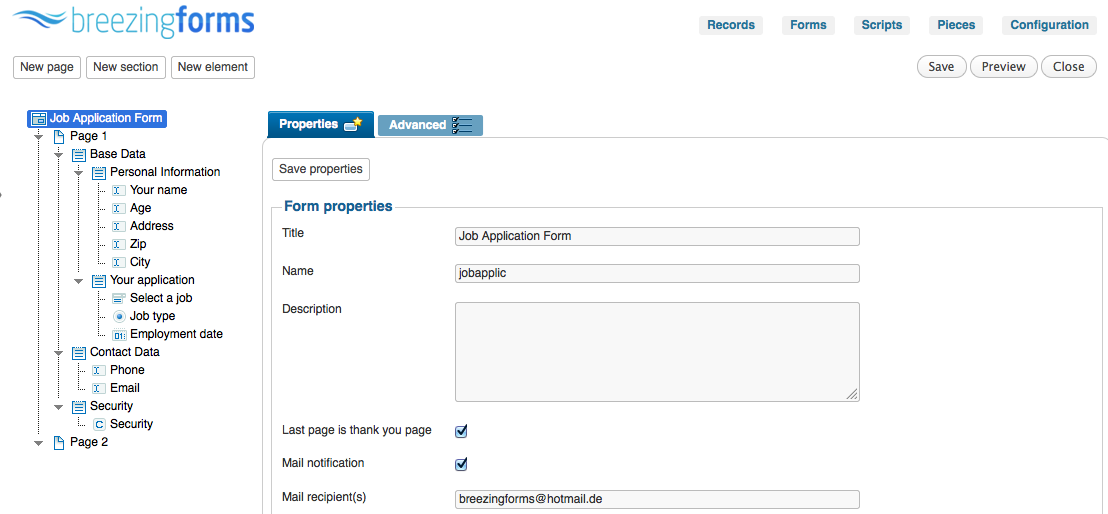
The form builder gives you the ability to easily build complex forms within the WordPress dashboard:

This is an example job application form created with the included glossy blue theme:

example job application form using Breezing Forms

One thing that I love about this plugin is that it does not load its scripts and styles across your entire site but rather only on the pages where they are needed for the forms.

If you’re looking for a free forms plugin that can provide you with advanced options such as multipage forms, payments, and conditional fields, then you’ll want to give Breezing Forms a try. Download it from the WordPress plugin repository and make sure to checkout the plugin’s homepage for more information.

Related posts:

Featured Plugin - WordPress Wiki Plugin

To get a wiki up and running you used to need to install Mediawiki and toil away for days configuring it... not any more! This plugin gives you *all* the functionality you want from a wiki, in WordPress!!!
Find out more

Featured Plugin - WordPress Pop-Up Chat Plugin

No javascript required, no third part chat engine, just fully featured chat right in your own database on your own WP sites - couldn't be easier.
Find out more

Featured Plugin - WordPress Newsletter Plugin

Now there's no need to pay for a third party service to sign up, manage and send beautiful email newsletters to your subscriber base - this plugin has got the lot.
Find out more

Featured Plugin - WordPress Q&A Site Plugin

It's now incredibly easy to start your own Q&A site using nothing more than WordPress - The Q&A plugin simply and brilliantly transforms any site, or page, into a perfect support or Q&A environment.
Find out more

Featured Plugin - WordPress Infinite SEO Plugin

Fully integrated with the SEOMoz API, complete with automatic links, sitemaps and SEO optimization of your WordPress setup - this is the only plugin you need to help you rank your site number 1 on Google - nothing else compares.
Find out more

Featured Plugin - WordPress Google Maps Plugin

Simply insert google maps into posts, sidebars and pages - show directions, streetview, provide image overlays and do it all from a simple button and comprehensive widget.
Find out more

Featured Plugin - WordPress Facebook Plugin

Would you like to add Facebook comments, registration, 'Like' buttons and autoposting to your WP site? Well, The Ultimate Facebook plugin has got that all covered!
Find out more

Featured Plugin - WordPress Appointments Plugin

Take, set and manage appointments and client bookings without having to leave WordPress. Appointments+ makes it easy.
Find out more

Featured Plugin - WordPress Ecommerce Shopping Cart Plugin

Out of all the WordPress ecommerce plugins available, MarketPress has got to be the winner - easy to configure, powerful functionality, multiple gateways and more. A simply brilliant plugin!
Find out more

Comments (16)

  1. Something is wrong with the install folder. Has a folder named “joomla-platform” and the install takes forever with a ton of error messages.

    I think they confused some files or something. Nothing should take that long to install.

    • Hi Harold,
      it’s using the joomla framework (an object oriented programming framework), not the CMS, so no typo here. If you get install errors, please go their forums, they will help you and you will help by reporting issues. Also make sure you are using the latest version.

  2. Not user friendly at all. I need to insert over 200 conditional dropdowns in my form and for each one of them I have to type “turn on element somefield if switcher is on”.
    User-interface is far from being intuitive, it’s clearly designed by programmers :)

    • Hi Talha,
      drop downs are not maintainable with 200 conditions, especially not when conditions need to be grouped “turn on element field1,field2,field3 if element is off”. The natural language that is used there are the quickest way.

      Sure matter of taste but what is more intuitive to click “new element”, save, click preview und publish a form?

      Also, try to create large forms with a typical drag and drop interface, happy scrolling ;)

  3. I have no idea what you all are talking about. I used this for my clan website for gaming and it works wonderfully. All you have to do is go to post -> add new post -> then once you go there, you’ll see a little icon that has three blue lines. Click it and a pop up for breezing forms will show that will allow you to add the form to the page. Great job crosstec!

  4. Hi Subash,

    The free version doesn’t contain mobile forms yet. As soon as the new commercial version will be out, the current commercial will have full mobile support. You can already create responsive forms.

    Regards,
    Markus

  5. Amazing! This is very flexible, and best of all someone abandons a form you can still see results in the back-end. This is definitely well worth a paid subscription, I feel this product is being under-priced. Great tool to add to any website!

  6. Hi,

    Upon installation into WordPress I do not have any options for setting up the plugin. Furthermore there is an internal error message shown at the foot of my page.

    Tried to install – re-install many times, but nothing changes.

Participate