Cool WordPress shortcode plugins to snap your blog into style

Do you like to style content on your WordPress blog and make it look real pretty? Are you NOT a whiz with css? Then, here are some quick and easy shortcode solutions for you!

Shortcodes are, imho, one of the best things to happen to WordPress. They allow you to do all kinds of cool things on your blog with just a few mouse clicks; like create beautiful buttons, boxes, columns and tabs. Today, I’d like to share 3 of my favorite shortcode plugins to do just that, and then some… check out #3 on the list; it’s awesome!

#1 – J-Shortcodes

J-Shortcodes is one of the simplest plugins available for buttons, tabs and the like.

  • Uses pure CSS to achieve effects like hover and active states for buttons
  • A real lightweight when it comes to page load times
  • Combine and nest the shortcodes to create truly unique WordPress layouts.

Speaking of layouts, have you ever struggled to get your post content “just so” in nicely arranged columns or boxes? Fret no more. The J-Columns and J-Boxes shortcodes enable you to create custom layouts in your posts, pages and widgets. You can use them in divs, tables, lists… just about anywhere.
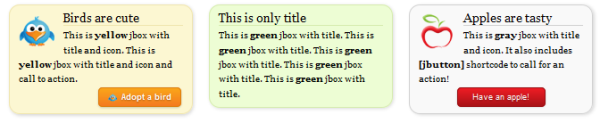

Have a lot of good content that needs to be squeezed in?

The variations of the J-Tabs shortcodes – 5 themes and 5 sizes – allow for 25 unique looks. And, yup, you can nest other shortcodes in there too!

J-Shortcodes is available for download from the WordPress repository here: http://wordpress.org/extend/plugins/j-shortcodes/
Full specs are also available here: http://www.jshortcodes.com/

#2 – TheTheFly Shortcodes for tabs and accordions

TheTheFly (weird name, I know) has some fully customizable shortcodes for WordPress tabs, as well as both vertical and horizontal accordions. The output of these shortcodes also inherits the styles of your current WordPress theme, so no futzing around required.

Customization is accomplished with a whole slew of parameters you can define in the shortcode:

  • Title
  • Speed
  • Style
  • Collapsible
  • Animated
  • Autoheight
  • Autoplay
  • Pauseonhover
  • …and many more

TheTheFly Shortcodes is available for download from the WordPress repository here: http://wordpress.org/extend/plugins/thethe-tabs-and-accordions/
Full specs here: http://thethefly.com/wp-plugins/thethe-tabs-and-accordions/

#3 – Shortcodes Ultimate… for just about everything!

The Shortcodes Ultimate plugin deserves its name. Pretty much anything can be accomplished with this WordPress plugin. All shortcodes and custom parameters can be defined in a modal window that pops up when you click the “Add shortcode” icon available above your post editor.

  • Buttons
  • Tabs
  • Spoilers
  • Accordions
  • Image frames
  • Quotes and pullquotes
  • Labels
  • Boxes

  • Members-only content (really!)
  • Lists
  • Columns
  • Tables
  • Google maps
  • Google docs
  • Image sliders, carousels and galleries
  • …and more still

The Shortcodes Ultimate plugin also has an easy-to-use admin panel where you can load only the scripts you actually use. Custom CSS can be added too.

Here’s a video demo for using the Shortcodes Ultimate plugin:

Shortcodes Ultimate shortcodes plugin is available for download from the WordPress repository here: http://wordpress.org/extend/plugins/shortcodes-ultimate/

Photo credit: Plugs from Flickr.com

Featured Plugin - WordPress Ecommerce Shopping Cart Plugin

Out of all the WordPress ecommerce plugins available, MarketPress has got to be the winner - easy to configure, powerful functionality, multiple gateways and more. A simply brilliant plugin!
Find out more

Featured Plugin - WordPress Newsletter Plugin

Now there's no need to pay for a third party service to sign up, manage and send beautiful email newsletters to your subscriber base - this plugin has got the lot.
Find out more

Featured Plugin - WordPress Appointments Plugin

Take, set and manage appointments and client bookings without having to leave WordPress. Appointments+ makes it easy.
Find out more

Featured Plugin - WordPress Google Maps Plugin

Simply insert google maps into posts, sidebars and pages - show directions, streetview, provide image overlays and do it all from a simple button and comprehensive widget.
Find out more

Featured Plugin - WordPress Facebook Plugin

Would you like to add Facebook comments, registration, 'Like' buttons and autoposting to your WP site? Well, The Ultimate Facebook plugin has got that all covered!
Find out more

Featured Plugin - WordPress Infinite SEO Plugin

Fully integrated with the SEOMoz API, complete with automatic links, sitemaps and SEO optimization of your WordPress setup - this is the only plugin you need to help you rank your site number 1 on Google - nothing else compares.
Find out more

Featured Plugin - WordPress Pop-Up Chat Plugin

No javascript required, no third part chat engine, just fully featured chat right in your own database on your own WP sites - couldn't be easier.
Find out more

Featured Plugin - WordPress Wiki Plugin

To get a wiki up and running you used to need to install Mediawiki and toil away for days configuring it... not any more! This plugin gives you *all* the functionality you want from a wiki, in WordPress!!!
Find out more

Featured Plugin - WordPress Q&A Site Plugin

It's now incredibly easy to start your own Q&A site using nothing more than WordPress - The Q&A plugin simply and brilliantly transforms any site, or page, into a perfect support or Q&A environment.
Find out more

Comments (8)

  1. Thanks for that Patrick. I do like to use shortcodes when possible, as it just adds that extra pazzing to your pages.

    Of course, there is also the danger that users will get the ‘new designer syndrome’ and be so busy creating flashy and cool effects that they forget that it is more about using these tools to give the reader a better experience (not about making the writer look clever).

    • I fully agree that there is a risk of developing the “syndrome”. So, just to get you in the loop, this is the first of a short series of posts on some shortcode plugins I find quite useful. The coming articles will go into more detail about custom functionality that can built with some of them, and how to do it. Stay tuned to my author page if you want more. :-)

Participate