Create, Edit and Display Facebook Events on Your WordPress Site

October 25, 2011  | 
3 Comments

Update: We no longer recommend downloading and using this plugin. Please read this post for more information.

Facebook. Everyone is on it. Some people like it, some don’t. Some even take the time to use it to complain about its latest design or feature changes. Yet there is no denying that it can be a powerful tool for getting word out about your event. Posting an event on Facebook can be much faster than creating an email campaign but the convenience can also cost you time and focus; it can be very difficult to stay on track with so much social interaction happening right in front of your eyes. But what if you could post Facebook events from your WordPress dashboard?

The WP Facebook Events Plugin Brings Event Scheduling to Your Dashboard

WP Facebook Events is a new plugin that allows you to create, edit, and display your Facebook Events without ever leaving your WordPress site.
Though you’ll have to create a Facebook app in order for it to work, this plugin has the friendliest installation instructions you’ll ever read in the WordPress repository.

After you set that up, creating new events is as simple as creating a new WordPress post. You’ll have a new Facebook Events Management panel in your post editor. Place your event info in the appropriate fields and you’ll get an Event ID to paste into your post or page content area.

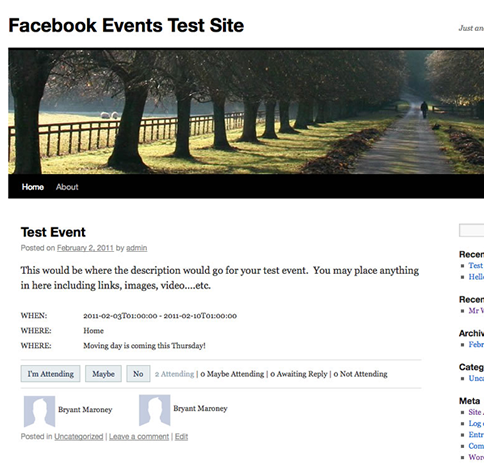
Visitors to your site will be able to respond to events directly on your website:

WP Facebook Events makes event planning ridiculously convenient through your WordPress dashboard. Take advantage of that extra half an hour that you’ll save. Make yourself a cup of tea, cook a meal, take a nice long shower or spend time with some friends and family. Or log onto Facebook and post about how much time you just saved. You know you were probably going to go there anyway. ;)

Featured Plugin - Send beautiful html email newsletters, from WordPress!

Now there's no need to pay for a third party service to sign up, manage and send beautiful email newsletters to your subscriber base - this plugin has got the lot.
Find out more

Featured Plugin - Open an Online Store with MarketPress

Out of all the WordPress ecommerce plugins available, this has got to be the winner - easy to configure, powerful functionality, multiple gateways and more. A simply brilliant plugin!
Find out more

Featured Plugin - Turn any WordPress page into a fully featured wiki!

To get a wiki up and running you used to need to install Mediawiki and toil away for days configuring it... not any more! This plugin gives you *all* the functionality you want from a wiki, in WordPress!!!
Find out more

Featured Plugin - Start your own Quora / StackOverflow / Yahoo Q&A site

It's now incredibly easy to start your own Q&A site using nothing more than WordPress - The Q&A plugin simply and brilliantly transforms any site, or page, into a perfect support or Q&A environment.
Find out more

Featured Plugin - Add bottom corner (or anywhere else) chat to your site

No javascript required, no third part chat engine, just fully featured chat right in your own database on your own WP sites - couldn't be easier.
Find out more

Featured Plugin - Easily integrate your WordPress site with Facebook

Would you like to add Facebook comments, registration, 'Like' buttons and autoposting to your WP site? Well, The Ultimate Facebook plugin has got that all covered!
Find out more

Featured Plugin - Every great SEO tweak you need, in one snazzy bundle

Fully integrated with the SEOMoz API, complete with automatic links, sitemaps and SEO optimization of your WordPress setup - this is the only plugin you need to help you rank your site number 1 on Google - nothing else compares.
Find out more

Featured Plugin - Host sites, get paid, just like WordPress.com

If you've ever wondered how you could offer a paid site management and hosting service, then this is the plugin for you. Offer a freemium or paid service, for any niche you like, it's powered Edublogs.org to success already!
Find out more

Featured Plugin - WordPress + Google Maps = Perfect

Simply insert google maps into posts, sidebars and pages - show directions, streetview, provide image overlays and do it all from a simple button and comprehensive widget.
Find out more

3 Responses to Create, Edit and Display Facebook Events on Your WordPress Site

  1. This looks really cool. I can’t wait to try it out on my church website!

  2. Pingback: Beware Fake jQuery Inclusions by WordPress Plugins in the Repo

  3. I am looking for a similar plugin. Where can I grab a copy? It has been taken off from wordpress.. Anyone has a clean copy?

    Would really appreciate any help.

Click on a tab to select how you'd like to leave your comment

Leave a Reply

Your email address will not be published. Required fields are marked *

*

You may use these HTML tags and attributes: <a href="" title=""> <abbr title=""> <acronym title=""> <b> <blockquote cite=""> <cite> <code> <del datetime=""> <em> <i> <q cite=""> <strike> <strong>

Subscribe without commenting