WordPress Post Formats… Is There Life After Gutenberg?
Post formats premiered in WordPress back in 2011, allowing you to inject some life into your blog section. Sadly, a lot of themes no longer support them. But with a pinch of Gutenberg and a sprinkle of code, you can still mold your blog section into the masterpiece it should be.
Post formats were last featured in WordPress’ Twenty Seventeen and are no longer supported in the more recent WP themes.
So the question is, with fewer themes supporting them, should they still be used at all? If so, how? And if not, is there another way to format your posts?
It’s WordPress, my dear friends, of course there are other ways!
(*Hint: one big way starts with “Guten” and ends with “berg” ;)).
And if you’re REALLY keen for a 2011 throwback, you can still add post formatting to themes with code.
But before we get to your array of post formatting options, let’s start simple and look at what WordPress post formats are and how they can be used.
- What is a WordPress Post Format?
- How To Use Post Formats
- But Wait… Doesn’t Gutenberg Solve All Our Formatting Dilemmas?
- Let’s Take a Look At Some Examples Of Post Formats in Action
- Manually Add Support For WordPress Post Formats
- Using CSS To Style Your Own Post Formats
- Add WordPress Post Formats Using A Child Theme
What is a WordPress Post Format?
If you want your blog page to be more than a never-ending wall of text, post formats can help jazz things up with a simple click.
They let you change the way your theme displays content – whether that be allowing you to add videos, images or simply displaying things like quotes in a snazzier way.
All themes style their formats slightly differently (we’ll take a look at a few examples shortly), and with some not supporting them at all, it can be hard trying to get the right look for your blog section.
How To Use Post Formats
If your theme does support post formats, you will see this little drop-down when you go to create a new post:

If not, you can select a new theme which supports post formats.
To make finding supported themes easier, filter your search in the theme directory by “Post Formats.”
Check out options like Codex, Manta, or Diginews if you’re looking for a solid theme which supports post formats.
Alternatively, you can add some styling yourself using code (we’ll come onto that later.)

But Wait… Doesn’t Gutenberg Solve All Our Formatting Dilemmas?
Good question. Since the release of the Gutenberg block editor, we now have many more options when it comes to styling our posts.
It’s also one of the main reasons post formats aren’t supported by the latest WP themes. Many of Gutenberg’s blocks essentially give users the same functionality as the various format options.
For example, take a look at this inspirational quote I posted using the Quote Gutenberg block on the Twenty Nineteen theme:

Does exactly what it needs to, and all it takes is one simple click.
Unfortunately, this isn’t true for all themes.
Here’s what happens when you add just an image block into some themes, with this example from Colibri:

With some themes, Gutenberg will only get you so far.
You can use it to spice up your posts, however, some themes will only display ‘continue reading’ on your main blog page if you have used anything other than plain text in your post.
Using the classic post formats, on the other hand, ensures your blog page is full of all your images and videos at first glance.
And on that note…
Let’s Take a Look At Some Examples Of Post Formats in Action
There are ten main formats, and as every theme styles each type of format in its own way, I have compared two below: Origami and Arcanum.
Standard
Probably the format you’re trying to escape from.
Standard posts are the bricks and mortar of most blogs – but you have hundreds of them, and no one blames you for wanting something a little different.
Origami:

Arcanum:

Aside
An aside can be used when you have a quick note you want to display – typically something that wouldn’t warrant its own full post.
Most themes style them without titles, so pretty similar to the Status format. Arcanum went all fancy and put theirs in a box.

Audio
Pretty self-explanatory – you can use the audio format if you want to embed an audio clip.

One thing I’ve noticed is that some themes don’t allow captions on audio posts.
Captions are definitely handy if you need to credit the artist, but it’s also useful to add a description (most people would be hesitant to click ‘play’ on something if they have no idea what it is – myself included!)
Origami doesn’t support the audio post format, however, this is a good time to take a look at the difference that formats actually make.
I changed the post format type on the audio clip I posted above using Arcanum to Standard, and this happened:

When you click ‘read more’ the audio clip is present and correct, however, without setting the post format to audio, you can’t actually see it on the blog page.
Seems Gutenberg has some catching up to do.
Chat
The Chat format is used for displaying chat transcripts.
Origami’s efforts were disappointing.
Arcanum, on the other hand, changed the font to something typewriter-y.
Small victories.

Image
Now, this is where this starts to look kinda useful.
You can always add an image using the block editor, however, it won’t always show on the main blog page – it depends entirely on the theme.
Using the image post format is a sure-fire way to ensure that your photo is featured on your blog page in all its glory. See exhibits A and B from Arcanum below:
Exhibit A – using the image post format

Exhibit B – using the standard post format

Of course, when you click ‘read more’, your image will be there.
However, if you want your blog page itself to be more than a wall of text, you should really use the image post format.
Told you they might actually come in handy.
Gallery
The difference between the Gallery and Image post formats on the themes that I’ve tested are very subtle.
For example, here’s how images and image galleries look on posts with the formats set to either ‘Image’ or ‘Gallery’ using the Arcanum theme:

While the posts may not show obvious differences when switching between different post formats like ‘Image’ or ‘Gallery,’ other sections of the theme may treat these post formats differently, and apply different styles or formatting.

FREE EBOOK
Your step-by-step roadmap to a profitable web dev business. From landing more clients to scaling like crazy.

FREE EBOOK
Plan, build, and launch your next WP site without a hitch. Our checklist makes the process easy and repeatable.
For example, as I pointed out in the Image post format section, and please allow me to quote myself:
“Using the image post format is a sure-fire way to ensure that your photo is featured on your blog page in all its glory.”
With a theme like Carton, for example, the blog page treats posts differently depending on their post format. And it will display the first image of a post using post format = Image (in this example, it’s an image gallery) but not if the post format is set to ‘Gallery’.

The point is… although the differences using post formats like Image or Gallery may be slight in the post itself, it’s important to keep in mind that your theme can affect how your posts behave in other parts of your site.
Moving on…
Link
There wasn’t a difference between using the standard post format or the link one in Origami – both produce your standard blue hyperlink.
Arcanum have been a bit more creative:

Quote
Some themes need to take heed of the below quote, as their attempts at catering for different post formats are very half-hearted.
Gutenberg actually saves the day on this one.
If you post using the quote post format in the Origami theme, it doesn’t add any formatting.
If you post a quote using the Gutenberg quote block, it doesn’t matter whether you use the standard or post format, it still actually adds some formatting.

There are a few variations using Arcanum.
Below is what you get if you just set the post format to Quote but don’t add the quote block.

Makes it stand out (slightly) from a regular post, however there is no room to add a citation.
If you use the quote Gutenberg block but leave the post format as standard, this is the result.

You only see the styling for the quote once you click ‘read more’.
Fine I guess, if you don’t mind your main blog page being bland.
The real magic happens when you combine the two.
Set the post format to Quote and add the quote Gutenberg block and voila!

A fancy little quote that appears on your main blog page.
Status
You literally had one job. A status post is supposed to be a line or two of text with no title. At least one of them got it right.

Video
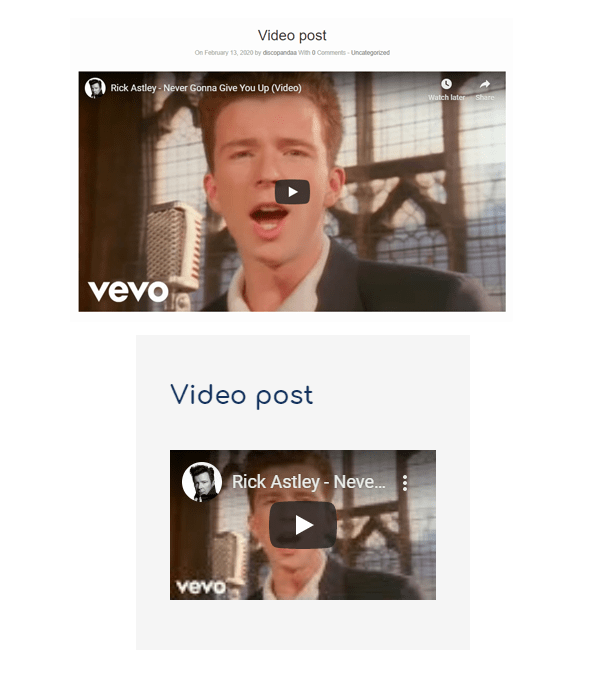
If you want to display a video on your post, both themes will easily allow you to do this using either the Video or Standard formats. It’s nice when stuff works.
Manually Add Support For WordPress Post Formats
So you like the idea of post formats, but you have your heart set on a theme that doesn’t support them?
Have no fear; you can add them manually!
So let’s start with the theme Twenty Nineteen – it doesn’t come with post formatting, so when you create a new post, you won’t get the option to select a format.

We would, of course, recommend using a child theme for this sort of stuff. However, if you’re feeling brave, you just need to add the below into your theme’s functions.php file.
If you’re yet to set up a child theme, take a look at our guide. We’ll go through adding post formats using a child theme a little later on.
function themename_post_formats_setup() {

add_theme_support( 'post-formats', array('gallery','quote','video','aside','image', 'link','status','audio','chat') );

}

add_action( 'after_setup_theme', 'themename_post_formats_setup' );

You don’t have to add all the formats into the array – feel free to just add the ones you’re actually going to use.
It would be nice if this was all you had to do, however all we’ve done is told the theme that other post formats exist.
The theme still has no clue how to style them. We must put it out of its misery.
Using CSS To Style Your Own Post Formats
Fancy your links on a colored background? Want your quotes in a huge, bold font?
The posts page is now your oyster – so get styling.
Let’s start with something simple.
You want to remove the title from your status posts, right? All you need to do is edit your style sheet using the class .format-(post-format-type), as below:
.format-status .entry-title {

display:none;

}
I used the theme Twenty Nineteen for this, so you would need to check which class your post title comes under on your own theme.
It’s a status though; it needs to be bold. Why not make it big and green?
.format-status.entry .entry-content p {

color:green;

font-size:72px;

}

Let’s say you run a blog featuring dogs doing human things. It’s very modern and contemporary, and you’ve been thinking that black and white images with a bold border are exactly what your site needs.
All it takes is a couple of lines of CSS and you can apply this to all images you post, as long as you select the image post format.
.format-image .wp-block-image {

border-style: solid;

border-width: 5px;

filter: grayscale(100%);

}

Add all the custom styling you want to your posts using this method and it will help you make the important stuff stand out, the images and videos easily accessible, and basically inject some life into your blog section.
Add WordPress Post Formats Using A Child Theme
A child theme is always a good option – especially if you’re trying something new.
The code you need to add to your child theme’s functions file is right here:
function childtheme_add_post_formats(){

add_theme_support( 'post-formats', array( 'gallery','quote','video','aside','image','link','status','audio','chat' ) );

}

add_action( 'after_setup_theme', 'childtheme_add_post_formats', 11 );
You can then crack on with making your different formats look pretty by styling them in the child theme’s stylesheet.
Throwback? Or No Going Back?
Should WordPress post formats remain a thing of the past?
It really depends on your personal preference, and how you interpret this question.
With many major themes not supporting them, and the introduction of Gutenberg, it doesn’t look good for the future of this throwback feature.
However, although theme support for post formats may be dropping, you’re free to help continue their legacy.
By enabling the post format support in your theme and styling them yourself, you aren’t limiting your theme choices. It isn’t difficult and it gives you a much better level of control over how they look.
If your only focus is making sure that the post itself looks great, then Gutenberg may tick all your boxes. There’s no question the block editor is the future, and its various blocks can help you format posts to suit your specific needs.
On the other hand, if you want a blog page full of color and personality, you can stick with post formats a while longer, as Gutenberg doesn’t cover all the bases just yet.
Kirstan Norman Kirstan is a digital marketer from Yorkshire, England... She formerly wrote for the WPMU DEV blog on anything and everything WordPress, and provided copy for other areas of the website and business.