How to Easily Put Together a Review Site on WordPress
You’ve probably noticed that reviews are everywhere these days. You see them on almost any website offering a service, product sales, or a site that’s entertainment-focused.
So, it’s worth asking, have you ever wanted to create an awesome review website using WordPress?
Perhaps it’s for pleasure – you’re the kind of a person who feels that urge to share your opinion on your favorite restaurant, movie, or game – or maybe it’s for-profit.
Whatever your motivation, building a review site with WordPress is within reach of even the most novice of WordPress users.

Putting together a review site on WordPress is, on the surface at least, relatively straightforward: it’s just a matter of picking the right theme, plugin, or both.
Rather than providing a massive list of options for you to trawl through, we’ve done that for you with just a selected handful of themes and plugins that will allow you to build a review site.
This article will explore ways to create a review website easily. By the time you’re done, you’ll have your 5-star site up in no time.
Things To Bear In Mind
Reviewing Paid-for Plugins Is About Trust
Obviously, when it comes to reviewing products that cost money, there’s a strong reliance on demonstrations and trust in the supporting documentation and copy.
For themes, it is fairly easy to check the look and feel and how the theme works, but for plugins, this is much more difficult.
Support For Schema.org
Google likes and supports schema.org, and so really, every review site should be making sure that its reviews are marked up as per the Review schema.
If your reviews are marked up correctly, then Google will show your listing in its search results with the rating, making it much more noticeable:

In fact, this IMDb page is a prime example of the use of multiple schemas, not just reviews. If you are interested, have a look at it using the Rich Results Test.
If the schema is not included in a particular theme or plugin, a free plugin like our very own SmartCrawl can help. She comes with schema markup support, which can help make it easier for search engines to understand the meaning of your content.
So, let’s get started! We’ll cover themes first and then take a look at plugins.
WordPress Review Themes
Divi
Divi is no stranger to WordPress, considering it’s the most popular theme out there. It makes design flexible and easy for a theme with endless possibilities and design options.
Since it’s compatible with the WooCommerce plugin and its built-in rating and review feature, it can serve you well as a review theme.
You can try Divi for free. Then, you have the options for a yearly membership or lifetime options. They have promotions constantly (at the time of writing this, yearly access is $67 and lifetime access is a one-time payment of $187) so check their site to see the current special or cost.
OriginMag
OriginMag by WPZoom is a clean-looking magazine theme that can function as an eCommerce store and review site.
It’s WooCommerce ready with numerous layouts to choose from. You can also change the slideshow option’s position and size from a full-width version to a smaller one.
Some of its other features include logo input, SEO friendly code, and is translation ready.
OriginMag is a premium theme that costs $69. It’s well-maintained by WPZoom and comes with support.
You can check out a live demo of this theme here.
Schema
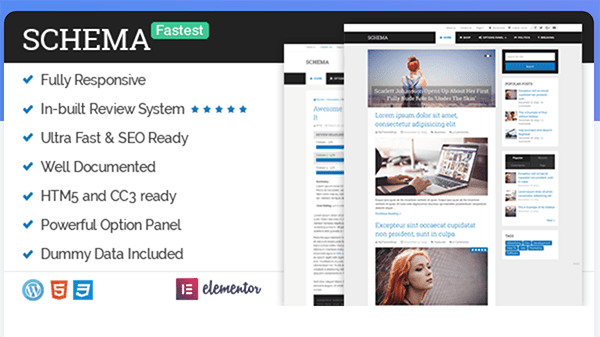
The Schema theme from mythemeshop was made for reviews. Its sleek design features an in-built review system, so you can easily build your review WordPress site in no time.
This attractive theme features custom options panels, rich snippets, and SEO-friendly.
It has detailed information about how the theme functions and is put together on the theme’s page. Plus, there are some good examples of it in action with their demos. The demos include a Default, Minimal, and Shop theme to check out.
The price is $59 for three sites. That includes one year of updates and support.
Magnitude
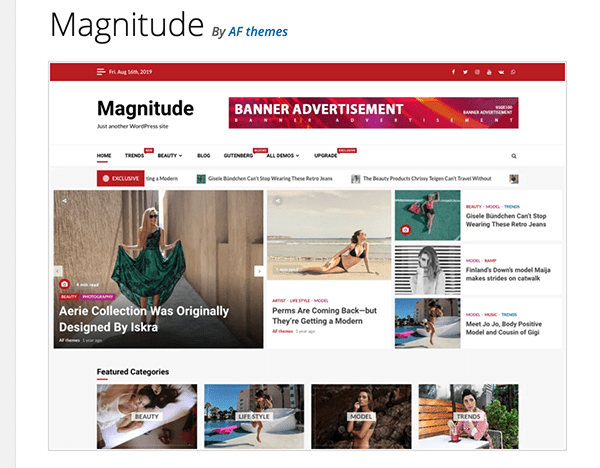
Magnitude by AF themes is an elegant way to list reviews as a blog or online magazine. It’s compatible with WooCommerce, so you can easily tie your reviews to products that can be sold.
It’s also well-optimized to help your ranking with search engines and maintained regularly.
Some more key features are:
- Live editing in the customizer
- Preloader option
- Logo and title customization
- Featured categories on the banner section
It’s a free theme; however, there’s also a Pro version that features advanced options, like typography style, dark mode, gradient effect, and more.


Like the themes, plugins can also do the trick when adding reviews to your site.
A plugin is beneficial if you already have the perfect theme set up and you want to include reviews on your established site.
That being said, here’s a look at seven WordPress review plugins. All are highly rated, updated regularly, and have decent amounts of active users.
WordPress Review Plugins
Site Reviews
With the Site Review plugin, visitors can submit reviews with a 1 to a 5-star rating on your WordPress site. It’s similar to the review system on TripAdvisor or Yelp.
You’re able to pin your best reviews so that they appear first. Plus, you can require approval before new review submissions are published, require users to be logged in to write a review, and send custom notifications on new submissions.
Some of this plugin’s best features are:
- It’s actively developed and supported
- It has Avatars provided by the WordPress Gravatar service
- You can blacklist words, phrases, IP addresses, names, and emails
- The ability to add categories
And more…
FREE EBOOK
Your step-by-step roadmap to a profitable web dev business. From landing more clients to scaling like crazy.
FREE EBOOK
Plan, build, and launch your next WP site without a hitch. Our checklist makes the process easy and repeatable.
With a 5-star rating and over 20k active installations, this plugin is definitely a good choice worth trying out for your WordPress site.
WP Customer Reviews
The WP Customer Reviews plugin allows you to set up a specific page on your WordPress blog to get customer testimonials for your business or leave reviews about a product.
This plugin is multisite and multiuser compatible. Along with that, there are some other great features, such as:
- Moderate all submissions so you can choose which reviews get shown
- Multiple antispam measures are used to prevent automated spambots from submitting reviews
- Completely customizable
- Works well with caching plugins and custom themes
- You can add your own custom fields
Speaking of reviews, they’re good for this plugin. It has a solid 4.5-star rating and over 50k active installations.
Widget for Google Reviews
Widget for Google Reviews displays Google Business Reviews on your WordPress site’s sidebar widget. What’s unique about this plugin is that it saves reviews in WordPress’s database; therefore, it doesn’t depend on Google’s services to show reviews in the widget.
It also features auto-refresh reviews and keeps reviews in a list theme.
Some of the other highlights of this plugin are:
- Shows “Based on…reviews” section
- Custom business place photo
- Pagination
- Shortcode support
- SEO-friendly
You can also upgrade to a Business Version for additional features, such as slider/grid themes, Google Trust Badge, a Write a Review button, and more.
This popular plugin ranks up there with a 5-star review and over 70k active installations.
WP Product Review
The WP Product Review plugin lets you expose your reviews in an easy to read way and will also help you generate money by adding a buy now button in your post.
This plugin will create a top products review widget for products or services.
Some of the features of this plugin are:
- Easy update of all the colors of the widget
- Include a download button in the posts
- Add a wrap-up widget at the end of your articles
- Add rich snippet to your posts
This plugin has a nice 4.5-star rating and over 30k active installations.
WP Review
The WP Review plugin has all the goods to add reviews to your WordPress site. It includes several rating systems, including star, point, and percentage.
This plugin supports 19 different Schema types and customization with styling options.
Some other features are:
- Easy and fast to add reviews
- Visitor ratings
- Premium support
You can get a pro version of the plugin for $87. With the pro version, it will support three sites and comes with features such as compatibility with every theme, Yelp! reviews integrations, and comparison tables.
This plugin has a 3.5-star review and has 60k active installations.
Review for Discount
When a site is brand new, it can be a struggle getting people to be willing to take a leap of faith and buy a product from an unknown. To get things moving more quickly until you generate a steady stream of customers and reviews, you can motivate people to do so by offering a discount with this WooCommerce extension.
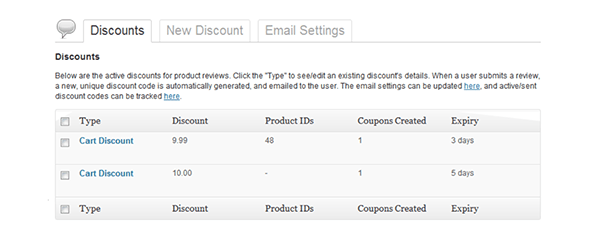
Review for Discount lets you offer discounts to shoppers that provide reviews for products. With this plugin, you can auto-create coupons for customers that leave product reviews in your WooCommerce store that are redeemable at checkout.
This plugin does come at a cost ($29 annually), however, the rewards may outweigh the costs once product reviews come rolling in and sales go up.
WooCommerce Product Review Pro
If your store is powered by WooCommerce, then the WooCommerce Product Review Pro plugin will be a great option for you.
It gives you the ability to collect robust product reviews and display and filter them on your site in a way that rivals Amazon. You can also collect user-generated photos and videos, which will add a whole new level of quality to product reviews on your website.
This premium plugin comes with a price tag of $79.








What’s Your Review?
Now that you’ve had a chance to check out some review themes and plugins — what’s your review of them? Hopefully, a few get a high rating from you for your WordPress site, and you can start implementing a theme or plugin today.
For more information on adding reviews to your site, be sure to check out our post, How to Seamlessly Add Product Reviews to Your WordPress Site.
Also, go the extra mile and consider adding testimonials. We show you how to get creative and do it right in this article.
With all of the tools for product reviews, testimonials, and input from your users, you should have your products or services receiving high marks in no time.
Tags:
Chris Knowles A WordPress pro, Chris has a bent on hacking WordPress, content management, and online media.