Catch Fire Before Launch Day With These Free WordPress Coming Soon Page Plugins
Your site’s Coming Soon page is the perfect canvas to give visitors a sneak peek of what’s to come. The pre-launch or construction stage of a website is also a great opportunity to drum up excitement and interest in advance. In this article, we’re reviewing some of the best WordPress plugins that can help you do this.
Three, two, one… and we’re “go” for launch…
Soon!
As touched on above, today we’re introducing you to several free WordPress Coming Soon and Under Construction plugins.
All of these plugins can help you with a new pre-launch, or if you need to perform maintenance on your site. If used correctly, best believe they can help your site take off like a rocket (before it’s even live!).
We’ll also demonstrate how to set each plugin up, and introduce you to all of the main features.
The goal being to see what sets each one apart, and helping you decide which plugin will work best for you.
By the time we’re done, you’ll hopefully feel better about launching your site before it’s open, or after construction.
Doing it the right way is important, unlike, well…

First, Make Sure Your Coming Soon Page Can Be ‘Counted On’…
As several of these plugins countdown for you, you need to count on them. There are some essential things your coming soon page needs to do.
For example, the page should:
- Match your branding – Your coming soon content should be along the same lines of your overall offerings in terms of design. Also, it should highlight specific features you want to showcase.
- Help capture leads – You’ll want to have prominent form displayed on your page to encourage visitors to sign up for launch notifications. A free plugin like Forminator is great for this.
- Encourage social sharing – To help generate buzz about your launch, you’ll want easy to integrate options for people to share news of your site socially.
Grab a Hard Hat, Here’s What Else Your Under Construction Page Needs:
If your site is under construction, there are additional features that should be included:
- Stay analytically friendly – If you need to do work on your site, ensure that you don’t get penalized by Google for being down. Keep your SEO in check.
- Mention you’re under construction and will open soon – Nothing can upset a potential customer or visitor than a site that doesn’t function and doesn’t mention why.
It’s a fairly simple set of requirements, and the tools we’ll be discussing will help you execute all of them in style.
Let The [Plugin] Countdown Begin!
WAIT! Before we accelerate into examples of plugins, you may be interested in some background resources:
- Neil Patel’s article on launch strategies and Gleam’s round-up of pre-launch growth hacking strategies are both excellent resources with a ton of tips and takeaways.
- We also have our article on pre-launching with a big bang instead of a fizzle.
So now you have a good marketing plan, you have a URL, and your website’s being worked on. It’s time to get on the clock. Punch in and we’ll set up the ultimate coming soon page.
Down below you’ll find five free coming soon plugins for WordPress, as well as one of our own premium plugins (which we’d be silly not to mention).
Some function specifically for counting down, others are best for when you’re under construction.
Let’s get to work.
Under Construction
The Under Construction plugin by WebFactory LTD is a free and simple to use under construction plugin that takes just minutes to install.
We love the fun designs and illustrations they include that can be used for your website while it’s getting ready for take off.
All of the features are bundled in one area, and can all be simply accessed. It has most of the essentials you need for your page, as you’ll soon see.
First, start under Settings to access the main panel.
Since we’re going to be going under construction, the first step is to flip the Under Construction Mode switch to On.
This will ensure visitors will see that it’s being worked on.
In this tab, you can also prevent search engines from indexing the temporary site, automatically set up an end date and time, enable Google Analytics tracking, and reset settings.

The main panel where you have plenty of options. To design your under construction page, click over to the Design tab.

The Design area. This is where you’ll discover a lot of fun, unique, and effective page designs.
Some of them are premium features, which you can get if you upgrade. However, even without upgrading, they have a lot of great options to choose from.
Once you find a design you like, click Activate and you’re in business.
Of course, you’ll want to edit your message. You can do all of that in the Content area.

The content area. Here you can edit more than just text. There are shortcode options, multilingual support, and also an area to include your social links and email.

In the Access area, you can include things like whitelisted IP addresses and other URL based options.
The Access area. And just like that, you can have a custom under construction page up for your visitors.

A preview of our just created under construction page. Purr-fect. Though it’s functional, one thing it lacks is opt-in options for your visitors.
You can include your social links and email — which is good. However, it’s always recommended to include an area for visitors to sign up, too. This can be created with some custom CSS.
Here’s a bit more about using Under Construction in the video below.
Colorlib Coming Soon & Maintenance Mode
Coming Soon & Maintenance Mode by ColorLib allows you to create coming soon and maintenance pages that are one of a kind.
While it’s operating, you can easily work on your website while the plugin collects your visitors’ emails.
Let’s go ahead and activate this plugin.
By the way… if you’d like to follow along with all of the demonstrations in this post, be sure to visit the plugin’s page and download it. (I know, it goes without saying. But still…)
Once you have it installed, go to Settings and you’ll be taken to the block editor.

The settings area. All the settings are accessible by clicking the blue pencils, or you can edit them on the left-hand side of the screen.
The General area is where it supports its main function — which is a countdown clock.
You can quickly activate it so it’s displayed on your website by clicking the switch next to Activate Colorlib Coming Soon Page.
Below that is an option for the timer. Simply flip the switch to activate it.
All the features of this plugin are accessible without any advanced CSS needed. It’s easy to adjust the date and time, timezone, and you can even upload a new image in this area.

A look at the General tab. As we mentioned at the beginning of this article, social sharing is important.
Folks need to share and get the word out about your launch. With that said, there is a tab you can utilize to help get visitors get in tune with your social accounts. You can also keep them posted on your progress.

The social tabs. Also, for more advanced customizations, you can add custom CSS.

ColorLib custom CSS. As for getting visitors to sign up for updates and to get on your email list, there’s a form already available when this plugin is activated.

The customizable signup form. You can easily disable or activate it, like anything else on this plugin. If activated, you can integrate it with an email service (e.g. MailChimp).
I like how the form remains hidden while editing the site. It’s only accessible once you’re logged out and you preview your site, or if you use a different browser.

A live look at what the coming soon timer and opt-in form look like. It’s nice how there is currently no upgrade option, so all of the features are instantly available and free.
Overall, what I enjoyed most was the beautiful and responsive designs, the ability to work with all WordPress themes, and the easy setup.
You don’t need much more than what is offered. With plenty of 5-star reviews, we’re down (countdown, that is) with this plugin.
Countdown, Coming Soon -- Countdown & Clock
The Countdown, Coming Soon — Countdown & Clock is another simple, easy to use timer and coming soon plugin. It comes with numerous countdown display options (e.g. digital, circle, etc.) and customizable coming soon settings.
On that note, let’s check it out in WP.
When you have the plugin installed, it’s nice that the two main features of it are prominent on your dashboard. You can easily pick between creating a Countdown & Clock or a Coming Soon display.

The dashboard. If you’d like to feature a countdown timer it’s quick and easy to do. There are several varieties to choose from when it comes to look and style.

The Add New Countdown screen. As you can see, immediately you have some options not available unless you upgrade, such as hiding on mobile devices, scheduling, and more.
But that’s okay. For basic use of creating a timer, you don’t need the upgrade unless there are specific features you wish to include.
You can add a title, date, timezone, and set your clock’s countdown time.
With Countdown Types, you can specify what style of countdown clock you would like.
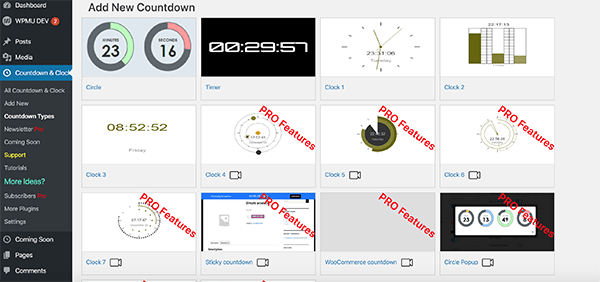
Selection of timers. There are other options to add advanced CSS to the timers and more. However, if you want to keep it simple, none of that is necessary.
Once you have it named and designed how you would like it – simply save the timer. It will then give you a shortcode.

Where the shortcode is located. Paste the shortcode on a blog or webpage — and you’re all set.

Where we’ll paste the code for this example. 
The live timer. If you’d like to set the coming soon display up, it’s also very easy to do.
FREE EBOOK
Your step-by-step roadmap to a profitable web dev business. From landing more clients to scaling like crazy.
FREE EBOOK
Plan, build, and launch your next WP site without a hitch. Our checklist makes the process easy and repeatable.
Go to the dashboard and select Coming Soon.
You’ll then want to make sure Enable is turned on. Here you can craft your Headline and Message that you would like displayed on your website.

Where you type your message. If all looks well, hit Save Changes and it will display on your website.

Example of what the coming soon message can look like. Again, this is a very simple plugin. It has the essential features needed for creating a countdown timer and coming soon message.
It’s a bit limited on some of the other features (e.g. an opt-in form), but it’s functional, easy to set up, and works well.
JQuery T (-) Countdown
The JQuery T (-) is a basic countdown sidebar widget that requires shortcodes for it to function. You’ll notice the theme of this plugin is all Star Wars based (for example, one of the Force Load CSS options is ‘Jedi’), which we find quite interesting (and out of this world).
It’s not exactly user friendly for anyone looking to quickly set up a countdown timer. However, with a little CSS knowledge, it is easy to use. It’s also highly customizable and the result can look impressive.
This doesn’t come with all of the bells and whistles as some of the other plugins. There’s no opt-in forms, upgrades, or social buttons.
With all that being said, grab a lightsaber, and let’s check it out.
There’s only one page of customization widget options once installed, which makes it nice to have everything in the same spot.

The jQuery T (-) Countdown Widget options. Once here, this is where all of the coding and building of the countdown timer takes place.
What if I don’t have any CSS knowledge? No problem. They’ve made it a breeze to find the shortcode that is needed for your purposes with a link to one of their CSS pages.

You simply paste it into the Custom CSS area and build it up like the Death Star. Once you have the shortcode that you need, jQuery works as a widget. So, you can move it into the desired area in WordPress.

Where the widget is located when activated. When it’s added to your site, you can customize the widget even more, if you’d like.

You can see numerous options that require CSS coding. Here is our very basic widget that we just set up.

An example of the countdown timer live. You can get more advanced with this and have some fun customizing the CSS.

Some advanced timers. They do have options to upgrade, like an advanced countdown control. All additional features require being purchased.
Overall, it’s a nice free plugin/widget that’s fairly easy to set up and use.
You might find it difficult using some of the CSS without much knowledge of it, however, we also see this as a good opportunity to learn about basic CSS and — like a good Jedi mind trick — you might be surprised with what you can do.
Minimal Coming Soon & Maintenance Mode -- Coming Soon Page
For a free plugin, the Minimal Coming Soon & Maintenance Mode — Coming Soon Page offers a ton of options to ensure your visitors will be excited to visit your website when it’s ready for launch. And you can get it up and running in a matter of minutes.
It doesn’t include a countdown timer, but it’s one of the most customizable options for everything else. You can even brand the plugin as your own, as it supports rebranding.
This plugin even has its own themes that can work well with the maintenance mode. However, you don’t necessarily need to use theirs, because it’s also compatible with any other theme in WordPress.
It’s a great choice for simplicity, ease of use (no CSS or coding required), and functionality.
After downloading the plugin, it’s effortless to get moving. Everything is on the page and organized by the following menu tabs:
- Basic
- SEO
- Themes
- Design
- Advanced
- Support
There is also a tab to upgrade to the PRO version, which offers a lot more options for themes, SEO, design, email, and more.
Starting with the Basic tab.

The Basic menu. Here you can enable Maintenance Mode, add Header Text, and Content.
You can set everything up accordingly and include whatever message is best for your viewers. It does come with default text as well, if you’re not sure what to include.

The SEO section. This is an area where you can add keywords, a meta description, enable search engines, and more. It’s nice that they’ve also included an area to enable Google Analytics Tracking ID.

The themes area. It’s impressive how this plugin has its own themes available.
There are free and PRO themes to choose from. As mentioned, you don’t need to include one of their themes to get this plugin to function, however, these themes were designed to function with the plugin so it’s aesthetically pleasing.

Design options. When designing your page, they make it easy to upload a background and foreground image. You can upload your design or use theirs.

Email settings. The email settings are available with everything else. It’s also extremely simple to incorporate MailChimp or another email service.
Once added, you can include an opt-in form so that your visitors can be contacted with updates.

The form area. Your opt-in form can be edited specifically to your liking. And as you can see, you’re given plenty of options to choose from.
You can also get into more advanced settings, which include adding custom CSS and more.
However, we chose to keep it simple.
As you can see below, we added our very own Dev Man and used their default background. This is just a simple example of what you can do with this plugin.

Dev Man, mountains, a nice looking coming soon site…What more do you need? This plugin has a 5-star rating from well over a hundred users, so don’t just take our word for it that this is a nice and easy coming soon option.
Despite missing a timer option, this plugin has everything else you’d want to support your website before you’re up and running.
Branda
Now we couldn’t let this post come to an end without giving our very own Branda a cheeky mention…

“Hey there.” She’s a plugin that boasts WordPress white label branding, maintenance mode, and coming soon landing pages, custom admin bars, and much more.
The free version includes more than 30 modules. Branda Pro adds premium 24/7 live chat support, hosting credits, and our complete pro marketing, performance, and security suite, making it ideal for agencies and freelancers offering site maintenance services.

More Branda Pro features. There’s a TON you can do with customization. And what’s especially great about Branda is that it makes it easy to match your website’s theme or topic.
For this example, we’ll just be looking at the coming soon and under construction features she has on offer.
Once installed, you can quickly access Branda on your dashboard. To start maintenance or coming soon mode, navigate to the Utilities area under Website Mode.

The Utilities area in the WordPress dashboard for Branda. 
Once here, you can pick Coming Soon, Maintenance, or Off.
The content can all be edited directly below. Even the option for adding all of your social accounts.

The social linking area in Branda. Adjusting colors and adding your own custom CSS is also a breeze.

Branda color and CSS section. And here’s a look at a finished countdown timer.

And the Branda countdown begins! Branda is a simple, easy to use plugin that can definitely get the job done when coming soon and maintenance mode is needed for your website.


Time is On Your [Web]Side.
Hopefully, you have some ideas on what works best for your website on your next pre-launch or maintenance.
You can have peace of mind knowing your visitors won’t be turned off by an ugly construction or a 404 error.
Fun Fact: Being Under Construction Can Be Beneficial
It shows your visitors that the website is evolving, up to date, and gives them a chance to connect with you on your social accounts or email.
And with that, when the maintenance is done and the website is open — job well done.
Feel free to punch the clock and take some time to yourself.
N. Fakes Nathanael Fakes is a blog writer and cartoonist at WPMU DEV. He’s worked with WordPress for over a decade. Beyond WordPress, he’s a published author, syndicated cartoonist, and donut enthusiast. Connect with Nate on Instagram and learn more about his work on his comics website.